nRF52840 UART bootload issue

Hi,

I developed a firmware without softdevice for a custom board with nRF52840

I recently decided to add a bootloader to my application and I based my bootloader code from the example : secure bootloader pca10056 uart

In the bootloader code I changed main to :

int main(void)
{
	gpio_setup();
	LED_GREEN();
	nrf_bootloader_init(dfu_observer);
}

As I intend to stay in bootloader using retention register, I set in sdk_config.h :

#ifndef NRF_BL_DFU_ENTER_METHOD_GPREGRET
#define NRF_BL_DFU_ENTER_METHOD_GPREGRET 1
#endif

Here are my steps regarding how I flash my device/prepare my files :

1 - From my app hex I generate a bootloadable app zip

nrfutil --verbose pkg generate --hw-version 52 --application-version 1 --application app.hex --key-file private.key --sd-req 0 app.zip

2 - I generate bootloader settings for my app

nrfutil --verbose settings generate --family NRF52840 --application app.hex --application-version 1 --bootloader-version 1 --bl-settings-version 1 btl_settings.hex

3 - I merge the bootloader hex and the bootloader settings to a bundle hex

mergehex --merge btl_settings.hex btl.hex --output bundle.hex

4 - I erase my whole chip to make sure to start clean

nrfjprog -f nrf52 --eraseall

5 - I flash the mbr hex I found in "nRF5_SDK_17.1.0_ddde560\examples\dfu\secure_dfu_test_images\uart\nrf52840\mbr.hex"

nrfjprog -f nrf52 --program mbr.hex --sectorerase --verify

6 - I flash the bundle generated in step 3

nrfjprog -f nrf52 --program bundle.hex --sectorerase --verify

7 - I flash the app

nrfjprog -f nrf52 --program app.hex --sectorerase --verify

8 - hard reset my device

Output :

I can clearly see that bootloader is exited shortly after power on with the green led but it doesn't look like my app is started after the bootloader exited

Why doesn't my app start and how can I fix this issue ?

I am working with :

- SDK 17.1.0

- Latest nrf command line tools

- Latest nrfutil

Parents
  • Hi Gabriel, 

    Before testing with bundling the hex files together, have you tried to flash them one by one ? 
    I would suggest to try : 

    1. Flash MBR -> Flash bootloader -> Flash bootloader setting -> flash application 

    It this doesn't work, continue with: 

    2. Flash MBR -> Flash bootloader.  -> Do DFU update of your application image , check if the application work. 

    3. If 2 works, you can try to do a hex dump of what in the flash using nrfjprog --readcode and then compare with what you have at step 1. 

    If 2 doesn't work, there must be something wrong with the bootloader. Please double check that the way to enter DFU mode using a button is disabled. It's in case that you have the GPIO hardware differently from the Dev Kit and the bootloader takes it as the button is pressed and won't enter application but enter DFU instead. 

  • Also I changed this in "sdk_config.h"

    #define NRF_BL_DFU_ENTER_METHOD_BUTTON 0
    #define NRF_BL_DFU_ENTER_METHOD_GPREGRET 1
    #define NRF_BL_DFU_ENTER_METHOD_BUTTONLESS 1
    #define NRF_CRYPTO_ALLOCATOR 2
    #define NRF_DFU_APP_ACCEPT_SAME_VERSION 1
    #define NRF_DFU_APP_DOWNGRADE_PREVENTION 0

Reply Children
  • Hi Gabriel, 

    Do you get any RTT log on the bootloader side ? 
    Have you tried to test the bootloader (+MBR)on the nRF52840 DK ? 

    Also please use the bootloader you find in \nRF5_SDK_17.1.0_ddde560\components\softdevice\mbr\hex not in \examples\dfu\secure_dfu_test_images\uart\

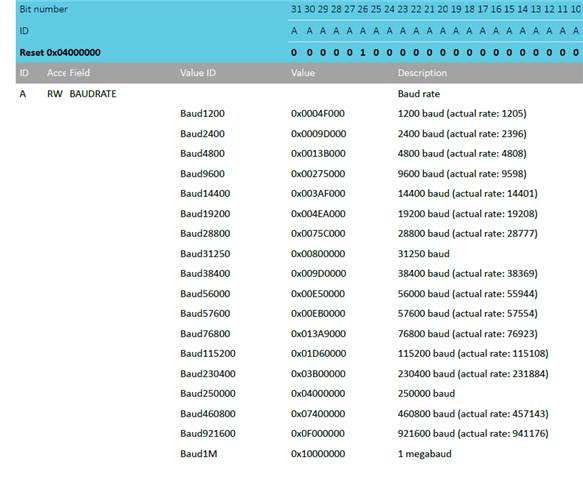
  • The PC outputs a baudrate of 115473 for the UART instead of 115200, that might trouble the nRF52 so we switched to 100k baudrate

    Also I need to know what is best in the sdk config for bootload UART or UARTE ? I would say UARTE but it really depends on the nRF52 bootloader code, how is the compatibility with the easyDMA feature ?

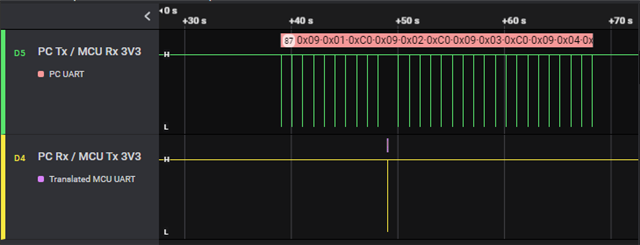
    I can clearly see with the logic analyzer that the nRF52 gets pinged by the PC but it does not respond

    PC logs :

    >nrfutil dfu serial -pkg app.zip -p COM4 -fc false -b 100000
      [------------------------------------]    0%
    Traceback (most recent call last):
      File "C:\Users\gat\AppData\Local\Programs\Python\Python310\Scripts\nrfutil-script.py", line 33, in <module>
        sys.exit(load_entry_point('nrfutil==6.1.6', 'console_scripts', 'nrfutil')())
      File "C:\Users\gat\AppData\Local\Programs\Python\Python310\lib\site-packages\click\core.py", line 1130, in __call__
        return self.main(*args, **kwargs)
      File "C:\Users\gat\AppData\Local\Programs\Python\Python310\lib\site-packages\click\core.py", line 1055, in main
        rv = self.invoke(ctx)
      File "C:\Users\gat\AppData\Local\Programs\Python\Python310\lib\site-packages\click\core.py", line 1657, in invoke
        return _process_result(sub_ctx.command.invoke(sub_ctx))
      File "C:\Users\gat\AppData\Local\Programs\Python\Python310\lib\site-packages\click\core.py", line 1657, in invoke
        return _process_result(sub_ctx.command.invoke(sub_ctx))
      File "C:\Users\gat\AppData\Local\Programs\Python\Python310\lib\site-packages\click\core.py", line 1404, in invoke
        return ctx.invoke(self.callback, **ctx.params)
      File "C:\Users\gat\AppData\Local\Programs\Python\Python310\lib\site-packages\click\core.py", line 760, in invoke
        return __callback(*args, **kwargs)
      File "C:\Users\gat\AppData\Local\Programs\Python\Python310\lib\site-packages\nordicsemi\__main__.py", line 1073, in serial
        do_serial(package, port, connect_delay, flow_control, packet_receipt_notification, baud_rate, serial_number, True,
      File "C:\Users\gat\AppData\Local\Programs\Python\Python310\lib\site-packages\nordicsemi\__main__.py", line 988, in do_serial
        dfu.dfu_send_images()
      File "C:\Users\gat\AppData\Local\Programs\Python\Python310\lib\site-packages\nordicsemi\dfu\dfu.py", line 127, in dfu_send_images
        self._dfu_send_image(self.manifest.application)
      File "C:\Users\gat\AppData\Local\Programs\Python\Python310\lib\site-packages\nordicsemi\dfu\dfu.py", line 88, in _dfu_send_image
        self.dfu_transport.open()
      File "C:\Users\gat\AppData\Local\Programs\Python\Python310\lib\site-packages\nordicsemi\dfu\dfu_transport_serial.py", line 214, in open
        raise NordicSemiException("No ping response after opening COM port")
    pc_ble_driver_py.exceptions.NordicSemiException: No ping response after opening COM port

  • Hi Gabriel, 

    the nRF52840 doesn't support both 115200 and 100K baud. Do you mean 1M baud ? 


    Regarding your question about UART/UARTE, the bootloader code by default uses UARTE. 

  • I use this value to generate a 100k baudrate :

    0x01999000
  • I set the baud rate back to 115200, I can clearly see the PC pings but the bootloader just pulls the Tx low after few pings, something is missing but I can't find what

Related