nRFDK52 revision 3.0.0 reports two identical JLink CDC UART port

Hi,

hi have the same problem related here: https://devzone.nordicsemi.com/f/nordic-q-a/91890/nrf52-reports-two-jlink-cdc-uart-ports

With revision 2, UART show only one port com on windows device manager, and i have no problems. I use UART on window side with a Qt IHM, wich connect to the segger port com available.

Because windows report 2 identical JLink CDC uart port com, IHM connects to one of them. Sometimes it works because the connected one is the working one, and sometimes it fails because it's the one not working. If i uninstall faulty device driver in device manager (the faulty one cannot be identified, i have to test each), then UART is working well.

The very bad thing is when you switch ON/OFF the DK, the faulty port com is changing, so at each startup, we need to configure window device manager for fixing this strange behaviour. 

This behaviour must be reproductible with uart example and any window terminal program.

Our demonstration product is unusable because of that, and we bought a few dozen of DK!

Do you have any update for the MCU firmware ?

Thanks,

  • Hi

    We're aware that this is an issue in the latest DKs and it has been reported internally. At the moment, I'm afraid I don't have a better workaround than what Michal already suggested in the last ticket, or move to Linux/Mac if possible when using multiple (new) DKs. 

    I hope I can provide more details, a workaround or even a better fix early next week. Thank you for your patience.

    Best regards,

    Simon

  • Hi

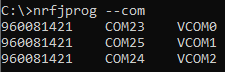
    One workaround should be to use the "nrfjprog --com" command in the nRF Command Line Tools to list what COM is associated with what VCOM. VCOM is set by the DK itself, and will not change, so if the customer makes a script to connect to the correct VCOM that should solve this issue. 

    Best regards,

    Simon

  • Hi, thanks for the tips. But how knowing wich VCOM is the good one ? Is it he VCOM0 each times ?

  • Yes, VCOM0 should be the COM port to the nRF52 on your DKs.

    Best regards,

    Simon

  • Hi! I know this is a necro-post but distinguishing between these ports still seems to be an issue and I believe I have figured out a way to work around the problem, at least on Linux.

    Step 1: get the serial number of your board:

    udevadm info -a -n /dev/ttyACMx | grep '{serial}' | head -n1

    (where /dev/ttyACMx is replaced with one of the TTYs that the board is providing)

    This should print a line like:

        ATTRS{serial}=="SOME_SERIAL_NUMBER"

    Step 2: add the following rules to a udev rule file (e.g. /etc/udev/rules.d/99-nrf52-vcom.rules):

    SUBSYSTEM=="tty", ATTRS{serial}=="SOME_SERIAL_NUMBER", MODE:="0666", DEVPATH=="*:1.0*", SYMLINK+="ttynRF52_VCOM0", GROUP="plugdev"
    SUBSYSTEM=="tty", ATTRS{serial}=="SOME_SERIAL_NUMBER", MODE:="0666", DEVPATH=="*:1.2*", SYMLINK+="ttynRF52_VCOM1", GROUP="plugdev"

    (where SOME_SERIAL_NUMBER is replaced by the serial number you got in step 1).

    Step 3: Reload udev rules:

    sudo udevadm control --reload-rules && sudo udevadm trigger

    Done! Now you should see /dev/ttynRF52_VCOM0 and /dev/ttynRF52_VCOM1 as permanent symlinks to the two serial ports provided by the board.

    For the curious, the important bit in the above rules is the 'DEVPATH=="*:1.0*"' part. This basically selects a specific interface number provided by the board.

Related