Beware that this post is related to an SDK in maintenance mode
More Info: Consider nRF Connect SDK for new designs

DK Boards Not Working

I have 2 DK boards neither of which is working.

The first is a PCA10040 V1.2.1.  When I plug it into my Window 10 computer with a data cable, Windows says it's an unrecognized device.  I tried uninstalling the driver in Windows Device Manager but that did not fix the problem.  The green LED is flickering.  No matter which computer or USB port I try to plug into, it always behaves the same way.  If I hold the IF BOOT/RESET button down when I slide the power switch to on, the green LED will start blinking, but there is still no USB connection.

The second is a PCA10056 2.0.2.  When I plug in to either USB port on the board and switch the power on, nothing happens, even while holding IF BOOT/RESET down.  No LED's are lit.  If I measure between the 5V and GND pads on the back of the board with a voltmeter I get 5V.  I tried switching between VDD and USB for the nRF power source, but it didn't make a difference either.

Is there a way to restore both of these boards so that I can use them again.  They were both working at one time.  I was using them for power profiling.

Thanks,

Alec

  • For the PCA10040, I was able to get the BOOTLOADER drive to appear and follow step 4 at   My nRF52/nRF51 DK kit doesn't work. dragging and dropping the bin file from https://www.nordicsemi.com/Products/Development-hardware/nrf52840-dk/download#infotabs but after powering off and powering back on I still don't see the mass storage drive appear, though the unrecognized device error message doesn't pop up any more.  Just LEDs 1, 2, 3, and 4 are faintly lit. 

    For PCA10056, I can see JLink Device in nRF Connect for Desktop Programmer when I plug my JLink probe into the DEBUG IN connector on the board.  Is there a zip file I can drop in to restore functionality so that the board enters mass storage mode when I plug it into the USB port on my PC without the JLink probe connected?

  • Hi,

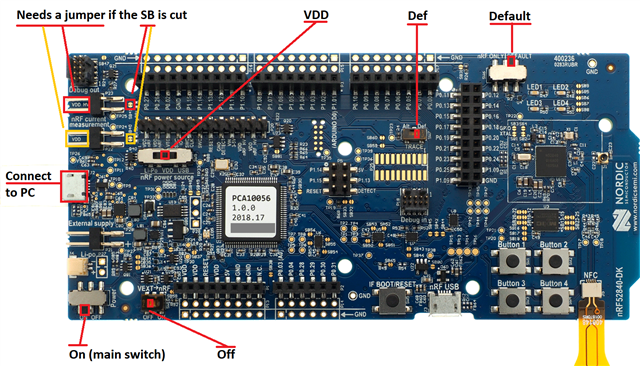
    First of all, check that the switches of the boards are in the correct positions, and that solder bridges for the power is not cut. (If the solder bridges are cut, you must use jumpers between the corresponding pins.)

    Check also that you have not cut any solder bridges, or soldered any solder bridges. The DK has several solder bridges that changes the board's behaviour, including affecting the availability of the on-board nRF. Two solder bridges can be cut related to power measurements. Those are marked in the above image. For those, you can put a jumper on the corresponding pins for reconnecting, instead of re-soldering the solder bridge itself.

    Regarding J-Link software (on the PC), you can go to the J-Link Software and Documentation Pack at https://www.segger.com/downloads/jlink/ and install the latest.

    Pressing IF BOOT/RESET while turning the main switch on, should put the interface chip (programmer) on the board into bootloader mode. That should result in a BOOTLOADER drive on the PC. The firmware can be found from our web pages:

    For nRF52840 DK (PCA10056): https://www.nordicsemi.com/Products/Development-hardware/nRF52840-DK/Download#infotabs

    For nRF52 DK (PCA10040): https://www.nordicsemi.com/Products/Development-hardware/nRF52-DK/Download#infotabs

    Regards,
    Terje

  • After I held the BOOT/RESET button on the PCA10040 board, then slid the Power switch to the ON position, I was able to copy j-link-ob-sam3u128-v2-nordicsemi-170724.bin at https://www.nordicsemi.com/Products/Development-hardware/nrf52-dk/download#infotabs to the BOOTLOADER drive that appeared, then after powering the board off and back on, I was able to see the JLINK drive.  However, no matter what hex file I drop onto the drive, for example, the one in nrf52dkfw110.zip at that URL, a FAIL folder appears on the JLINK drive containing the text "Error while connecting to CPU". 

    When I try to use nrfjprog -f nrf52 --recover --log at the Windows command line, I get

    [error]: [SeggerBackend] - JLinkARM.dll reported "-1", "An unknown error.". 

    When I use JLink Commander v7.66a from the PC, I get the following:

    SEGGER J-Link Commander V7.66a (Compiled May 19 2022 15:14:46)
    DLL version V7.66a, compiled May 19 2022 15:13:27

    Connecting to J-Link via USB...O.K.
    Firmware: J-Link OB-SAM3U128-V2-NordicSemi compiled Jan 20 2022 16:43:31
    Hardware version: V1.00
    S/N: 682910671
    License(s): RDI, FlashBP, FlashDL, JFlash, GDB
    USB speed mode: High speed (480 MBit/s)
    VTref=3.300V


    Type "connect" to establish a target connection, '?' for help
    J-Link>connect
    Please specify device / core. <Default>: NRF52
    Type '?' for selection dialog
    Device>
    Please specify target interface:
    J) JTAG (Default)
    S) SWD
    T) cJTAG
    TIF>
    Device position in JTAG chain (IRPre,DRPre) <Default>: -1,-1 => Auto-detect
    JTAGConf>
    Specify target interface speed [kHz]. <Default>: 4000 kHz
    Speed>
    Device "NRF52" selected.


    Connecting to target via JTAG
    InitTarget() start
    InitTarget() end
    TotalIRLen = ?, IRPrint = 0x..000000000000000000000000
    Failed to identify target. Resetting via Reset pin and trying again.
    InitTarget() start
    InitTarget() end
    TotalIRLen = ?, IRPrint = 0x..000000000000000000000000
    InitTarget() start
    InitTarget() end
    TotalIRLen = ?, IRPrint = 0x..000000000000000000000000
    Failed to identify target. Resetting via Reset pin and trying again.
    InitTarget() start
    InitTarget() end
    TotalIRLen = ?, IRPrint = 0x..000000000000000000000000
    Cannot connect to target.
    J-Link>

    What else do I need to try to restore drag 'n drop capability to this board?

    Thanks.

  • Found the issue.  Under high magnification I could see that what had been a solder bridge at SB9 had been severed.  I jumpered the pins for the nRF current measurement connector together, and the board now consumes the hex file that I copy to the JLINK drive without any errors.

  • Hi,

    I am happy to hear you that you figured it out! SB9, of all things, that can't have been easy to spot.

    Does this mean everything is now in working order?

    Regards,
    Terje

Related