NUS send very slow.

Environment: nRF connect SDK 1.9.1

Hardware: nrf5340 dk

We try to send data by BLE NUS. According to excemple Bluetooth: Peripheral UART and Bluetooth: Throughput, we developed a program to send data from peripheral kit. We try to use LE 2M PHT. While the send speed is only about 8Kbps. The sample Bluetooth: Throughput achieves about 1Mbps. We want to know where the problem is. The configuration file parameter is wrong or there is a problem with the code writing. 

There is the prj.conf

# Enable the UART driver
CONFIG_UART_ASYNC_API=y
CONFIG_NRFX_UARTE0=y
CONFIG_SERIAL=y

CONFIG_GPIO=y

# Make sure printk is printing to the UART console
CONFIG_CONSOLE=y
CONFIG_UART_CONSOLE=y

CONFIG_HEAP_MEM_POOL_SIZE=2048

CONFIG_BT=y
CONFIG_BT_PERIPHERAL=y
CONFIG_BT_DEVICE_NAME="Smile_ble"
CONFIG_BT_DEVICE_APPEARANCE=833
CONFIG_BT_MAX_CONN=1
CONFIG_BT_MAX_PAIRED=1

# Enable the NUS service
CONFIG_BT_NUS=y

# Enable bonding
CONFIG_BT_SETTINGS=y
CONFIG_FLASH=y
CONFIG_FLASH_PAGE_LAYOUT=y
CONFIG_FLASH_MAP=y
CONFIG_NVS=y
CONFIG_SETTINGS=y

# Enable DK LED and Buttons library
CONFIG_DK_LIBRARY=y

# This example requires more workqueue stack
CONFIG_SYSTEM_WORKQUEUE_STACK_SIZE=2048

# Config logger
CONFIG_LOG=y
CONFIG_USE_SEGGER_RTT=y
CONFIG_LOG_BACKEND_RTT=y
CONFIG_LOG_BACKEND_UART=n

CONFIG_ASSERT=y

#throuhput
CONFIG_BT_USER_DATA_LEN_UPDATE=y
CONFIG_BT_USER_PHY_UPDATE=y
CONFIG_BT_GAP_AUTO_UPDATE_CONN_PARAMS=n

CONFIG_BT_BUF_ACL_RX_SIZE=251
CONFIG_BT_ATT_PREPARE_COUNT=2

CONFIG_BT_CONN_TX_MAX=10
CONFIG_BT_L2CAP_TX_BUF_COUNT=10
CONFIG_BT_L2CAP_TX_MTU=247
CONFIG_BT_L2CAP_DYNAMIC_CHANNEL=y
CONFIG_BT_CTLR_PHY_2M=y
CONFIG_BT_CTLR_RX_BUFFERS=5
CONFIG_BT_BUF_ACL_TX_COUNT=10
CONFIG_BT_BUF_ACL_TX_SIZE=251
CONFIG_BT_CTLR_DATA_LENGTH_MAX=251
CONFIG_BT_PERIPHERAL_PREF_MIN_INT=12
CONFIG_BT_PERIPHERAL_PREF_MAX_INT=15

There is a main part of main.cpp

void main(void)
{
	int blink_status = 0;
	int err = 0;

	configure_gpio();

	err = bt_enable(NULL);
	if (err) {
		error();
	}

	LOG_INF("Bluetooth initialized");

	k_sem_give(&ble_init_ok);

	if (IS_ENABLED(CONFIG_SETTINGS)) {
		settings_load();
	}

	err = bt_nus_init(&nus_cb);
	if (err) {
		LOG_ERR("Failed to initialize UART service (err: %d)", err);
		return;
	}

	err = bt_le_adv_start(BT_LE_ADV_CONN, ad, ARRAY_SIZE(ad), sd,
			      ARRAY_SIZE(sd));
	if (err) {
		LOG_ERR("Advertising failed to start (err %d)", err);
		return;
	}
    dummy[0]=0x55;
	dummy[243] = 0x55;
	for (;;) {
		dk_set_led(RUN_STATUS_LED, (++blink_status) % 2);
		k_sleep(K_MSEC(RUN_LED_BLINK_INTERVAL));
	}

}


void ble_write_thread(void)
{
	/* Don't go any further until BLE is initialized */
	uint32_t data = 0;
	uint32_t prog = 0;
	uint64_t stamp;
	int64_t delta;
	int err=0;
	uint16_t index=0x55;
	struct uart_data_t buf;
	// k_sem_take(&ble_init_ok, K_FOREVER);
	k_sem_take(&ble_conn_ok, K_FOREVER);

	if (bt_nus_send(NULL, dummy, 1)) {
		LOG_ERR(" byte2 failed!!");

	}
	printk(" 1byte succeed!!");
	stamp = k_uptime_get_32();
	while (prog < IMG_SIZE) {
		/* Wait indefinitely for data to be sent over bluetooth */
		// struct uart_data_t *buf = k_fifo_get(&fifo_uart_rx_data,
		// 				     K_FOREVER);

		if (bt_nus_send(NULL, dummy, 244)) {
			LOG_ERR("Failed to send data over BLE connection\n");
			continue;
		}
		/* print graphics */
		printk("%c", img[prog / IMG_X][prog % IMG_X]);
		data += 244;
		prog++;
		// k_free(buf);
	}
	delta = k_uptime_delta(&stamp);
	printk("\nDone\n");
	printk("[local] sent %u bytes (%u KB) in %lld ms at %llu kbps\n",
	       data, data / 1024, delta, ((uint64_t)data * 8 / delta));
	for(;;)
	{
		k_sleep(K_MSEC(5000));
		//LOG_INF("\ntest done\n");
	}
}

K_THREAD_DEFINE(ble_write_thread_id, STACKSIZE, ble_write_thread, NULL, NULL,
		NULL, PRIORITY, 0, 0);

Parents
  • Hello,

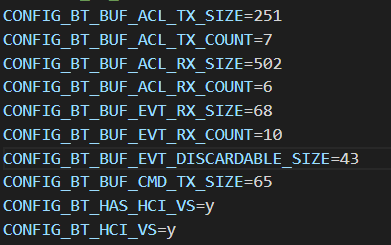
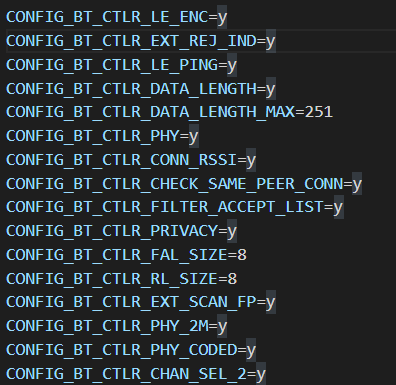
    Please try the attached sample and see if you get better results. Notice I have added the CONFIG_BT_CTLR_* settings to the hci_rpmsg child image in /child_image/hci_rpmsg/boards.

    0285.peripheral_uart_throughput_test.zip

    Best regards,

    Vidar

  • Hello,

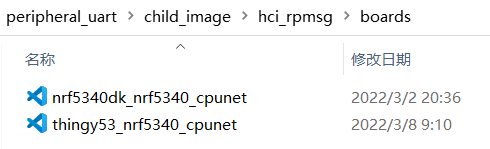
    The sample you provided do get faster transfer speeds. But what confuses me is that there is a document missing in my project. As shown in the figure below.

    I don't know what role this missing file plays in the whole project. I tried to paste this file into my project, but it doesn't work.

    Looking for your help,thanks!

  • Hello,

    I'm not sure what configuration file you provided, but I tried to modify my project. 

    After a  pristine build(build/hci_rpmsg/zephyr):

    in hci_rpmsg/boards:

    What I do is just copied Kconfig and prj.conf from the "0285.peripheral_uart_throughput_test" into my project. 

    This is my Kconfig:

    source "Kconfig.zephyr"
    
    menu "Nordic UART BLE GATT service sample"
    
    config BT_NUS_THREAD_STACK_SIZE
    	int "Thread stack size"
    	default 1024
    	help
    	  Stack size used in each of the two threads
    
    config BT_NUS_UART_BUFFER_SIZE
    	int "UART payload buffer element size"
    	default 40
    	help
    	  Size of the payload buffer in each RX and TX FIFO element
    
    config BT_NUS_SECURITY_ENABLED
    	bool "Enable security"
    	default y
    	select BT_SMP
    	help
    	  "Enable BLE security for the UART service"
    
    config BT_NUS_UART_DEV
    	string "UART device name"
    	default "UART_0"
    	help
    	  Name of the used UART device. The sample uses uart0 by default.
    	  The UART device should not be used as logger backend.
    
    config BT_NUS_UART_RX_WAIT_TIME
    	int "Timeout for UART RX complete event"
    	default 50
    	help
    	  Wait for RX complete event time in milliseconds
    
    config BT_NUS_UART_ASYNC_ADAPTER
    	bool "Enable UART async adapter"
    	select SERIAL_SUPPORT_ASYNC
    	help
    	  Enables asynchronous adapter for UART drives that supports only
    	  IRQ interface.
    
    endmenu

    This is my prj.conf:

    #
    # Copyright (c) 2018 Nordic Semiconductor
    #
    # SPDX-License-Identifier: LicenseRef-Nordic-5-Clause
    #
    
    # Enable the UART driver
    CONFIG_UART_ASYNC_API=y
    CONFIG_NRFX_UARTE0=y
    CONFIG_SERIAL=y
    
    CONFIG_GPIO=y
    
    # Make sure printk is printing to the UART console
    CONFIG_CONSOLE=y
    CONFIG_UART_CONSOLE=y
    
    CONFIG_HEAP_MEM_POOL_SIZE=2048
    
    CONFIG_BT=y
    CONFIG_BT_PERIPHERAL=y
    CONFIG_BT_DEVICE_NAME="Nordic_UART_Service"
    CONFIG_BT_DEVICE_APPEARANCE=833
    CONFIG_BT_MAX_CONN=1
    CONFIG_BT_MAX_PAIRED=1
    
    # Enable the NUS service
    CONFIG_BT_NUS=y
    
    # Enable bonding
    CONFIG_BT_SETTINGS=y
    CONFIG_FLASH=y
    CONFIG_FLASH_PAGE_LAYOUT=y
    CONFIG_FLASH_MAP=y
    CONFIG_NVS=y
    CONFIG_SETTINGS=y
    
    # Enable DK LED and Buttons library
    CONFIG_DK_LIBRARY=y
    
    # This example requires more workqueue stack
    CONFIG_SYSTEM_WORKQUEUE_STACK_SIZE=2048
    
    # Config logger
    CONFIG_LOG=y
    CONFIG_LOG2_MODE_IMMEDIATE=y
    CONFIG_LOG_BACKEND_UART=y
    
    CONFIG_ASSERT=y
    
    CONFIG_BT_USER_DATA_LEN_UPDATE=y
    CONFIG_BT_USER_PHY_UPDATE=y
    
    CONFIG_BT_BUF_ACL_RX_SIZE=251
    CONFIG_BT_GATT_CLIENT=y
    CONFIG_BT_ATT_PREPARE_COUNT=2
    CONFIG_BT_L2CAP_TX_MTU=247
    CONFIG_BT_BUF_ACL_TX_COUNT=10
    CONFIG_BT_BUF_ACL_TX_SIZE=251
    

    Still, the speed has not accelerated at all.

    My project is attached here.

    3513.peripheral_uart.zip

  • Hello,

    ell_pass said:
    I'm not sure what configuration file you provided

    I meant the 'nrf5340dk_nrf5340_cpunet.conf' file in child_image directory.

    ell_pass said:
    This is my prj.conf:

    You have selected CONFIG_BT_USER_DATA_LEN_UPDATE and CONFIG_BT_USER_PHY_UPDATE,  but you have not added any code in main.c to initiate these procedures.

    Please de-select these settings symbols to let the Bluetooth host initiate the procedures and see if that improves the throughput.

  • Hello,

    OK, what transfer speed were you able to get with my peripheral_uart_throughput_test.zip example (you can use JLink RTT Viewer to view the logs)?

  • Hello,

    When phy is set to 2M(1M), the transfer speed is about 1Mkbps(500kbps)

Reply Children
Related