nrf Connect SDK in private repo

Hi Team,

We are currently using nrf Connect SDK 1.8.0 and developing our application using nrf52833.

Currently we use our own git to maintain our application and nRF SDK is not part of our private git. Now we are planning to integrate nRF SDK in our repo. Mainly to keep track of changes we have done in nRF Connect SDK and also for long term maintenance perspective.

Ideally, we would like new developer to:

- Clone our private repo (Our application + nRF Connect SDK)

- Install toolchain in their machine and start build application using VS Code

To accomplish this we were referring https://developer.nordicsemi.com/nRF_Connect_SDK/doc/2.0.0/nrf/dm_adding_code.html#id3

As per above link, this is what we did:

1. Cloned the v1.8.0 using : west init -m https://github.com/nrfconnect/sdk-nrf --mr {revision} ncs; cd ncs; west update

2. Added this folder in our repo

3. On other machine, cloned our private repo and opened our application in VS Code, selected nRF Connect SDK in Welcome Page. Toolchain is already selected (installed at different location)

4. Now when we try to go to build configuration there is no Board available to select.
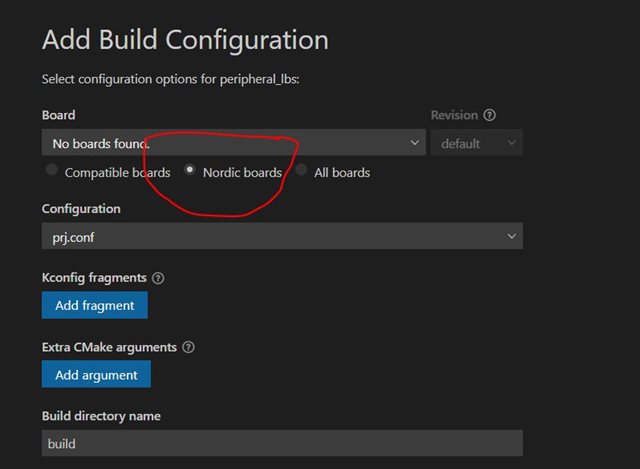
Could you please guide on what's wrong here or what's the right way to achieve what we want to do?

We are using VS Code (1.68.0) on Windows.

Thanks!

Parents
  • Hi Dejan,

    Thanks for the reply.

    VS Code also allows you to create new application in the Workspace. Workspace applications use west workspace for NCS versioning and they will have their own NCS instance which does not to be preinstalled. When you create your application in this way, you would also need to specify NCS repository of your choice.

    Could you point me to any link or document on how to achieve this using VS Code? We are expecting to work with VS Code on Windows and compile/flash the programs from there. Not from the command line tool.

    Thanks!

  • Hi Dejan,

    I tried creating new application using Workspace using VS Code. I was able to compile the sample application from the standalone NCS. However, now to add this to our private repo, I removed the .git folders from this standalone SDK.

    After doing this I ended with the same error:

    usage: west [-h] [-z ZEPHYR_BASE] [-v] [-V] <command> ...
    west: error: argument <command>: invalid choice: 'build' (choose from 'init', 'update', 'list', 'manifest', 'diff', 'status', 'forall', 'help', 'config', 'topdir', 'selfupdate')

    After digging a little, t looks like, it's renaming the .git in the nrf/ and zephyr/ is causing this issue. I couldn't understand the dependency of the .git in the building.

    Could you please let me know how to get around this? I want to push this stand-alone ncs to our private repo. So, that anytime we want to work with our app, we just need to clone our repo, install toolchain and start compiling our app against stand-alone (modified ncs).

    Thanks!

Reply
  • Hi Dejan,

    I tried creating new application using Workspace using VS Code. I was able to compile the sample application from the standalone NCS. However, now to add this to our private repo, I removed the .git folders from this standalone SDK.

    After doing this I ended with the same error:

    usage: west [-h] [-z ZEPHYR_BASE] [-v] [-V] <command> ...
    west: error: argument <command>: invalid choice: 'build' (choose from 'init', 'update', 'list', 'manifest', 'diff', 'status', 'forall', 'help', 'config', 'topdir', 'selfupdate')

    After digging a little, t looks like, it's renaming the .git in the nrf/ and zephyr/ is causing this issue. I couldn't understand the dependency of the .git in the building.

    Could you please let me know how to get around this? I want to push this stand-alone ncs to our private repo. So, that anytime we want to work with our app, we just need to clone our repo, install toolchain and start compiling our app against stand-alone (modified ncs).

    Thanks!

Children
  • Hi,

    embeddedER said:
    I was able to compile the sample application from the standalone NCS.

    What do you refer to as standalone NCS? How did you create your standalone NCS? Where is this standalone NCS located? Does it have .git folder?

    embeddedER said:
    However, now to add this to our private repo, I removed the .git folders from this standalone SDK.

    Which .git folders have you removed? Did you remove .git folders before or after the addition to your private repo? How did you add standalone NCS to your private repo?

    embeddedER said:
    After digging a little, t looks like, it's renaming the .git in the nrf/ and zephyr/ is causing this issue.

    Could you explain mentioned renaming? What is the issue that appeared? Can you show the issue?

    embeddedER said:
    we just need to clone our repo, install toolchain and start compiling our app against stand-alone (modified ncs).

    Which NCS do you want to use with your application? What is modified NCS?

    Best regards,
    Dejan

Related