nrf Connect SDK in private repo

Hi Team,

We are currently using nrf Connect SDK 1.8.0 and developing our application using nrf52833.

Currently we use our own git to maintain our application and nRF SDK is not part of our private git. Now we are planning to integrate nRF SDK in our repo. Mainly to keep track of changes we have done in nRF Connect SDK and also for long term maintenance perspective.

Ideally, we would like new developer to:

- Clone our private repo (Our application + nRF Connect SDK)

- Install toolchain in their machine and start build application using VS Code

To accomplish this we were referring https://developer.nordicsemi.com/nRF_Connect_SDK/doc/2.0.0/nrf/dm_adding_code.html#id3

As per above link, this is what we did:

1. Cloned the v1.8.0 using : west init -m https://github.com/nrfconnect/sdk-nrf --mr {revision} ncs; cd ncs; west update

2. Added this folder in our repo

3. On other machine, cloned our private repo and opened our application in VS Code, selected nRF Connect SDK in Welcome Page. Toolchain is already selected (installed at different location)

4. Now when we try to go to build configuration there is no Board available to select.
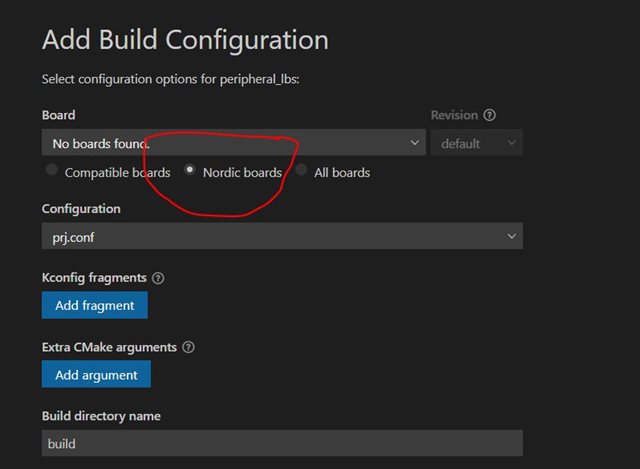
Could you please guide on what's wrong here or what's the right way to achieve what we want to do?

We are using VS Code (1.68.0) on Windows.

Thanks!

Parents
  • Hi Dejan,

    Thanks for the response. However, I do understand I can use west to clone individual repo and all.

    But as I said we need to maintain our changes over nRF SDK and we want to maintain a copy of SDK in our private repo. We may not take up upstream changes once we go into production.

    Could you explain me, if there is a way to get rid off this error? Why the build process is dependent on the .git folder?

    Thanks!

  • Hi,

    You shouldn't be thinking about removing .git folders, but rather of various repositories that exist inside NCS. In order to maintain changes in NCS, you can fork required repositories and change them according to your needs. Instead of having one combined directory, you should maintain separate repositories. After you have done making changes, you can push the changes to a proper remote. When you make changes to one repository, you would then push those changes only to that particular repository. When you make your VS Code Workspace application, you can specify desired nRF Connect SDK repository which will be included.  Managing your own repositories is possible through the use of west. File west.yml specifies particular repositories which will be cloned. You can read more about adding your own code in the documentation. In your case, you should not push combined folder which consists of application and nrf, but each part separately.

    Best regards,
    Dejan

Reply
  • Hi,

    You shouldn't be thinking about removing .git folders, but rather of various repositories that exist inside NCS. In order to maintain changes in NCS, you can fork required repositories and change them according to your needs. Instead of having one combined directory, you should maintain separate repositories. After you have done making changes, you can push the changes to a proper remote. When you make changes to one repository, you would then push those changes only to that particular repository. When you make your VS Code Workspace application, you can specify desired nRF Connect SDK repository which will be included.  Managing your own repositories is possible through the use of west. File west.yml specifies particular repositories which will be cloned. You can read more about adding your own code in the documentation. In your case, you should not push combined folder which consists of application and nrf, but each part separately.

    Best regards,
    Dejan

Children
  • Hi Dejan,

    Thanks for reply. However, this is not helping. You are giving me the same link which I already mentioned in my original request. I've already seen those links and still not getting what I want to do and that's the reason for this post.

    I do understand the way of managing multiple repos using west. But we don't want to do that. Why can't we just push everything as single package in our private repo? We've been using multiple MCU and managing all the SDK in such a way in our private single repo.

    As I asked multiple time in previous posts, could you please let me know how to get rid off this error (build fail without .git directory)? Why the ncs SDK build is dependent on the .git?

    Thanks!

  • Hi,

    sdk-nrf is a repository which contains .git folders as part of repository initialization. If you would like to push repository with multiple .git folders.to a new repository, you would need to copy source files into another repository. 
    You should be aware that sdk-nrf is public repository and that you might have regrets in the future while trying to synchronize your private repository with sdk-nrf.

    Best regards,
    Dejan

Related