Docker installation - build image locally loading for long time

Hi,

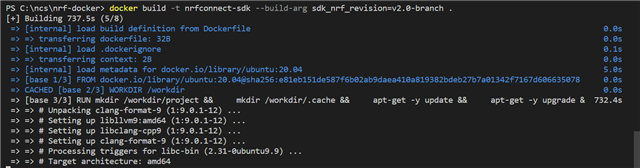
I have devloped an application with NCS v2.0.0. I have succesfully built and flahsed the application to the nRF52833 DK. I now would like to use Docker to build the application. I am following the steps on this page. After pasting the below line into the terminal, it loads indefintely. I have attached a screenshot of what I see in the terminal. Any suggestions as to what I should do please?

docker build -t nrfconnect-sdk --build-arg sdk_nrf_revision=v2.1-branch

Regards,
Adam
Parents
  • Hei, can you share the project code (or a minimal sample) so that I can reproduce the issue? There is a daily test in the repo that ensures building the asset_tracker_v2 works, but I haven't added more samples.

  • Hi Markus,

    Our application is a modified version of this Zephur sample: Peripheral HT. How do I go about building this with docker?

    Thanks,

    Adam

  • Hei, I followed the instructions for the full example:

    # Launch Docker image with an interactive shell
    docker run -it -v ${PWD}:/workdir/project nordicplayground/nrfconnect-sdk:main /bin/bash
    # Init NCS
    west init -m https://github.com/nrfconnect/sdk-nrf --mr v2.1-branch
    # Update
    west update --narrow -o=--depth=1
    # Go to sample
    zephyr/samples/bluetooth/peripheral_ht/
    # Build
    ZEPHYR_BASE=/root/test/zephyr west build -p always -b nrf52840dk_nrf52840
    # This builds and the HEX file is in build/zephyr:
    -- west build: generating a build system
    Loading Zephyr default modules (Zephyr base).
    -- Application: /root/test/zephyr/samples/bluetooth/peripheral_ht
    -- Found Python3: /usr/bin/python3.8 (found suitable exact version "3.8.10") found components: Interpreter 
    -- Cache files will be written to: /workdir/.cache//zephyr
    -- Zephyr version: 3.1.99 (/root/test/zephyr)
    -- Found west (found suitable version "0.14.0", minimum required is "0.7.1")
    -- Board: nrf52840dk_nrf52840
    -- Found host-tools: zephyr 0.14.2 (/workdir/zephyr-sdk)
    -- Found dtc: /workdir/zephyr-sdk/sysroots/x86_64-pokysdk-linux/usr/bin/dtc (found suitable version "1.6.0", minimum required is "1.4.6")
    -- Found toolchain: zephyr 0.14.2 (/workdir/zephyr-sdk)
    -- Found BOARD.dts: /root/test/zephyr/boards/arm/nrf52840dk_nrf52840/nrf52840dk_nrf52840.dts
    -- Generated zephyr.dts: /root/test/zephyr/samples/bluetooth/peripheral_ht/build/zephyr/zephyr.dts
    -- Generated devicetree_unfixed.h: /root/test/zephyr/samples/bluetooth/peripheral_ht/build/zephyr/include/generated/devicetree_unfixed.h
    -- Generated device_extern.h: /root/test/zephyr/samples/bluetooth/peripheral_ht/build/zephyr/include/generated/device_extern.h
    -- Including generated dts.cmake file: /root/test/zephyr/samples/bluetooth/peripheral_ht/build/zephyr/dts.cmake
    Parsing /root/test/zephyr/samples/bluetooth/peripheral_ht/Kconfig
    Loaded configuration '/root/test/zephyr/boards/arm/nrf52840dk_nrf52840/nrf52840dk_nrf52840_defconfig'
    Merged configuration '/root/test/zephyr/samples/bluetooth/peripheral_ht/prj.conf'
    Configuration saved to '/root/test/zephyr/samples/bluetooth/peripheral_ht/build/zephyr/.config'
    Kconfig header saved to '/root/test/zephyr/samples/bluetooth/peripheral_ht/build/zephyr/include/generated/autoconf.h'
    -- The C compiler identification is GNU 10.3.0
    -- The CXX compiler identification is GNU 10.3.0
    -- The ASM compiler identification is GNU
    -- Found assembler: /workdir/zephyr-sdk/arm-zephyr-eabi/bin/arm-zephyr-eabi-gcc
    -- Configuring done
    -- Generating done
    -- Build files have been written to: /root/test/zephyr/samples/bluetooth/peripheral_ht/build
    -- west build: building application
    [1/232] Preparing syscall dependency handling
    
    [2/232] Generating include/generated/version.h
    -- Zephyr version: 3.1.99 (/root/test/zephyr), build: 86893246053c
    [222/232] Linking C executable zephyr/zephyr_pre0.elf
    
    [226/232] Linking C executable zephyr/zephyr_pre1.elf
    
    [232/232] Linking C executable zephyr/zephyr.elf
    Memory region         Used Size  Region Size  %age Used
               FLASH:      175292 B         1 MB     16.72%
                SRAM:       34421 B       256 KB     13.13%
            IDT_LIST:          0 GB         2 KB      0.00%
    

  • Hi Markus,

    Thanks for the help.

    I am still unable to build the application with Docker. I should point out that I am using windows - does the mkae a difference with regards to building the application? I also have a few more questions pelase:

    1. Does it matter what repository you run Docker in? Also, does it matter which repository you are in when you clone a docker image? Should you be in the nrf application’s repository?

    2. I ran the terminal code succesfully from line 1 to 7 above in the Docker interactive shell. However, in line 8, zephyr/samples/bluetooth/peripheral_ht/, the command does not work. My application repository is C:\ncs\myapps\atmo_temp. Insetad of running line 8 as you did, I insetad tried cd C:\ncs\myapps\atmo_temp; as expected, it says that this repository does not exist. What are you trying to do here?

    3. Because of the issue with line 8, I could not run the code in line 10. Insetad I tried the following: west build C:\ncs\myapps\atmo_temp -p always -b nrf52833dk_nrf52833. After running this line, all I see in the terminal is: > and nothing happnes... What should I do here?

    4. Instead of running in the Docker interactive shell, I also tried running the terminal commands from this page that you linked to. I first open a command prompt from the nrf toolchain. I could not copy lines 140-143 into the command prompt as it had an issue with the inverted commas used: '.Instead, I ran each line one at a time. I first run: docker run --rm -v "%cd%":/workdir/project nrfconnect-sdk /bin/bash and I think it runs succesfully as nothing happens... I just see C:\ncs\v2.0.0> in the terminal window. I then run west init and update succesfully. After that, I run the following west build command: west build C:\ncs\myapps\atmo_temp -p always -b nrf52833dk_nrf52833 and the application buids succesfully. How do I know if I am actually building with docker? I could run this command without Docker and it would still build as it is just a west build command.

    Kind Regards,

    Adam

  • It looks like an issue with accessing your local windows folders inside the Docker container. You have to mount it, so it is accessible inside the container and this seems to be an issue. Since I am not on Windows, you have to figure out how mount windows directories in Docker yourself. Then all commands inside the container work with the Linux folder notation. So west build should not use the Windows folder notation, but the Linux one.

Reply
  • It looks like an issue with accessing your local windows folders inside the Docker container. You have to mount it, so it is accessible inside the container and this seems to be an issue. Since I am not on Windows, you have to figure out how mount windows directories in Docker yourself. Then all commands inside the container work with the Linux folder notation. So west build should not use the Windows folder notation, but the Linux one.

Children
No Data
Related