Write 6-Bytes data using pc-ble-driver-py with nRF52840 Dongle

Hi,

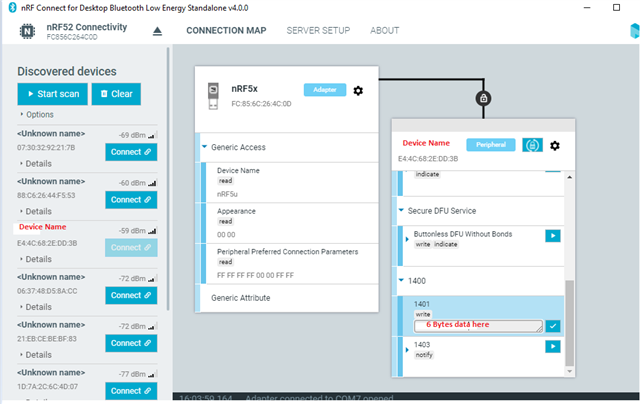
I am a very beginner in Python and BLE. I would like to use a nRF52840 Dongle to connect to a Bluetooth Device, send 6-Bytes data in the 1401 section and also perform DFU. I tried to use nRF Connect Desktop and they are workable as below. Now, I need to use pc-ble-driver-py to perform the same actions.

I have referred to the example from Heart Rate Collector and I am able to connect to my Device successfully.

To be done:

1. Send 6 Bytes data in 1401 section.

2. Perform DFU to program product firmware.

Below are some references.

https://devzone.nordicsemi.com/f/nordic-q-a/59885/custom-128bit-uuid-operations-write-and-read-in-pc-ble-driver-py/243652#243652

 Adding custom service UUID in pc_ble_driver_py 

 Adding custom service UUID in pc_ble_driver_py problems 
  • The loop should only enter if you have not set the COM port in the arguments:

    if len(sys.argv) == 3:
        serial_port = sys.argv[2]
    else:
        descs = BLEDriver.enum_serial_ports()
        choices = ["{}: {}".format(d.port, d.serial_number) for d in descs]
        choice = item_choose(choices)
        serial_port = descs[choice].port

    The default should be for instance: "application_name NRF52 COM10". Did you also specify connectivity IC identifier?

    These inputs are not required parts of the application, they are only included to make the code support multiple chips and allow the user to select from a list of available COM ports. You can also hardcode this in your application, or find your own way to input the choice. This is not Nordic-specific code, but only standard Python.

Related