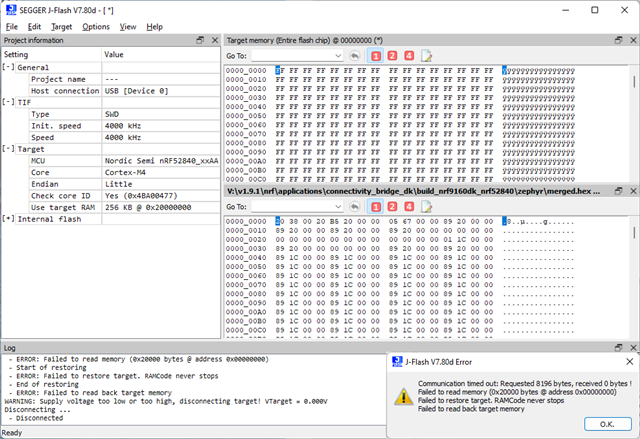
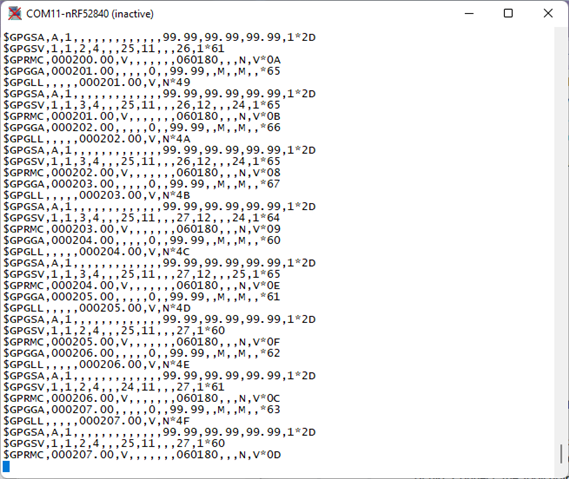
Ever since I updated the onboard controller for nRF9160dk ( see jLink USB-UART chip on nRF9160dk malfunction )
I've been experiencing a crash whenever I try to erase or program the nRF52840 chip, while the USB UART interfaces are in use.
I tried using different USB cables and ports. I reproduce the crash on both macOS and Windows. The USB UARTs may be open in KiTTY or gncom https://httpstorm.com/download/g-net-com/
Steps to reproduce:
1. Toggle the onboard switch to program the nRF52840 chip
2. Open the USB UARTs in gncom or KiTTY
2a. macOS
gncom -r 115200 -T -f /dev/cu.usbmodem0009600613711
gncom -r 115200 -T -f /dev/cu.usbmodem0009600613713
2b. Windows
gncom -r 115200 -T -f \\.\COM10
gncom -r 115200 -T -f \\.\COM11
3a. Start nRF Connect for Desktop, and open Programmer
3b. Make sure Auto read memory is enabled
3c. SELECT DEVICE, nRF9160 DK
3d. The board controller reboots, USB UARTS are disconnected
3e. on macOS gncom reports "ERROR: 6, Device not configured"
3f. on Windows gncom reports
AlG_SO_TASK::h_pipe.read()
^ERROR: 995, The I/O operation has been aborted because of either a thread exit or an application request.
3g. on macOS Programmer reports
19:43:05.013 Using nrf-device-lib-js version: 0.4.15
19:43:05.014 Using nrf-device-lib version: 0.12.8
19:43:05.337 Using nrfjprog DLL version: 10.16.0
19:43:05.337 Using JLink version: JLink_V7.80d
19:43:05.398 Installed JLink version does not match the provided version (V7.66a)
19:43:14.215 Using @nordicsemiconductor/nrf-device-lib-js to communicate with target via JLink
19:43:14.215 JLink OB firmware version J-Link OB-K22-NordicSemi compiled Dec 3 2021 15:46:55
19:43:14.219 Device family NRF52_FAMILY
19:43:14.220 Device version NRF52840_xxAA_REV2
19:43:14.221 Board version PCA10090
19:43:14.223 Loading readback protection status for Application core
19:43:14.929 Readback protection status: NRFDL_PROTECTION_STATUS_NONE
19:43:15.611 Parse memory regions for Application core
19:43:15.616 Update files regions according to Application core
19:43:15.616 Parse memory regions for file
19:43:15.624 Device is loaded and ready for further operation
19:43:15.628 Reading memory for NRFDL_DEVICE_CORE_APPLICATION core
19:43:16.339 Target device closed
19:43:16.498 Failed to get device memory map: async task failure for id: 338167846 msg: JLINKARM_DLL_TIME_OUT_ERROR (Origin: "Error when running fw program.")
19:43:16.500 Error when reading device
3h. on Windows Programmer reports
20:00:08.848 Using nrf-device-lib-js version: 0.4.13
20:00:08.849 Using nrf-device-lib version: 0.12.8
20:00:08.849 Using nrfjprog DLL version: 10.16.0
20:00:08.850 Using JLink version: JLink_V7.80d
20:00:09.000 Installed JLink version does not match the provided version (V7.66a)
20:00:12.145 Using @nordicsemiconductor/nrf-device-lib-js to communicate with target via JLink
20:00:12.146 JLink OB firmware version J-Link OB-K22-NordicSemi compiled Dec 3 2021 15:46:55
20:00:12.146 Device family NRF52_FAMILY
20:00:12.147 Device version NRF52840_xxAA_REV2
20:00:12.147 Board version PCA10090
20:00:12.148 Loading readback protection status for Application core
20:00:13.043 Readback protection status: NRFDL_PROTECTION_STATUS_NONE
20:00:13.844 Parse memory regions for Application core
20:00:13.857 Update files regions according to Application core
20:00:13.857 Parse memory regions for file
20:00:13.877 Device is loaded and ready for further operation
20:00:13.884 Reading memory for NRFDL_DEVICE_CORE_APPLICATION core
20:00:14.958 Failed to get device memory map: async task failure for id: 2171690943 msg: JLINKARM_DLL_TIME_OUT_ERROR (Origin: "Error when running fw program.")
20:00:14.959 Error when reading device
20:00:15.076 Target device closed
if step 3c is repeated a few times, the board controller LED is switched off, and the board is no longer recognised until power is switched off/on or the USB interface is reconnected.
4a. Start nRF Connect for Desktop, and open Toolchain Manager, then VS code
4b. Add Application:
nrf/Applications/connectivity_bridge_dk (see jlink-crash.7z)
4c. Create build configuration for nrf9160dk_nrf52840 (see jlink-crash.7z)
4d. Flash
* Executing task: nRF Connect: Flash: connectivity_bridge_dk/build (active)
Flashing build to 960061371
west flash -d v:\nordic\v2.1.0\nrf\applications\connectivity_bridge_dk\build --skip-rebuild -r nrfjprog --dev-id 960061371
-- west flash: using runner nrfjprog
-- runners.nrfjprog: Flashing file: V:\nordic\v2.1.0\nrf\applications\connectivity_bridge_dk\build\zephyr\merged.hex
Parsing image file.
Verifying programming.
ERROR: The JLinkARM DLL timed out while communicating to the J-Link probe.
ERROR: If the error condition persists, run the same command again with
ERROR: argument -- log, contact Nordic Semiconductor and provide the generated
ERROR: log.log file to them.
NOTE: For additional output, try running again with logging enabled (--log).
NOTE: Any generated log error messages will be displayed.
FATAL ERROR: command exited with status 35: nrfjprog --program 'V:\nordic\v2.1.0\nrf\applications\connectivity_bridge_dk\build\zephyr\merged.hex' --sectoranduicrerase --verify -f NRF52 --snr 960061371
* The terminal process terminated with exit code: 35.
* Terminal will be reused by tasks, press any key to close it.
5a. Run the Segger J-Link GDB Server.
5b. Connect a debugger over the network or localhost.
5c. Try to reprogram the board using merged.hex (previously generated by VS-code in step 4c).
5d. The GDB server reports an error and disconnects.
Mitigating factors:
All previously described errors are reproduced even if the nRF52840 chip is erased.
In my tests I have the used SEGGER - J-Link V7.80d drivers installed on both macOS and Windows. I also tried installing some older versions, but this did not make any difference. Segger may also want to investigate BSOD on Windows. After playing with the onboard controller crash for some time, I got a blue screen. I also got a blue screen when I first installed V7.80d and connected the board. I should note that I've been experiencing these with older versions of Segger drivers in the past years with different computers, jTAG interfaces and boards.
With JLink_Windows_V754a_x86_64 installed, J-Link Configurator shows that the board controller firmware is newer 2021 Dec 3 15:46, then the host firmware, but it does not allow me to downgrade.
If the USB UARTs are being used, any read, erase and program operation will fail.
If the USB UARTs are NOT in use, there is a 50% chance that a read, erase or program operation will fail.