nRF5340 SAADC power consumption

I'm profiling the current consumption of our device, on an nRF5340 module, at SDK 2.1.0.

So far as I can tell, the ADC is using approximately 1000 uA. It's sampling via PPI, and is triggered from an external clock signal at 1 kH.

The current consumption figures for the SAADC here show typical current consumption based on different configuration options. It looks like ~1000 uA is on the high end of what is expected, and that setting LPOP=LowPower would save us a considerable amount of current.

However I can't find anything about LPOP or LowPower anywhere else, either in the SAADC documentation or in the SDK.

Any tips as to where This can be enabled? I've seen this for an old version of the SDK, but it seems to come down to setting saadc_config.low_power_mode = true; which isn't part of the config struct in the current SDK.

Parents
  • Okay, I had the wrong idea a couple of days ago - in the sample button code, it sleeps for 1 ms in a while loop, and if I make that 1000 ms instead, the current consumption drops massively. I think that whole reply can be safely ignored!

    I've now copied over our interrupt code, so I can test it in isolation from the rest of our code. If I initialise the interrupt using a spare unconnected pin, I get current consumption of ~90 uA, and this is with the sense set to NRF_GPIOTE_POLARITY_HITOLO, which I suspect means we're doing edge detection, which adds some extra current. So that's encouraging.

    If I go back to using our external 1000 Hz RTC signal, I get just over 1 mA consumption. But I can set the prescaler on our external RTC to give different interrupt frequencies, and this is where things get weird...

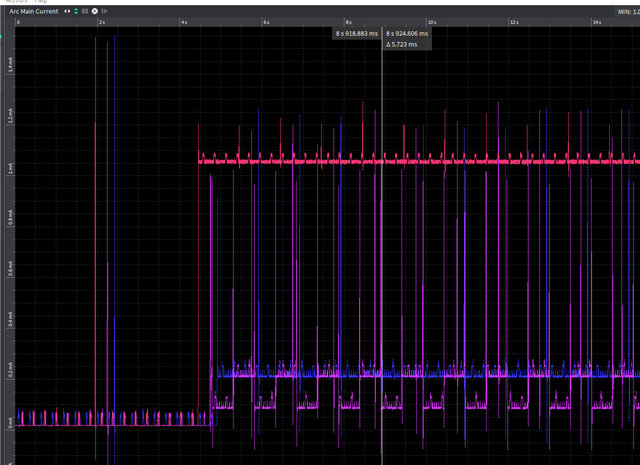
    The pink line is 1000 Hz interrupts, and just over 1 mA current. The blue line is 250 Hz interrupts, and about 220 uA. The purple line is 500 Hz and oscillates between ~90 uA and ~220 uA.

    (The low power at the beginning is 2.5 seconds of sleep, the code to set up our external RTC over spi, and then 2.5 seconds of sleep again)

    All I can think is that the timing of the MCU going to sleep somehow requires > 1 ms for it to kick in, and so at 1000 Hz interrupts, we never get there. Or rather, I guess the idle current still has the HF oscillator on for ~1 ms?

    This is the config/init code I'm using - so the interrupt is disabled, and so button_pressed shouldn't be being executed. And I've done nothing to initialise the ADC or PPI.

        static const nrfx_gpiote_in_config_t pin_interrupt_config = {
            .sense = NRF_GPIOTE_POLARITY_HITOLO,
            .pull = NRF_GPIO_PIN_PULLUP,
            .is_watcher = false,
            .hi_accuracy = true,
            .skip_gpio_setup = false,
        };

        nrfx_gpiote_in_init(pin, &pin_interrupt_config, button_pressed);
        nrfx_gpiote_in_event_enable(pin, false);
Reply
  • Okay, I had the wrong idea a couple of days ago - in the sample button code, it sleeps for 1 ms in a while loop, and if I make that 1000 ms instead, the current consumption drops massively. I think that whole reply can be safely ignored!

    I've now copied over our interrupt code, so I can test it in isolation from the rest of our code. If I initialise the interrupt using a spare unconnected pin, I get current consumption of ~90 uA, and this is with the sense set to NRF_GPIOTE_POLARITY_HITOLO, which I suspect means we're doing edge detection, which adds some extra current. So that's encouraging.

    If I go back to using our external 1000 Hz RTC signal, I get just over 1 mA consumption. But I can set the prescaler on our external RTC to give different interrupt frequencies, and this is where things get weird...

    The pink line is 1000 Hz interrupts, and just over 1 mA current. The blue line is 250 Hz interrupts, and about 220 uA. The purple line is 500 Hz and oscillates between ~90 uA and ~220 uA.

    (The low power at the beginning is 2.5 seconds of sleep, the code to set up our external RTC over spi, and then 2.5 seconds of sleep again)

    All I can think is that the timing of the MCU going to sleep somehow requires > 1 ms for it to kick in, and so at 1000 Hz interrupts, we never get there. Or rather, I guess the idle current still has the HF oscillator on for ~1 ms?

    This is the config/init code I'm using - so the interrupt is disabled, and so button_pressed shouldn't be being executed. And I've done nothing to initialise the ADC or PPI.

        static const nrfx_gpiote_in_config_t pin_interrupt_config = {
            .sense = NRF_GPIOTE_POLARITY_HITOLO,
            .pull = NRF_GPIO_PIN_PULLUP,
            .is_watcher = false,
            .hi_accuracy = true,
            .skip_gpio_setup = false,
        };

        nrfx_gpiote_in_init(pin, &pin_interrupt_config, button_pressed);
        nrfx_gpiote_in_event_enable(pin, false);
Children
  • Hi,

    Have you checked how long the execution time of the interrupt is? You can use GPIO toggling in the interrupt handler to check that, or toggle a GPIO at the end of the handler and compare this to the GPIO input. It is also possible to use DPPI and GPIOTE to toggle a GPIO from the POWER->EVENTS_SLEEPENTER and EVENTS_SLEEPEXIT to see when the CPU is actually in sleep.

    If for instance the interrupt takes 250us to complete, the ~1mA avereage current makes sense as it will make the Application CPU running about 25% of the time. This also makes sense for the 250Hz current. The 500Hz current does not make sense, but there could be some other error with this. Have you checked that the interrupt actually happens at 500Hz with this configuration? Is there anything in your application that corresponds with the rate that it toggles between high and low current consumption?

    Best regards,
    Jørgen

  • Those EVENTS_SLEEPENTER and EVENTS_SLEEPEXIT sound useful - I'll give that a try to confirm how long the CPU is asleep/awake.

    Just to clarify, the current consumption above is in the sample button project with the code to initialise our external RTC copied in, and the interrupt changed to the RTC pin on our board. I also swapped the interrupt code to use nrfx_gpiote in the same way as our main project.

    As far as I'm aware there shouldn't be any interrupt callback actually running, as nrfx_gpiote_in_event_enable(pinfalse); will mean it doesn't actually call the handler.

    Since all it does is initialise the RTC and enable the interrupt, there shouldn't be any other code running. I'm assuming that when the interrupt fires it wakes up the CPU, there's no ISR and no PPI/SAADC configured either, so it should just go straight back to sleep.

    I opened this support request to try to get to the bottom of what might be going on with the CPU sleep without worrying about the SAADC, PPI, interrupts etc. and just looking at the current consumption if we sleep in a while loop. As I mentioned before, I was getting ~650 uA in the button sample project just sitting in a while loop sleeping for 1 ms at a time, but only 23 uA if I set the sleep time to 1000 ms.

    I guess based on your reply, it might be taking ~250 us to go back to sleep from a GPIO interrupt, and ~150 us to go to sleep when just sat in a while loop. At least that would be consistent with the current figures. Is that longer than you would expect?

  • Hi Jørgen,

    I've managed to get a pin toggle from the sleep enter/exit events. In my test code I can see a 40 uS pulse when the CPU is awake with an interval of 1 second. That corresponds to the 1000 ms sleep in a while loop that I have at the end of my test main function.

    The rest of the time the CPU is off, so the ~1 mA current draw must be solely down to the GPIO interrupt.

    Some of that I suspect is down to the nrfx gpiote config - I think I can save a few hundred uA by using the nrf_gpiote library, triggering off a high or low signal instead of an edge, and changing the latency.

    It looks to me like, since it's not the CPU, something to do with the GPIO is keeping the HF oscillator on in between interrupts.

    Rory

  • Hi Rory,

    Would you be able to share your test sample with me? Then I could try it out on my board and see if I can figure out what is causing the higher current consumption.

    Best regards,
    Jørgen

  • Hi Jørgen

    I'll put together the minimal version of the code today (mostly just removing all the extra stuff I've got commented out!).

    Bear in mind that you'll need an external square wave source to generate the clock signal - without that present the current draw is fairly low, it's only when the interrupt is triggered at ~1000 Hz that we get 1 mA of current draw.

    Thanks,

    Rory

Related