Antenna pattern AoD

I'm using nRF5340 DK for BLE, AoD (Connection). I am also using the TX example from nordic. I can add extra antennas to the ant_patterns[] (up to 17), with no errors. I also changed #define BLE_ANT_PATTERN to 17. But in reality, while connecting to the chip (through the terminal (Linux)), The maximum number I could change is 10. Is there a pre-defined number somewhere else? 

I also changed CONFIG_BT_CTLR_DF_MAX_ANT_SW_PATTERN_LEN to 17, as you mentioned for nrf52833dk_nrf52833.config for My board (nRF5340) [in the child image).

I am using zephyr and west directly on a Linux VM, without the SDK. When the length is longer than 10, it gives me an error that I'm passing too many arguments. 

Could you pls help me with the error? 

Best, 

  • Hi

    I assume you're using the Direction Finding peripheral sample project, correct? And are you using the SoftDevice controller or the Zephyr controller? Can you check what

    dfe-antenna-num is set to in your nrf5340dk_nrf5340.overlay file? In our sample project this is set to 12 for the nRF52833 and nRF53 builds, but 10 for the nRF52820 overlay file. This is the first thing that comes to mind when you ask for why more than 10 defined antennas would cause issues. However I don't see why it wouldn't trig until you set the antenna pattern above 17 though, so I might have to ask the developers if there is some setting I'm not aware of here. But please, first answer my questions and check what dfe-antenna-num is set to in your application.

    Best regards,

    Simon

  • Hello,


    Thanks for your response. I am using the Zephyer Controller.


    I only have one *.overlay file in my child image that is written based on nRF5x SoC . dfe-antenna-num = <4>; in this file. Also in this file, I defined 7 gpios. (dfegpio0-gpios = <&gpio1 1 0>; …). In this file, I also define: dfe-pdu-antenna = <0x40>. That’s all!

    (I am using an antenna array with 4 switches that each of which switches 16 antennae. (64 in total) Separately, they all are functioning well)

    In my mBluetooth.h file (in modules), I have defined the BLE_ANT_PATTERN 17,

    In the gBluetooth.c file (in src), I have: static unit8_t ant_pattern[] = {0x40, …} (I’m using gpio 4)

    Then I build the whole project, with no errors. (build target = nrf5340dk_nrf5340_cpuapp)

    Once I programmed my dev board, I connect to the Port (ttyACM1), to change the antenna pattern, and then, I come across the error that I can not put more than 10 gpios when entering the new pattern. (I am using aod_tx )


    Best,

    Pooneh

  • Hi Pooneh

    Did you change the dfe-antenna-num to match the number of antennas you'd like to use, as this is the number of antennas you want to use. dfe-pdu-antenna sets what antenna you want to be the default used for PDU transmissions. 

    These mBluetooth.h and gBluetooth.c does not seem to be part of the nRF Connect SDK at all, have you added these yourself or are you using a version of Zephyr outside of the nRF Connect SDK?

    Can you upload the log where this "too many arguments" message is returned as well so we can get a better idea of what's happening?

    Best regards,

    Simon

  • I added these two files myself. It's a compatible Zephyr version, but I'm only using the necessary parts for my application from the SDK. So, I'm combining several codes with each other. (That's why I have Bluetooth.h)

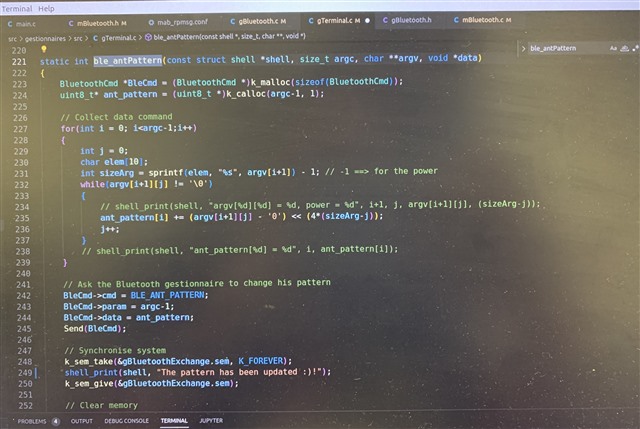
    I'm working directly with Zephyr, and I'm sending a command through the shell to specify the antenna pattern. Here is the code screenshot: (Is there a limit on the number of arguments with Zephyr?) 

    Here is the problem. I try to connect to the serial port, and I'm sending this command to change the antenna pattern, but I receive the following message. (40, 41, ... are the gpios for the antennas) 

    Can it be a limit to the length of command in the terminal? I'm using minicom to connect to the port. 

  • Hi Simon is OoO until Monday and he is a right person to answer you. It would be great if you can wait until Monday. Thanks a lot for your patience so far.

Related