NRF52833 runs error after DFU

Hi,   

   Error happens after follow steps:

   1.  program app.hex+bootloader.hex+device_page.hex+softdevice.hex to boad.

   2.  use nRF Mesh APP to provision,  it runs well

   3.  add two new server model then compile, and build new app.hex

   4.  doing dfu

   5.  after dfu, see log as follow:
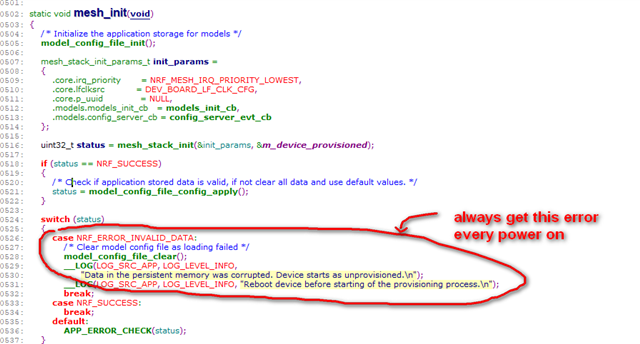
   

       Could someboady help me, please?

Parents
  • Hi,

    The composition of a mesh node cannot change, without removing the node from the network and re-provision it. This is mandated by the Bluetooth mesh specification. What it means in practice is, you cannot add or remove models on a node while it is part of a Bluetooth mesh network.

    With applications built on our mesh stack, trying to change the number of models through a DFU will make the internal data stored in flash (about the states of the models on the device) out-of-sync with the mesh model implementations in the application. That's why you get the error message.

    The solution is, as the error message suggests, to reset the device and provision it into the network.

    Alternatively, do not change what models are present on the device. If the models are the same (and on the same elements,) then you should not get this error in the first place.

    Regards,
    Terje

Reply
  • Hi,

    The composition of a mesh node cannot change, without removing the node from the network and re-provision it. This is mandated by the Bluetooth mesh specification. What it means in practice is, you cannot add or remove models on a node while it is part of a Bluetooth mesh network.

    With applications built on our mesh stack, trying to change the number of models through a DFU will make the internal data stored in flash (about the states of the models on the device) out-of-sync with the mesh model implementations in the application. That's why you get the error message.

    The solution is, as the error message suggests, to reset the device and provision it into the network.

    Alternatively, do not change what models are present on the device. If the models are the same (and on the same elements,) then you should not get this error in the first place.

    Regards,
    Terje

Children
Related