NRF9160 DK UART configuration

Hi

I am currently running and adjusting the zephyr echo_bot uart sample
on my nrf9160 DK. Currently , the sample makes use of UART0 to send a receive information which I have made compatible with an external device and the nrf terminal. My issue is that configuring the exact code to UART1 or UART0 has been difficult to achieve. Please assist.

  • Hello Hasssan Khan,

    Thank you for contacting DevZone at NordicSemi.

    Your query is regarding configuring and using a different uart on a nrf9160DK.

    You can use overlay file to configure the device-tree properly for your needs.

    For example, as in this case, you want to use uart1 to communicate to the computer for printing / echoing-back. You can choose your uart port for console output using following in the device overlay.

    /{
        chosen {
            zephyr,console = &uart1;
            zephyr,shell-uart = &uart1;
            zephyr,uart-mcumgr = &uart1;
        };
    };

    Also, by default, uart1 would be disabled, so you need to enable it, and set the required baudrate using code like:

    &uart1{
        compatible = "nordic,nrf-uarte";
        status = "okay";
        current-speed = <115200>;
        pinctrl-0 = <&uart1_default>;
        pinctrl-1 = <&uart1_sleep>;
    };

    Please connect with the configured baudrate on your serial terminaal or nrf terminal.
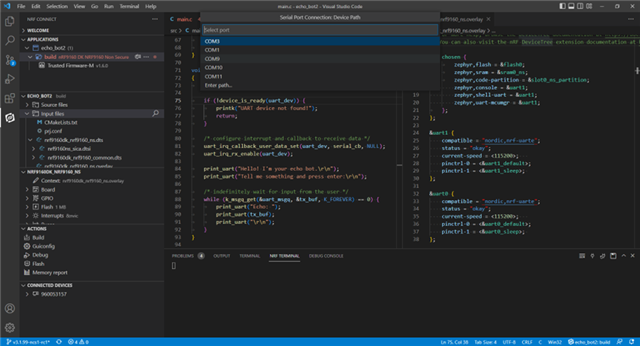
    You need to connect to the correct COM port on your computer.

    This is all I could infer from your query. If you need more specific help, please do send more information including code, log, and/or overlay files etc.

    Thank you and regards,
    Naeem

  • Hi again

    I've created the overlay file, used the code you provided and the echobot does not work.  In my understanding, the program should display an output using the LTE link monitor or the or the VS built in serial monitor.  Please assist urgently.  Do I need to add some code in the prj.config file as well?

    Thank you

  • Please also note that I am using the Zephyr echo bot sample.  The only change I made was the code you suggested.

  • Hi Hassan Khan,

    I am attaching complete project folder in the zip format. Once you unzip and analyze files, you will see that I have only included the overlay file. Rest of the project is exactly same.

    echo_bot2.zip

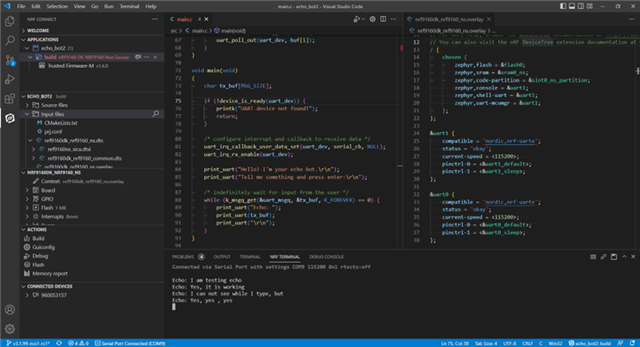
    Another thing is connecting to the right COM port with correct baudrate / configuration. I am also attaching snapshots of connecting to COM port using nRF terminal, and the sample output of the project after it has been flashed on the DK and COM port is connected to the terminal output. 

    Two things to note here is that: (1) you will not see any output if you are connected to wrong port or with wrong configurations, and (2) if everything is correct, and you start typing in the terminal, you will not see characters as you type in, but rather you will see the echo back (the same message) from the echo-bot on DK once you press ENTER key.

    I hope it will be helpful.

    With regards,

    Naeem

  • Yes, it is the same UART Echo_Bot sample from Zephyr.

    Also, no change in the prj.conf has been made. 

Related