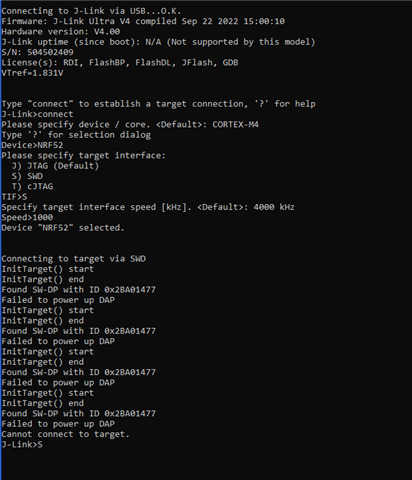
Failed to power up DAP Cannot connect to targe

Hello,

I have been working with a custom board that incorporates an nRF52840 in a similar way to the dongle (PCA10059). A problem had arisen in which there was no bootloader present on our boards and so I got to work trying to work out how to add one to it.

I have since been able to add a bootloader and have one of them up and running however in the process I have encountered the error shown below on the board I was initially attempting to work with. It is connected via an SWD header via JLink.

The device is also unable to be connected to nRFConnect and can not be programmed using nrfjprog.

I am unsure entirely when I caused this error but I believe I attempted to program an incompatible bootloader/multiple bootloaders at once. I know this isn't particularly helpful. I attempted at different stages to install the secure bootloader and the adafruit bootloader and I believe the latter of which to be the cause of the problem but I am really not sure. This board also had the Softdevice S140 installed to it.

So my question is, is the board bricked? Is there any way I could go about flashing the memory of the chip to allow it to be worked with again? 

Any help would be appreciated and any more information can be provided. Thanks in advance.
 

  • Hi Gibson, 

    If you have access to the SWD interface of the chip, I don't see much point to  have a bootloader on the dongle. 
    You can just directly write to the flash of the nRF52840 without using the bootloader. 

    Of course if you want to only use the dongle with USB and don't have to connect to a debugger then a bootloader would be useful. 

    What I would suggest to test is to try read and write to flash before you test with writing the bootloader. Just try testing if you can use nrfjprog or Jlink commander to read the flash, erase and write. Just to be sure the SWD interface is correctly working. 


    Could you send a photo of your set-up ? 

  • Hi,

    The device has an SWD interface however it isn't working right now, the jlink itself has a steady orange light when connected to the problemed board. I know this problem doesn't lie with my Jlink ultra as I was able to use it to program another one of the boards we have.

    The setup we're using is essentially a nordic dongle with an SWD header attached,  they're functionally near identical as it is being used to replace a dongle in our systems. 

    The reason that I required a bootloader to be added is because we were adding an assembled zip file via nrfutil to program the chip, this is not my problem anymore as this aspect is working fine and up to our requirements.

    The problem lies solely with the board that I had been working with initially and I believe I may have bricked it/corrupted the memory. Would you know if there is any easy way to wipe a nordic dongle? As this would function just as well on our custom board.

  • Hi Darren, 
    If you connect the nordic dongle to a SWD interface you can erase the whole chip the same way as you do with a Dev Kit. 
    You can either use nrfjprog --eraseall or you can use Jlink Commander to do that. 
    But from what I can see in the log is that the Jlink was not able to connect to the chip hence can't do anything with it. 
    Please double check if you have powered the chip properly and if  you have all the pins for SWD connected correctly. 

  • Hi,

    That's what I thought, the chip is powered properly, our board has a number of testpoints and all are at the expected values.

    Unfortunately it seems as though it may be a lost cause as I am unable to connect via JLink, I was hoping there was a way possibly to flash it without a connection however I understood that it was unlikely,

    I had attempted both nrfjprog --eraseall and erasing through JLink to no avail.

    Thanks anyway

  • Ok so my understanding is that you only got into this issue after you flashed a firmware (bootloader?) to the chip ? 
    There could be a chance that if there is a firmware that trigger reset too early in the code it may block the debugger from accessing the chip.

    But it's pretty small chance that you have such firmware. 
    So I'm not so sure if it was because of the firmware you flashed on the board that blocking the debugger or it's something else was wrong with the chip, possibly with the hardware. 

    No there is no way to erase the chip without the debugger.

Related