Thingy:53 is no more detectable via BLE

Hello,

I recently ordered a Thingy:53.

The first time I turned it on, I successfully tried the Edge Impulse app, and updated the Thingy:53 network and app firmware via BLE thanks to the nRF programmer android app.

Then I tried to update the firmware through USB with nRF programmer Desktop on Windows following the instructions at https://developer.nordicsemi.com/nRF_Connect_SDK/doc/latest/nrf/ug_thingy53_gs.html.

I got everything as described at this link, but now, I can't detect my Thingy:53 with any nRF BLE android app anymore.

I have activated the verbose mode on Windows nRF programmer Desktop and I have been able to catch these error messages:

I have seen that other users have experiences a similar issue but I have not been able to find a solution (I know about the SW2 manipulation).

Anyone can help me ? Thanks in advance :)

Adam

  • Hi,

    Which application firmware image did you use? There is a precompiled application firmware that can be found in Thingy53 Downloads section.

    Best regards,
    Dejan

  • Hello,

    Thanks for your answer Dejan.

    I have used the link you attached.

    In the 2022-08-03 version, I have especially tried:

    Edge_impulse

    Peripheral_LBS

    Peripheral_UART

    Bluetooth_Mesh light switch.

    For each one, nRF programmer on Windows 11 seems to tell me the programming went OK.

    For some of them, I got the LED flashing, but I never succeed in detecting my Thingy via BLE...

  • Hi,

    I could not reproduce the issue which you reported. Everything went as expected for me. However, I can provide several suggestions to you. 
    In order to program Thingy53, you would need to be in the bootloader mode. This is achieved by pressing SW2. Please make sure that you press button SW2 on the Thingy53 and not some other button. When you program applications using updating through USB mode, the name of your device will change. Therefore, when you scan for your Thingy53 (for this you can use nRF Connect Android app), it will appear with different names, such as "EdgeImpulse" if flashed with Edge Impulse zip, "EI Thingy53" if it is flashed with Machine Learning zip file, or "Nordic_LBS" if it is flashed with Peripheral_LBS zip file. You should be able to see your Thingy53 device if you followed the procedure correctly and if you scan for the device with a proper name.

    Best regards,
    Dejan

  • Hi Dejan, thanks for your investigation.

    I am pretty sure I did everything as detailed in your post and in the Getting Started webpage, but I still can't detect my thingy53 with tje nRF connect Android app (whatever the name of the device).

    I have kept investigating and for me there can be several causes for my problem:

    1: nRf programmer v3.0.4 logs two errors in verbose mode, "delete package returns error 8" and "serial io_contect executed 49860 handlers" (see original post for screenshots) while it still tells me the flashing of the thingy53 has been successfull.
    Where can I find the documentation presenting those errors ?

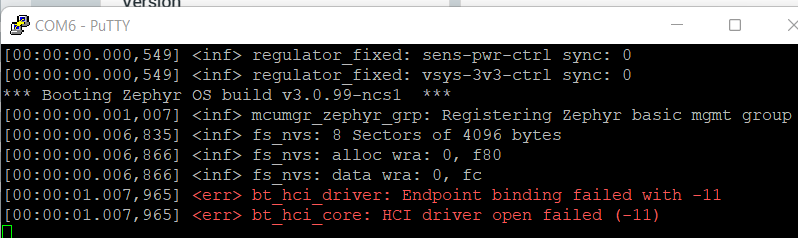
    2: The only app that seems to do something after I flash it with nRF programmer is the peripheral_uart app, the LED lights up in white and I get those messages on the COM port:

    So two errors about bt_hci_driver and bt_hci_core.
    Again, is there some documentation detailing those erros ?

    3: When I try the edge impulse app, the edge-impulse-daemon is not able to read anything from the COM port when my thingy is connected to my PC.
    So it does not seem it is only a BLE issue.

    Maybe I should create a new post more generic than just concerning the Thingy:53 ?

    Thanks again for your help.

  • Hi,

    I have asked internally about the possible reasons for the error that you reported. I'll get back to you when I get new information, possibly till the end of this week.

    Best regards,
    Dejan

Related