Software for saving bluetooth data to an excel sheet

Hi 

Is there any software that allows to save received Bluetooth data to a spreadsheet? I am using the nrf52 DK running the ble peripheral uart example and received the data on the nrf connect app. I was wondering if there is any other nrf software that allows that uart data to be piped to a spreedsheet or do I have to make a custom application.

Many thanks 

Tinashe 

Parents
  • Hi Tinashe,

    We do not have an official examples to demonstrate to pipe received BLE data to an excel file, unfortunately. But if you are familiar with Python, you could consider using our pc-ble-driver-py module and pair it with another Nordic DK or nRF52840 Dongle to connect to your peripheral from a PC. I have put together an example for this, in case it is of interest.

    Nordic UART central example in Python

    nus_central.zip

    Example CSV generated by script above (receiving a bunch of '1's from the UART peripheral)

    2022-10-27-11-41_nus_data.csv

    Steps to run the script

    1. Plug in a nRF DK or nRF52840 Dongle that is going to be used by the Python script to communicate with your UART peripheral

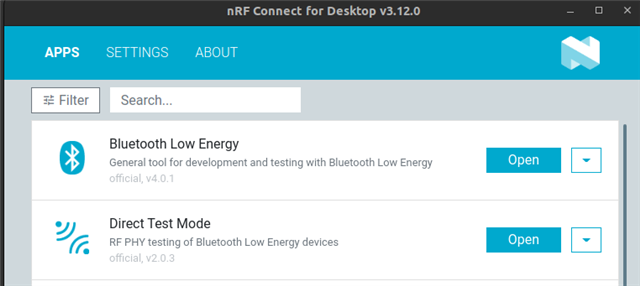
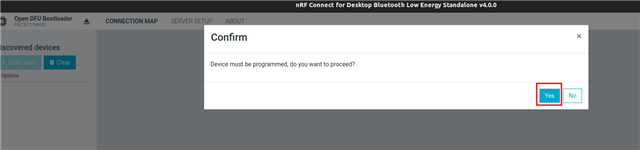
    2 Download and install nRF Connect for Desktop, then open the Bluetooth Low energy app. From this app, you can select the device you want to use. When prompted to program the board, select Yes. This will program the board with the connectivity FW needed by the python script to interface with the board.

    3. Exit the nRF connect app.

    4. From a terminal window, install the pc-ble-driver-py module through PyPI: $ pip3 install --user pc-ble-driver-py

    5. Run the script: $ python3 nus_central.py <com port>. E.g python3 nus_central.py COM10. The script will start scanning for devices named "Nordic_UART" and connect. Once connected, the peripheral can start sending notifications which will be logged to a *.csv file located in the same directory as the script.

    Best regards,

    Vidar

Reply
  • Hi Tinashe,

    We do not have an official examples to demonstrate to pipe received BLE data to an excel file, unfortunately. But if you are familiar with Python, you could consider using our pc-ble-driver-py module and pair it with another Nordic DK or nRF52840 Dongle to connect to your peripheral from a PC. I have put together an example for this, in case it is of interest.

    Nordic UART central example in Python

    nus_central.zip

    Example CSV generated by script above (receiving a bunch of '1's from the UART peripheral)

    2022-10-27-11-41_nus_data.csv

    Steps to run the script

    1. Plug in a nRF DK or nRF52840 Dongle that is going to be used by the Python script to communicate with your UART peripheral

    2 Download and install nRF Connect for Desktop, then open the Bluetooth Low energy app. From this app, you can select the device you want to use. When prompted to program the board, select Yes. This will program the board with the connectivity FW needed by the python script to interface with the board.

    3. Exit the nRF connect app.

    4. From a terminal window, install the pc-ble-driver-py module through PyPI: $ pip3 install --user pc-ble-driver-py

    5. Run the script: $ python3 nus_central.py <com port>. E.g python3 nus_central.py COM10. The script will start scanning for devices named "Nordic_UART" and connect. Once connected, the peripheral can start sending notifications which will be logged to a *.csv file located in the same directory as the script.

    Best regards,

    Vidar

Children
No Data
Related