Kconfig resets often to default. Why?

Hi

We have a strange problem with the Kconfig of the azure_iot:hzb sample project from the v.2.1.1 SDK:

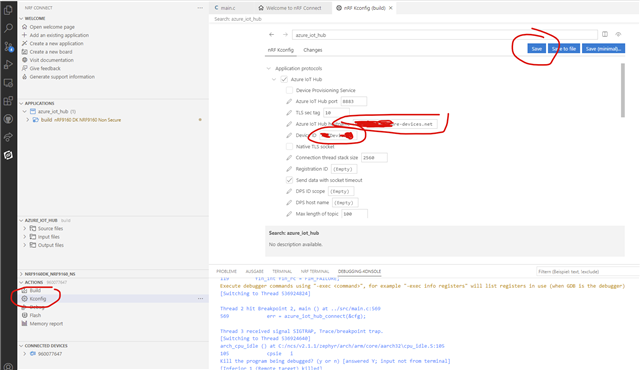
We have configured f.e. the "Azure Iot Hub hostname" and the "Device ID" in Kconfig, saved the config and built the project. Mostly this works as expected. But from time to time, the Kconfig seems to be suddenly resettet to its defautl values.(Empty for hostname, "my-device" for device name)...

Why and when can this behaviour occur?

Additional observation:

Also the Build configuration was resetted: the check mark "Enable debug options" was lost!

Parents
  • Hello,

    We have configured f.e. the "Azure Iot Hub hostname" and the "Device ID" in Kconfig, saved the config and built the project

    Do you do this inside VS Code? Can you please show me some screenshots on how you save it?

    Or do you set it manually in your prj.conf file?

    Best regards,

    Edvin

  • Hi Edvin

    We do the configuration (Kconfig) inside nRF Connect in VS code:

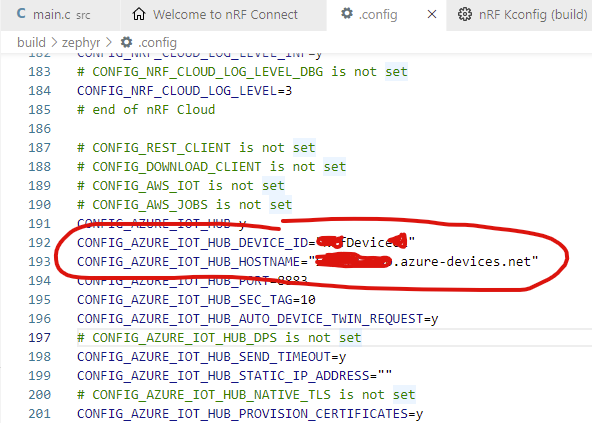
    Normaly it works and the changes are transfered into the projects Build -> zephyr -> .config file.


    But from time to time the confuguration is resetted "in background" to default values.

  • it happened just now again after some builds and debugging:

    We did no changes at the Kconfig in this time.

  • Ok, I see. These settings are stored inside the build folder, and if you do a pristine build, those may or may not be deleted. 

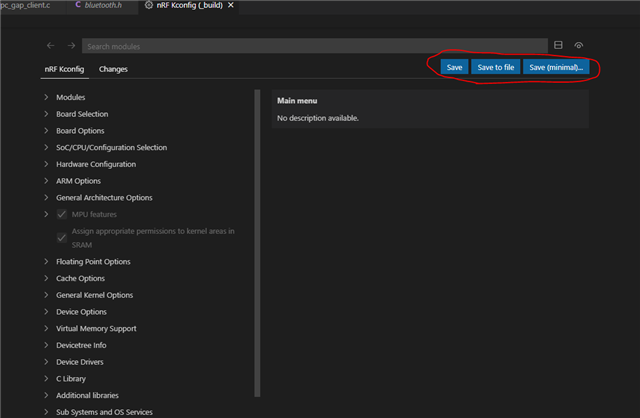
    It looks like you are not using the latest version of the nRF Connect for VS Code. My Kconfig window looks like this:

    I must admit that I have not used this Kconfig plugin. I usually just change the prj.conf file directly. Since that is stored outside the build folder, it will not disappear when a pristine build is triggered. The things that can trigger a pristine build are changes to certain files, such as a .conf file, the CMakeLists.txt file or an .overlay file. 

    If you update to the latest version of nRF Connect for VS Code, you can use the three save buttons that I circled for different features:

    "Save": Saves to the build folder, like your current Save button does.

    "Save to file": will save the settings directly to your prj.conf file. 

    "Save (minimal)..." will save to a new .conf file (with a name that you specify). 

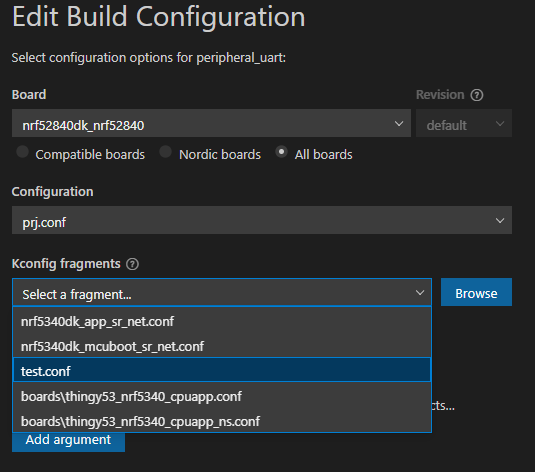
    Try to use "Save to file" or "Save (minimal)...". If you use "Save (minimal)", you need to manually add this .conf file to your project after it has been created:

    Best regards,

    Edvin

  • Hi Edvin

    Thank you for bringing some light into this issue. As you see in our first screen shot, we already have the latest nRF Connect for VS Code version installed. The screen shot you mentioned is just croped and therefor only the [save] button is visible.

    So the presence of this Kconfig editor is very dangerous because its use is nor very predictabel.
    If I save the settings by hitting [save], I assume that its persistantly saved in my configuration...
    At least for me, its not obvisious, that it's not!

    So in future, I will edit directly the prj.conf file. Thank you again for your support.

Reply
  • Hi Edvin

    Thank you for bringing some light into this issue. As you see in our first screen shot, we already have the latest nRF Connect for VS Code version installed. The screen shot you mentioned is just croped and therefor only the [save] button is visible.

    So the presence of this Kconfig editor is very dangerous because its use is nor very predictabel.
    If I save the settings by hitting [save], I assume that its persistantly saved in my configuration...
    At least for me, its not obvisious, that it's not!

    So in future, I will edit directly the prj.conf file. Thank you again for your support.

Children
No Data
Related