asset tracker v2 connot connect nrf-cloud

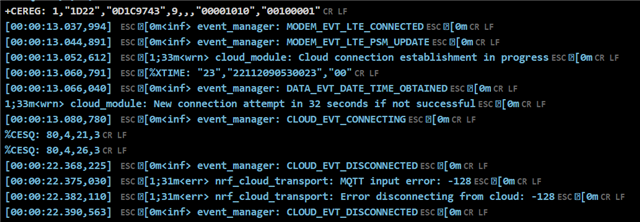
   hello,everyone!   I'm having a major problem with my nrf9160 dk board suddenly not connecting to the cloud.  I registered and renewed my certificate, but the result still failed to connect to the nrf-cloud. I don't know how to operate to solve it.  Please give me some help.  

   I would like to express my sincere thanks.

   yours

   jessie

   sdk:1.9.0               LTE:NB-IOT


Parents
  • Hi Jessie,

    1) Did you check if there is still data left for the SIM card subscription?

    2) Have you moved to one place that may have a poor signal?

    To check the network connection state, I suggest you play with the SLM sample with LTE Link Monitor. Use AT commands to connect the NB-IoT network then ping one website, something like

    AT+CFUN=4
    AT+CFUN?
    AT%XSYSTEMMODE=0,1,0,0
    AT+CEREG=5
    AT%CESQ=1
    AT+CFUN=1
    AT#XPING="www.google.com",45,5000,5,1000

    Remember to enable the Automatic requests setting and share the LTE Link Monitor log file if you have some findings.

    Best regards,

    Charlie

  • 1. The sim card can be connected to the Internet and has traffic

    2. 

    %CESQ: 84,4,34,4
    %CESQ: 77,3,34,4
    %CESQ: 255,0,255,0AT#XPING="www.baidu.com",45,5000,5,1000
    OK
    %CESQ: 76,3,20,2
    %CESQ: 77,3,34,4
    %CESQ: 77,3,29,4
    #XPING: 0.348 seconds
    [00:08:13.098,937] [0m<inf> slm_icmp: Ping target's IPv4 address
    [0m#XPING: 0.451 seconds
    #XPING: 1.088 seconds
    #XPING: 0.739 seconds#XPING: 0.266 seconds
    #XPING: average 0.578 seconds[00:08:21.004,913] 
    [0m<inf> slm_icmp: Packets: Sent = 5, Received = 5, Lost = 0 (0% loss)
    [0m[00:08:21.005,187] [0m<inf> slm_icmp: Approximate round trip times in milli-seconds:    Minimum = 266ms, Maximum = 1088ms, Average = 578ms
    [0m%CESQ: 77,3,24,3
    %CESQ: 78,3,29,4

    3.The nordic clouds were able to connect until recently

    4.The download and update of the certificate and the certification certificate are carried out according to the steps of the official website, and also try several times to ensure that there is no problem.

    Thanks very much!!!!

    Yours jessie

Reply
  • 1. The sim card can be connected to the Internet and has traffic

    2. 

    %CESQ: 84,4,34,4
    %CESQ: 77,3,34,4
    %CESQ: 255,0,255,0AT#XPING="www.baidu.com",45,5000,5,1000
    OK
    %CESQ: 76,3,20,2
    %CESQ: 77,3,34,4
    %CESQ: 77,3,29,4
    #XPING: 0.348 seconds
    [00:08:13.098,937] [0m<inf> slm_icmp: Ping target's IPv4 address
    [0m#XPING: 0.451 seconds
    #XPING: 1.088 seconds
    #XPING: 0.739 seconds#XPING: 0.266 seconds
    #XPING: average 0.578 seconds[00:08:21.004,913] 
    [0m<inf> slm_icmp: Packets: Sent = 5, Received = 5, Lost = 0 (0% loss)
    [0m[00:08:21.005,187] [0m<inf> slm_icmp: Approximate round trip times in milli-seconds:    Minimum = 266ms, Maximum = 1088ms, Average = 578ms
    [0m%CESQ: 77,3,24,3
    %CESQ: 78,3,29,4

    3.The nordic clouds were able to connect until recently

    4.The download and update of the certificate and the certification certificate are carried out according to the steps of the official website, and also try several times to ensure that there is no problem.

    Thanks very much!!!!

    Yours jessie

Children
No Data
Related
