Moving from nRF Connect SDK v2.0.2 to nRF Connect SDK v2.1.0

I'm moving an application from NCS v2.0.2 to NCS v2.1.0

Everything compiles properly in v2.0.2.

I think I've converted all of the pin definitions properly from the v2.0.2 .dts file to a new v2.1.0 .dts file and added a .dtsi file.

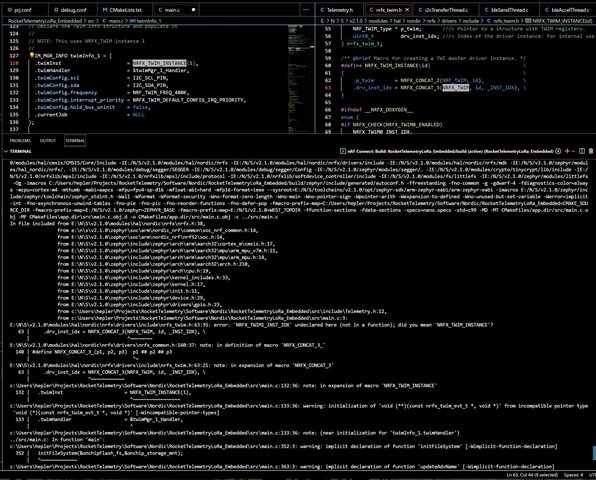
I have my own I2C/TWIM manager, so I instantiate a TWIM device using the macro NRFX_TWIM_INSTANCE(id).     Compilation fails in v2.1.0 but I have no problem with compilation in v2.0.2.

The prj.conf file has the statement:    CONFIG_NRFX_TWIM1=y    in both versions.

From the error message, it looks like "NRFX_TWIM1_INST_IDX" is not being defined (because the first argument of NRFX_CONCAT_3 is not defined??

Is there some other change I need to make this work in v2.1.0?   

Here is a partial screen capture of the error:
Thanks!

  • OK, thanks...    I see that I can no longer use DT_LABEL..    Thanks.

    For the memory issue, I find it strange that there is such a difference in size between builds using the same source code, but (slightly) different releases.

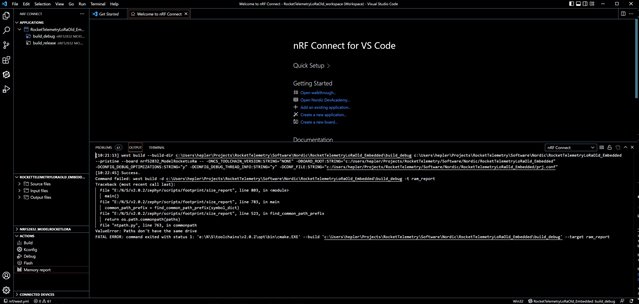
    I tried using the "Memory Report" tool, but it failed:

    The same error appears using both v2.0.2 and v2.1.0

    Not sure what "drive" the error is referring to...    Does it require that the tools be on the same volume as the project?

    Thanks again...

  • Hi,

    Yes, this seems to be an issue caused by ntpath.py. I found that this issue has recently been reported internally, but it is a Zephyr issue and not something that can be fixed in the VS Code extension. It has been reported to Zephyr here: https://github.com/zephyrproject-rtos/zephyr/issues/51549, so if you want to follow the development you can look there.

    One thing you can try is to move your project, or make a copy of it, on the same drive as your nRF Connect SDK installation.

    Best regards,

    Marte

  • Hi Marte,

    When should we delete build folder vs use  pristine build? I have experienced the same build issue with NRFX_TWIM0 and the i2c node on the nrf52840. Is it a hard and fast rule to delete the build directory if the dts or overlay changes? Are there known issues to be following instead of forum threads?

    thanks,

    jacob

  • Hi Jacob,

    It is not a hard and fast rule to always delete the build directory. I have tried to reproduce the issue myself now, but the changes were correctly applied every time when I tested. Pristine build should in theory be enough, but sometimes changes made to devicetree (dts or .overlay files) are not applied even with a pristine build due to cache. So if you are experiencing an issue with devicetree, for example that a device is undeclared or that it does not work when the program is running even though you have enabled it, then it is a good idea to check zephyr.dts (inside build/zephyr), and to possibly delete the build folder completely.

    Best regards,

    Marte

Related