

Hi,
I have several devices with the RIGADO BMDWare on them but whose hardware is inaccessible. I want to initialize these nRF52832 chips with out nRF Bootloader, Softdevice and Application.
I have loaded the nRF Bootloader and Application as a RIGADO update package (generated with RIGADO genimage tools).
Then I upload the application (generated with command below) with nRF DFU which is working fine.
nrfutil pkg generate --hw-version 52 --app-boot-validation VALIDATE_GENERATED_CRC --sd-req 0xCB --application-version $(APP_FW_VER_HEX) --application app.hex --key-file priv.pem app.zip
The problem arises when I try to update the Bootloader (generated with below command) over the NRF DFU or over UART. In this case the Bootloader does not start at all bricking the device.
nrfutil pkg generate --hw-version 52 --sd-req 0xCB --bootloader-version $(BL_FW_VER_HEX) --bootloader bootloader.hex --sd-id 0xCB --key-file priv.pem Bootloader.zip
I have read out the following settings page contents:
- After updating the Softdevice (version 0x01060000) and Bootloader (0x01000200) with a RIGADO package and App oder nRF_DFU (device is working)
* File:                     dump.hex
* Family:                   nRF52
* Start Address:            0x00000000
* CRC:                      0x14F73526
* Settings Version:         0x00000002 (2)
* App Version:              0x01060000 (17170432)
* Bootloader Version:       0x01000200 (16777728)
* Bank Layout:              0x00000000
* Current Bank:             0x00000000
* Application Size:         0x0001AF60 (110432 bytes)
* Application CRC:          0xE9B9C5E8
* Bank0 Bank Code:          0x00000001
* Softdevice Size:          0x00000000 (0 bytes)
* Boot Validation CRC:      0x5B4052C4
* SD Boot Validation Type:  0x00000000 (0)
* App Boot Validation Type: 0x00000001 (1)
- After trying updating the Bootloader (to version 0x01020000) over nRF_DFU or UART (device is NOT working and settings file looks strange)
* File:                     dump.hex
* Family:                   nRF52
* Start Address:            0x00000000
* CRC:                      0xACAA9FEB
* Settings Version:         0x00000002 (2)
* App Version:              0x01000000 (16777216)
* Bootloader Version:       0x01000200 (16777728)
* Bank Layout:              0x00000000
* Current Bank:             0x00000000
* Application Size:         0x00008004 (32772 bytes)
* Application CRC:          0x48A91DBA
* Bank0 Bank Code:          0x00000001
* Softdevice Size:          0x00000000 (0 bytes)
* Boot Validation CRC:      0x43C489A2
* SD Boot Validation Type:  0x00000000 (0)
* App Boot Validation Type: 0x00000001 (1)
Another Observations:
- If I read out the working hex before BL update and then flash it again with the nRF programmer it also stops working. Is this due to some wrong information in the MBR?
- when I read out the hex with the nRF programmer I can see differences in the MBR settings page and the Bootloader settings page (start at :10E00000 and :10F00000). Is as expected or should these regions stay intact?
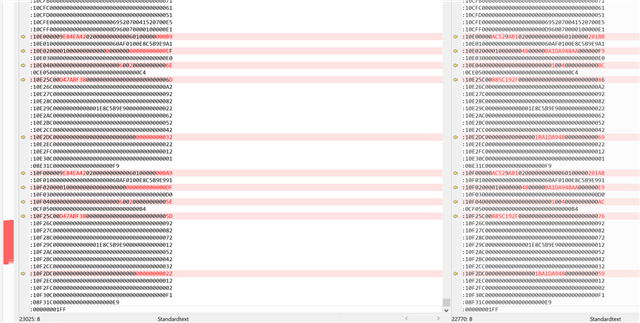
My questions are:
- What step in the chip initialization am I missing?
- Do I need to send a settings.hex file over nRF_DFU and if yes how can I do it?
- Do I need to write into the MBR and if yes how can I do it OTA or by modifying the Bootloader?

