central_uart on nrf52832DK and ble data forwarder on Thingy52 can not connect

Hi,

I am testing the sample "machine learning"  (from the template nrf/applications/machine_learning) on Thing52. And connect the Thingy52 to the central_uart on nrf52DK_52832 to stream the sensor data. 

If I build these programs on the nrf SDK v1.8.0, there is no issue of the connection.

However, if I build with the SDK from v2.0.0 or higher, then the Thingy52 and nrf52DK are able to connect only once after flashing. Then if I turn off one of the devices and turn it on again, none of them can be connected again. The only way to make them be connectable again is by "erasing all memory and re-flashing the program".

Can you help me to solve this?

Thanks

  • Hello,

    Did you investigate whether the peripheral (thingy) is advertising at all? Do you see it from your phone using nRF Connect for iOS/Android? Do you see it using nRF Connect for Desktop -> Bluetooth Low Energy?

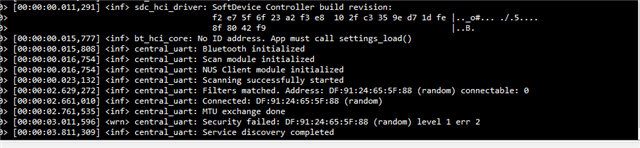
    I tried to reproduce what you are saying, but I don't know if they are ever properly connected. Is this what you see on your log from the nRF52dk?

    If not, what do you see the first time when they connect, and what do you see the second time?

    And does the log from the thingy print anything useful either the first time or the second time?

    Best regards,

    Edvin

  • Hi Edvin,

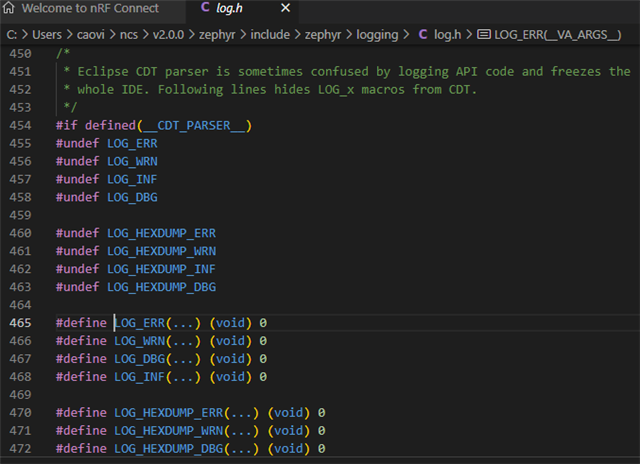
    I found that the LOG_XXX functions are blocked due to some conflict inside the compiler so I could not trace the LOG.

    To connect the 2 devices for the first time, I must do some tricks to make them connected.

    - After programming 2 devices with erase all memory mode, turn the nrfDK52 board off, switch Thingy52 off and on, then turn it to transferring data mode (hold button 5s), then turn on the nrfDK52, they will connect and transfer data (LED flash quickly in red). But sometimes they don't and I have no clue.

    - For connecting to other devices, I also tested Thingy52 with the nrfConnect app on an Android phone. As long as it has not been connected to the nrfDK52 to transfer data, the app can connect to Thingy, even when you turn on/off Thingy.

    But if Thingy connects to nrfDK52 for transferring data and then disconnects, then the phone app can not connect to it.

    I also checked the advertising of Thingy using the app. For both the connectable and non-connectable cases (and nrfDK52 board is off), I could find the Thingy advertised.

    I think maybe Thingy and nrf52DK board has locked some kind of address or security things in non-volatile memory so they can not connect to others. Looking at the Flash size of the program built by SDK 2.0, it is much larger than the SDK 1.8, maybe it leads to some variables saved in wrong places. Just my guess!!!

    Hope it help.

  • Hi Edvin,

    I think I used the term "connected" not adequately. It should be "connected and transfer data". And I can see the Thingy flashing in red quickly, and sensor data at 50hz are received at the COM port of nrfDK52. In case of "not connected" or maybe "connected but not transferring data", I see nothing on the COM port, and the LED flashes slowly (1sec on/1sec off) 

  • Hello,

    Can you try one thing before I try to reproduce it? (I need to find a Thingy and get more familiar with the application sample. 

    It is probably correct as you say that there is "some address or security things in non-volatile memory". It is called bonding in Bluetooth Low Energy, and it is encryption of the link, and storing the address and keys, so that no other device can listen in on the connection. It is very much possible to disable, but again, I am not familiar with the sample. If you are not familiar with Bluetooth Low Energy, you can consider starting with a simpler application, and perhaps using two DKs, so that you can see the log output from both of the devices (as you may know, the Thingy doesn't have a debugger). 

    That being said, can you please try to set this configuration in both the thingy application and the central_uart application's prj.conf files:

    CONFIG_BT_SETTINGS_CCC_STORE_ON_WRITE=y

    I don't know how familiar you are with Bluetooth Low Energy, but there is something called notifications, which is used to send data from a peripheral (the Thingy) to the central (the central_uart running on your DK). When you enable notifications it is stored in something called CCC (Client Configuration Characteristic). Usually, when you do not bond (store encryption data) the CCC value is stored in the non-volatile memory as well, as part of the bonding data. However, by default this is stored from the disconnected event. If your test consists of powering off the device, it doesn't receive the disconnect event, and it will not store the CCC value. 

    Then I imagine that they did some changes between v1.8.0 and now, where the central no longer writes the CCC value manually if the devices are bonded, and hence, the notifications aren't turned on anymore. Try adding the setting, and see if the behavior changes. And let me know if it doesn't.

    Best regards,

    Edvin

  • Hi Edvin,

    I tried to add the CONFIG CCC as your suggestion. It had no improvement. However, I tried to enable  LOG_xxx in the source code and could get the trace as below:

    - For the nrf52DK at successfully connected, I got 2 types of traces (sometimes I got trace 1, sometimes trace 2, but only one at a time):

    Trace 1

    [00:00:00.011,871] <inf> fs_nvs: 6 Sectors of 4096 bytes
    [00:00:00.011,901] <inf> fs_nvs: alloc wra: 0, fe8
    [00:00:00.011,932] <inf> fs_nvs: data wra: 0, 0
    [00:00:00.012,054] <inf> sdc_hci_driver: SoftDevice Controller build revision:
    f2 e7 5f 6f 23 a2 f3 e8 10 2f c3 35 9e d7 1d fe |.._o#... ./.5....
    8f 80 42 f9 |..B.
    [00:00:00.016,662] <inf> bt_hci_core: No ID address. App must call settings_load()
    [00:00:00.016,693] <inf> central_uart: Bluetooth initialized
    [00:00:00.017,456] <inf> central_uart: Scan module initialized
    [00:00:00.017,517] <inf> central_uart: NUS Client module initialized
    [00:00:00.024,017] <inf> central_uart: Scanning successfully started
    [00:00:00.043,182] <inf> central_uart: Filters matched. Address: C1:B0:66:6D:31:B7 (random) connectable: 0

    [00:01:35.840,209] <inf> central_uart: Connected: C1:B0:66:6D:31:B7 (random)
    [00:01:35.941,528] <inf> central_uart: MTU exchange done
    [00:01:36.799,804] <inf> central_uart: Pairing completed: C1:B0:66:6D:31:B7 (random), bonded: 1
    [00:01:36.800,079] <inf> central_uart: Security changed: C1:B0:66:6D:31:B7 (random) level 2
    [00:01:37.491,363] <inf> central_uart: Service discovery completed

     - For the Thingy52, I the log for successful connection as:

    [00:00:00.065,643] <inf> ble_state: Bluetooth initialized
    [00:00:00.067,169] <inf> ble_adv: Advertising stopped
    [00:00:00.067,199] <inf> ble_adv: Use fast advertising
    [00:00:00.069,183] <inf> ble_adv: Advertising started
    [00:00:00.148,284] <inf> ble_state: Setting TX power to: 0
    [00:00:00.148,620] <inf> ble_state: TX power returned by command: 0
    [00:00:00.148,742] <inf> ble_state: Connected to C0:69:85:73:08:F0 (random)
    [00:00:00.148,864] <inf> ble_state: Identity 0 has 0 bonds
    [00:00:00.149,871] <inf> app_event_manager: e:ble_peer_event id=0x20002440 CONNECTED
    [00:00:00.149,963] <inf> ble_adv: Advertising stopped

    [00:00:01.106,903] <inf> ble_state: Security with C0:69:85:73:08:F0 (random) level 2

     - For the failed connection, the log on nrfDK52:

    Sometimes it stopped after initializing the scanning

    [00:00:00.011,871] <inf> fs_nvs: 6 Sectors of 4096 bytes
    [00:00:00.011,901] <inf> fs_nvs: alloc wra: 0, fe8
    [00:00:00.011,932] <inf> fs_nvs: data wra: 0, 0
    [00:00:00.012,054] <inf> sdc_hci_driver: SoftDevice Controller build revision:
    f2 e7 5f 6f 23 a2 f3 e8 10 2f c3 35 9e d7 1d fe |.._o#... ./.5....
    8f 80 42 f9 |..B.
    [00:00:00.016,693] <inf> bt_hci_core: No ID address. App must call settings_load()
    [00:00:00.016,693] <inf> central_uart: Bluetooth initialized
    [00:00:00.017,456] <inf> central_uart: Scan module initialized
    [00:00:00.017,547] <inf> central_uart: NUS Client module initialized
    [00:00:00.024,017] <inf> central_uart: Scanning successfully started

    Sometimes it had the error message 

    [00:01:08.314,270] <inf> central_uart: Filters matched. Address: C1:B0:66:6D:31:B7 (random) connectable: 0
    [00:01:08.350,463] <inf> central_uart: Connected: C1:B0:66:6D:31:B7 (random)
    [00:01:08.450,836] <inf> central_uart: MTU exchange done
    [00:01:08.700,897] <wrn> central_uart: Security failed: C1:B0:66:6D:31:B7 (random) level 1 err 2
    [00:01:09.500,640] <inf> central_uart: Service discovery completed

    or:

    [00:01:48.762,847] <inf> central_uart: Filters matched. Address: C1:B0:66:6D:31:B7 (random) connectable: 0
    [00:01:51.764,617] <inf> central_uart: Failed to connect to C1:B0:66:6D:31:B7 (random) (2)

    - The log on Thingy52 for failed connection:

    [00:00:00.064,453] <inf> bt_hci_core: No ID address. App must call settings_load()
    [00:00:00.064,453] <inf> ble_state: Bluetooth initialized

    [00:00:00.066,436] <inf> ble_adv: Advertising stopped
    [00:00:00.066,467] <inf> ble_adv: Use fast advertising
    [00:00:00.068,450] <inf> ble_adv: Advertising started
    [00:00:00.068,511] <inf> app_event_manager: e:ble_peer_search_event inactive
    [00:00:00.068,572] <inf> app_event_manager: e:ble_peer_search_event active

    [00:00:30.068,908] <inf> ble_adv: Advertising stopped
    [00:00:30.068,939] <inf> ble_adv: Use slow advertising
    [00:00:30.070,556] <inf> ble_adv: Advertising started
    [00:00:30.070,617] <inf> app_event_manager: e:ble_peer_search_event inactive
    [00:00:30.070,648] <inf> app_event_manager: e:ble_peer_search_event active

Related