Install failed at toolchain

Hello,

I was following the steps mentioned in the https://developer.nordicsemi.com/nRF_Connect_SDK/doc/latest/nrf/gs_installing.html

in the step 5: point 4

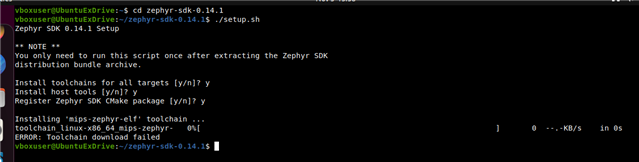
When I tried to Run the Zephyr SDK bundle setup script using the command mentioned:

cd zephyr-sdk-0.14.1
./setup.sh

Then it was showing me the error as mentioned below:


Could you please help me to solve this issue?

Regards,
Divya
Parents
  • Hi,

    Based on the error I wonder if you have a problem with a too strict firewall or similar? Or perhaps a temporary issue? I would consider testing at a later time or on a different network if needed (next step would be to modify the script to get more information about why download failed).

    PS: I see you are using Ubuntu, so a simpler way to get started could be to use the automatic installation with the Toolchain manager (see Installing automatically). This is currently only officially supported on Ubuntu 20.04 LTS, but I am using it without any issues on 22.04 LTS as well, and other recent versions will typically work out of the box.

Reply
  • Hi,

    Based on the error I wonder if you have a problem with a too strict firewall or similar? Or perhaps a temporary issue? I would consider testing at a later time or on a different network if needed (next step would be to modify the script to get more information about why download failed).

    PS: I see you are using Ubuntu, so a simpler way to get started could be to use the automatic installation with the Toolchain manager (see Installing automatically). This is currently only officially supported on Ubuntu 20.04 LTS, but I am using it without any issues on 22.04 LTS as well, and other recent versions will typically work out of the box.

Children
Related