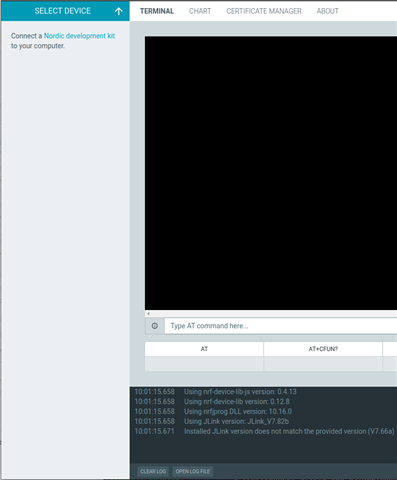
nRF Connect LTE Link Monitor and Programmer do not show device

Using Ubuntu (same behavior on 20.04, 22.04, and 22.10) and nRF Connect for Desktop 3.12.0. I have my J-Link hooked up to an nRF9160 on a custom board. When I check it at the command line, everything looks good:

me@computer:~$ nrfjprog --version
nrfjprog version: 10.18.1 external
JLinkARM.dll version: 7.82b

me@computer:~$ nrfjprog -i
261008254

me@computer:~$ nrfjprog --deviceversion
NRF9160_xxAA_REV2

The Segger software works great - JFlash, JLinkConfig, etc. But none of the nRF Connect apps see my J-Link. I have "Show only supported devices" unchecked:
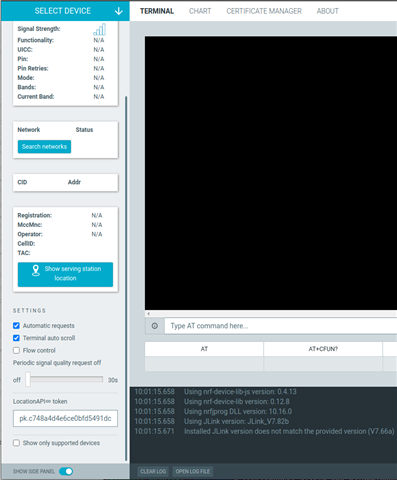
uncheck only supported devices

But no device:

No device

No idea where to go from here. It typically works fine.

Parents Reply Children
  • Yep!

    me@computer:~$ ls -l /lib/udev/rules.d/71*
    -rw-r--r-- 1 root root  192 Jun 15 16:16 /lib/udev/rules.d/71-ipp-usb.rules
    -rw-rw-r-- 1 me   me    493 Jun  7  2018 /lib/udev/rules.d/71-nrf.rules
    -rw-r--r-- 1 root root 2053 Oct 12 11:08 /lib/udev/rules.d/71-nvidia.rules
    -rw-r--r-- 1 root root  461 Oct 11 11:51 /lib/udev/rules.d/71-power-switch-proliant.rules
    -rw-r--r-- 1 root root 3810 Oct 11 11:51 /lib/udev/rules.d/71-seat.rules
    -rw-r--r-- 1 root root  437 Jul  5 05:30 /lib/udev/rules.d/71-u-d-c-gpu-detection.rules

  • I use Ubuntu 20.04, nRF Connect for Desktop v3.12.0, LTE Link Monitor v2.0.2.

    It detects a nRF9160-DK v1.1.0 and a Thingy:91 v1.4.0 and works as expected.

    Using lsusb I get

    Bus 003 Device 005: ID 1915:9100 Nordic Semiconductor ASA Thingy:91 UART
    Bus 001 Device 007: ID 1366:1055 SEGGER

    No clue, what went wrong on your side. I guess, I can't be of any help, sorry.

Related