nRF5340 bt_le_ext_adv_create fails with err -5 in various samples

Nrf Connect Version v2.1.2

VSCode Plugin v2022.10.30

Using various samples on my nRF5340DK fail with the following error codes:

hap_ha sample:

Bluetooth initialized
Failed to create advertising set (err -5)
Failed to set advertising data (err -5)
[00:00:00.267,333] <wrn> bt_pacs: No callback for publish_location
[00:00:00.286,987] <inf> bt_hci_core: HW Platform: Nordic Semiconductor (0x0002)
[00:00:00.286,987] <inf> bt_hci_core: HW Variant: nRF53x (0x0003)
[00:00:00.287,017] <inf> bt_hci_core: Firmware: Standard Bluetooth controller (0x00) Version 41.37468 Build 2457941745
[00:00:00.290,496] <inf> bt_hci_core: Identity: C0:1C:F1:98:45:37 (random)
[00:00:00.290,527] <inf> bt_hci_core: HCI: version 5.3 (0x0c) revision 0x21d8, manufacturer 0x0059
[00:00:00.290,527] <inf> bt_hci_core: LMP: version 5.3 (0x0c) subver 0x21d8
[00:00:00.295,257] <wrn> bt_hci_core: opcode 0x2036 status 0x01
[00:00:00.299,591] <wrn> bt_hci_core: opcode 0x2037 status 0x01

unicast_audio_server example:

*** Booting Zephyr OS build v3.1.99-ncs1-1 ***
Bluetooth initialized
Location successfully set
Failed to create advertising set (err -5)
[00:00:00.287,231] <inf> bt_hci_core: HW Platform: Nordic Semiconductor (0x0002)
[00:00:00.287,261] <inf> bt_hci_core: HW Variant: nRF53x (0x0003)
[00:00:00.287,292] <inf> bt_hci_core: Firmware: Standard Bluetooth controller (0x00) Version 41.37468 Build 2457941745
[00:00:00.290,649] <inf> bt_hci_core: Identity: C0:1C:F1:98:45:37 (random)
[00:00:00.290,649] <inf> bt_hci_core: HCI: version 5.3 (0x0c) revision 0x21d8, manufacturer 0x0059
[00:00:00.290,679] <inf> bt_hci_core: LMP: version 5.3 (0x0c) subver 0x21d8
[00:00:00.295,593] <wrn> bt_hci_core: opcode 0x2036 status 0x01

I added the folders to the workspace and created a build config. Using all default values results in the above mentioned errors.

What am I doing wrong?

Thanks in advance.

Parents
  • Hi, 

    The example only work with the LE Audio Controller Subsystem for nRF53 (see nRF5340 Audio), so you need to do a few things. Firstly, add the configs as this post indicated. 

    Then program the firmware hex found under nrf\applications\nrf5340_audio\bin\ on the network core, and the application core firmware you just built.

    You should be able to see the log like this

    ------------------
    hap_ha:
    ------------------
    *** Booting Zephyr OS build v3.1.99-ncs1-1  ***
    Bluetooth initialized
    Advertising successfully started
    [00:00:00.267,211] <wrn> bt_pacs: No callback for publish_location
    [00:00:00.274,597] <wrn> bt_hci_core: Controller to host flow control not supported
    [00:00:00.281,585] <inf> bt_hci_core: Identity: CA:3E:A2:9E:02:E3 (random)
    [00:00:00.281,585] <inf> bt_hci_core: HCI: version 5.2 (0x0b) revision 0x0ce7, manufacturer 0x07e8
    [00:00:00.281,616] <inf> bt_hci_core: LMP: version 5.2 (0x0b) subver 0x0ce7
    
    ------------------
    unicast_audio_server:
    ------------------
    *** Booting Zephyr OS build v3.1.99-ncs1-1  ***
    Bluetooth initialized
    Location successfully set
    Advertising successfully started
    [00:00:00.274,627] <wrn> bt_hci_core: Controller to host flow control not supported
    [00:00:00.280,059] <inf> bt_hci_core: Identity: DC:A6:0A:90:AC:EE (random)
    [00:00:00.280,090] <inf> bt_hci_core: HCI: version 5.2 (0x0b) revision 0x0ce7, manufacturer 0x07e8
    [00:00:00.280,090] <inf> bt_hci_core: LMP: version 5.2 (0x0b) subver 0x0ce7

    Regards,
    Amamda H.

  • Thanks! That seems to have fixed it.

    But sadly I don't see the device via the nRF Connect App. 

    The warning "<wrn> bt_hci_core: Controller to host flow control not supported" does not look good either. 

    Happens in both samples and you seem to get that as well.

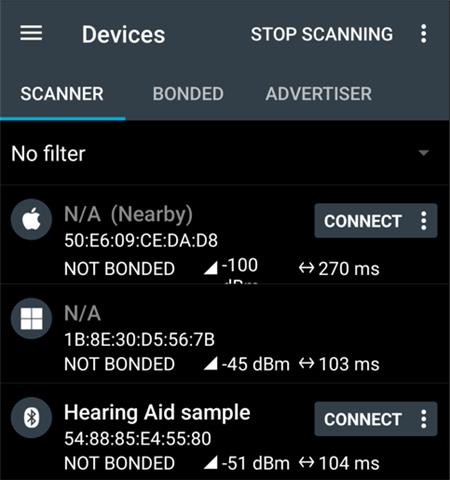
  • Hi, 

    I can see the device advertising in the the nRF Connect App like this

       
    If you don't see it, you could try to refresh the scanning several times.

    -Amanda H.

  • Had a look at all this again. 

    I programmed the network core with "ble5-ctr-rpmsg_3303.hex" via nrfjprog and after that flashed the hap_ha example with the extra config params as suggested by your first answer.

    I don't see the sample via the nRF Connect App either on an iOS (16.0) device or Android (13.0) (App version 4.26.0).

    But I can see it via an iPad OS 16.0 device. (Both apple devices use the nrf connect 2.5.3 build number 4)

    But the Android OS is able to see and connect to the sample for some reason.

    Sadly I can't do anything with the sample once connected though. Not available as an audio sink as I would expect.

    After connecting the sample log shows "Failed to discover GTBS". Maybe that has something to do with that?

    Is there a guide somewhere which mobile OS should be able to connect and how the sample device should behave once connected? 

  • Hi, 

    GTBS is the Generic Telephone Bearer Service (GTBS). The log indicates it cannot discover the GTBS on the phone.  

    Here is the documentation for the HAP Hearing Aid (HA) and Unicast Audio Server samples. From the documentation, it should test the HAP Hearing Aid (HA) sample with a Hearing Aid Unicast Client (HAUC) or Hearing Aid Remote Controller (HARC), and test the Unicast Audio Server sample with the Unicast Audio Client sample. 

    -Amanda H.

  • I already know about these but they don't specify if an existing mobile os can work with any example. I had hoped to have simply overlooked that.

    Do I understand correctly that this means that there is no mobile os available which is able to connect to any of these examples and work with them?

    Shouldn't Android 13 support LC3 Audio and therefore work with these examples? 

    Do all these examples really only work when one controls both client and server?

  • Hi, 

    I don't have enough information to know which mobile can support BLE Audio now. Since those samples are provided by Zephyr, you could get further information from their Discord.   

    -Amanda H.

Reply Children
No Data
Related