How to change mesh bootloader flash size?

Hi

When I build mesh bootloader code, there shows flash size not enough,  

Could you tell me wher I can change the size, please?

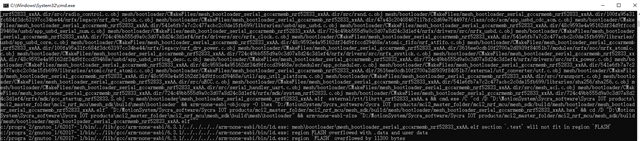
c:/progra~2/gnutoo~1/62017-~1/bin/../lib/gcc/arm-none-eabi/6.3.1/../../../../arm-none-eabi/bin/ld.exe: mesh\bootloader\mesh_bootloader_serial_gccarmemb_nrf52833_xxAA.elf section `.text' will not fit in region `FLASH'
c:/progra~2/gnutoo~1/62017-~1/bin/../lib/gcc/arm-none-eabi/6.3.1/../../../../arm-none-eabi/bin/ld.exe: region FLASH overflowed with .data and user data
c:/progra~2/gnutoo~1/62017-~1/bin/../lib/gcc/arm-none-eabi/6.3.1/../../../../arm-none-eabi/bin/ld.exe: region `FLASH' overflowed by 11300 bytes
Parents
  • Hello,

    How did you attempt to build the bootloader?

    Do you need to do any changes? Or what is the reason you can't use the provided bootloader?

    Best regards,

    Edvin

  • I need mesh dfu feature and communication with usb of nRF52833 D- and D+

    Do you have any examples ?

  • Do you need the USB communication inside the bootloader, or can that be part of your application? 

    The bootloader should only be responsible for the swap of the old and new application images. At 99.9% of the time, it would be the application that is running, and that is where you have all your normal functionalities (button handling, using peripherals and so on).

    BR,

    Edvin

  • So , do you mean that  USB communication receiving data from pc is only happend in application part when dfu is running?

    bootloader part is only responsible for the swap of the old and new application images, right?

    but there are two hex files mesh_bootloader_gccarmemb_nrf52833_xxAA.hex and mesh_bootloader_serial_gccarmemb_nrf52833_xxAA.hex,    what does mesh_bootloader_serial_gccarmemb_nrf52833_xxAA.hex use for?

    In SDK ,  examples\dfu\dfu_nrf52833_xxAA_s113_7_2_0.emProject,   in this example, if I want to receive fw data from pc side then mesh dfu, which bootloader hex file need to be programed to ev board?

  • Yes. All other parts that are running on the board is running from the application. Peripherals, Buttons, LEDs, mesh communication, logging over USB/UART, sensors connected via UART/SPI/I2C, LEDs controlled by PWM, and so on. This is also where you would typically put the USB parts that the application will run.

    BR,
    Edvin

  • No , I don't think so

    I followed https://infocenter.nordicsemi.com/index.jsp?topic=%2Fug_nrf52833_dk%2FUG%2Fnrf52833_DK%2Fhw_debug_out.html&cp=4_1_4_7_8

    ,  program 4 hex files to EV board, as follow:

    1) device_page_nrf52833_xxAA_s113_7.0.1.hex

    2) dfu_nrf52833_xxAA_s113_7.0.1.hex

    3) s113_nrf52_7.0.1_softdevice.hex

    4) mesh_bootloader_serial_gccarmemb_nrf52833_xxAA.hex

    Second ,  connected Ev board with PC,  then runned command "nrfutil --verbose dfu serial -pkg xxx.zip -p COM5 -b 115200 -fc --mesh"  to update other devices,   it can update successful.

    But ,  if programed 

    1) device_page_nrf52833_xxAA_s113_7.0.1.hex

    2) dfu_nrf52833_xxAA_s113_7.0.1.hex

    3) s113_nrf52_7.0.1_softdevice.hex

    4) mesh_bootloader_gccarmemb_nrf52833_xxAA.hex

    program mesh_bootloader_gccarmemb_nrf52833_xxAA.hex instead of mesh_bootloader_serial_gccarmemb_nrf52833_xxAA.hex,

    runned command "nrfutil --verbose dfu serial -pkg xxx.zip -p COM5 -b 115200 -fc --mesh",  it is get message "Abort event. Reason: 0x3"  after sending almost 50% of xxx.zip.

    So , may I know why?

  • Hello,

    Are you sure that was the link you were trying to copy? Please note that the links in the URL of your internet browser doesn't update after you click on internal links in Infocenter. To copy a link, right click the link, and select "copy link".

    I assume you meant to link to this page:

    https://infocenter.nordicsemi.com/topic/com.nordic.infocenter.meshsdk.v5.0.0/md_doc_user_guide_modules_dfu_configuring_performing.html

    Tomlee said:
    No , I don't think so

    What is it that you don't think?

    When you are doing your two tests, are you using one or two DKs?

    When you are updating via DFU, then you need one device connected via serial, which will then forward the image to the rest of the nodes. The one that is connected to the serial will need to be programmed with the mesh_bootloader_serial_gccarmemb_nrf52833_xxAA.hex. The rest can be programmed with mesh_bootloader_gccarmemb_nrf52833_xxAA.hex. 

    But I think I understand what you are trying to do now. Do you want the one that is connected to the computer to be connected with the USB instead of via UART? So you want to use the USB for actual bootloader DFU purposes? Or do you want to use USB for your application outside of DFU purposes?

    BR,
    Edvin

Reply
  • Hello,

    Are you sure that was the link you were trying to copy? Please note that the links in the URL of your internet browser doesn't update after you click on internal links in Infocenter. To copy a link, right click the link, and select "copy link".

    I assume you meant to link to this page:

    https://infocenter.nordicsemi.com/topic/com.nordic.infocenter.meshsdk.v5.0.0/md_doc_user_guide_modules_dfu_configuring_performing.html

    Tomlee said:
    No , I don't think so

    What is it that you don't think?

    When you are doing your two tests, are you using one or two DKs?

    When you are updating via DFU, then you need one device connected via serial, which will then forward the image to the rest of the nodes. The one that is connected to the serial will need to be programmed with the mesh_bootloader_serial_gccarmemb_nrf52833_xxAA.hex. The rest can be programmed with mesh_bootloader_gccarmemb_nrf52833_xxAA.hex. 

    But I think I understand what you are trying to do now. Do you want the one that is connected to the computer to be connected with the USB instead of via UART? So you want to use the USB for actual bootloader DFU purposes? Or do you want to use USB for your application outside of DFU purposes?

    BR,
    Edvin

Children
Related