Hi,
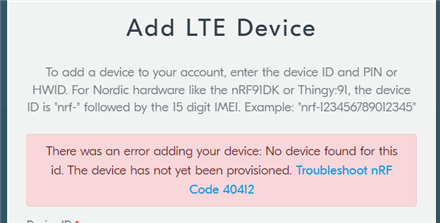
For asset tracker v2, it can detect the network and connect to it, and when it cannot connect to the nrf cloud, it disconnects. To be more specific, it disconnects from the connected network and starts searching for a new network.
I thought perhaps it was a connectivity issue, and I tried using AT client program which was able to detect to the network, and connect to the network, however when I tried to ping using the following AT command: AT#XPING="www.google.com",45,5000,5,1000 I got: Error: AT#XPING="www.google.com",45,5000,5,1000 failed: phone failure. However, the ping fails.
2022-11-21T10:30:29.786Z DEBUG modem << +CESQ: 99,99,255,255,34,91
2022-11-21T10:30:29.789Z DEBUG modem << OK
2022-11-21T10:31:01.507Z DEBUG modem >> AT+CESQ
2022-11-21T10:31:01.521Z DEBUG modem << +CESQ: 99,99,255,255,34,91
2022-11-21T10:31:01.524Z DEBUG modem << OK
2022-11-21T10:31:20.996Z DEBUG modem >> AT#XCONNECT="google.com",80
2022-11-21T10:31:21.012Z DEBUG modem << +CME ERROR: 0
2022-11-21T10:31:21.017Z ERROR Error: AT#XCONNECT="google.com",80
failed: phone failure
2022-11-21T10:31:29.771Z DEBUG modem >> AT+CESQ
2022-11-21T10:31:29.786Z DEBUG modem << +CESQ: 99,99,255,255,34,91
2022-11-21T10:31:29.792Z DEBUG modem << OK
2022-11-21T10:31:31.052Z DEBUG modem >> AT#XSOCKET=?
2022-11-21T10:31:31.066Z DEBUG modem << +CME ERROR: 0
2022-11-21T10:31:31.070Z ERROR Error: AT#XSOCKET=?
failed: phone failure
2022-11-21T10:31:37.467Z DEBUG modem >> AT#XSOCKET=?
2022-11-21T10:31:37.490Z DEBUG modem << +CME ERROR: 0
2022-11-21T10:31:37.494Z ERROR Error: AT#XSOCKET=?
failed: phone failure
2022-11-21T10:31:40.383Z DEBUG modem >> AT#XSOCKET?
2022-11-21T10:31:40.397Z DEBUG modem << +CME ERROR: 0
2022-11-21T10:31:40.400Z ERROR Error: AT#XSOCKET?
failed: phone failure
2022-11-21T10:32:01.505Z DEBUG modem >> AT+CESQ
2022-11-21T10:32:01.520Z DEBUG modem << +CESQ: 99,99,255,255,34,91
2022-11-21T10:32:01.523Z DEBUG modem << OK
2022-11-21T10:32:05.500Z DEBUG modem >> AT#XUDPSVR=1,3442
2022-11-21T10:32:05.516Z DEBUG modem << +CME ERROR: 0
2022-11-21T10:32:05.519Z ERROR Error: AT#XUDPSVR=1,3442
failed: phone failure
2022-11-21T10:32:31.516Z DEBUG modem >> AT+CESQ
2022-11-21T10:32:31.542Z DEBUG modem << +CESQ: 99,99,255,255,33,91
2022-11-21T10:32:31.546Z DEBUG modem << OK
2022-11-21T10:32:59.770Z DEBUG modem >> AT+CESQ
2022-11-21T10:32:59.788Z DEBUG modem << +CESQ: 99,99,255,255,34,91
2022-11-21T10:32:59.791Z DEBUG modem << OK
2022-11-21T10:33:07.868Z DEBUG modem >> AT#XCONNECT="google.com",80
2022-11-21T10:33:07.886Z DEBUG modem << +CME ERROR: 0
2022-11-21T10:33:07.892Z ERROR Error: AT#XCONNECT="google.com",80
failed: phone failure
2022-11-21T10:33:29.773Z DEBUG modem >> AT+CESQ
2022-11-21T10:33:29.787Z DEBUG modem << +CESQ: 99,99,255,255,34,91
2022-11-21T10:33:29.791Z DEBUG modem << OK
2022-11-21T10:33:29.814Z DEBUG modem >> AT#XMQTTCON=1,"xxx","xxx","xxx","xxx.xxx.com",1883
2022-11-21T10:33:29.832Z DEBUG modem << +CME ERROR: 0
2022-11-21T10:33:29.836Z ERROR Error: AT#XMQTTCON=1,"xxx","xxx","xxx","xxx.xxx.com",1883
failed: phone failure
2022-11-21T10:33:43.352Z DEBUG modem >> AT-CIPPING
2022-11-21T10:33:43.366Z DEBUG modem << +CME ERROR: 0
2022-11-21T10:33:43.369Z ERROR Error: AT-CIPPING
failed: phone failure
2022-11-21T10:33:45.064Z DEBUG modem >> AT-CIPPING?
2022-11-21T10:33:45.081Z DEBUG modem << +CME ERROR: 0
2022-11-21T10:33:45.085Z ERROR Error: AT-CIPPING?
failed: phone failure
2022-11-21T10:33:45.637Z DEBUG modem >> AT-CIPPING
2022-11-21T10:33:45.651Z DEBUG modem << +CME ERROR: 0
2022-11-21T10:33:45.654Z ERROR Error: AT-CIPPING
failed: phone failure
2022-11-21T10:33:54.319Z DEBUG modem >> AT+CGPADDR
2022-11-21T10:33:54.340Z DEBUG modem << +CGPADDR: 0,"172.16.0.2"
2022-11-21T10:33:54.347Z DEBUG modem << OK
2022-11-21T10:33:55.266Z DEBUG modem >> AT+CGPADDR
2022-11-21T10:33:55.281Z DEBUG modem << +CGPADDR: 0,"172.16.0.2"
2022-11-21T10:33:55.285Z DEBUG modem << OK
2022-11-21T10:33:55.581Z DEBUG modem >> AT+CGPADDR
2022-11-21T10:33:55.596Z DEBUG modem << +CGPADDR: 0,"172.16.0.2"
2022-11-21T10:33:55.601Z DEBUG modem << OK
2022-11-21T10:33:55.740Z DEBUG modem >> AT+CGPADDR
2022-11-21T10:33:55.754Z DEBUG modem << +CGPADDR: 0,"172.16.0.2"
2022-11-21T10:33:55.757Z DEBUG modem << OK
2022-11-21T10:33:55.871Z DEBUG modem >> AT+CGPADDR
2022-11-21T10:33:55.888Z DEBUG modem << +CGPADDR: 0,"172.16.0.2"
2022-11-21T10:33:55.891Z DEBUG modem << OK
2022-11-21T10:33:56.010Z DEBUG modem >> AT+CGPADDR
2022-11-21T10:33:56.034Z DEBUG modem << +CGPADDR: 0,"172.16.0.2"
2022-11-21T10:33:56.040Z DEBUG modem << OK
2022-11-21T10:33:56.122Z DEBUG modem >> AT+CGPADDR
2022-11-21T10:33:56.136Z DEBUG modem << +CGPADDR: 0,"172.16.0.2"
2022-11-21T10:33:56.141Z DEBUG modem << OK
2022-11-21T10:33:56.271Z DEBUG modem >> AT+CGPADDR
2022-11-21T10:33:56.286Z DEBUG modem << +CGPADDR: 0,"172.16.0.2"
2022-11-21T10:33:56.290Z DEBUG modem << OK
2022-11-21T10:34:01.510Z DEBUG modem >> AT+CESQ
2022-11-21T10:34:01.524Z DEBUG modem << +CESQ: 99,99,255,255,34,91
2022-11-21T10:34:01.527Z DEBUG modem << OK
2022-11-21T10:34:19.817Z DEBUG modem >> cloud connect
2022-11-21T10:34:19.831Z DEBUG modem << +CME ERROR: 0
2022-11-21T10:34:19.835Z ERROR Error: cloud connect
failed: phone failure
2022-11-21T10:34:31.512Z DEBUG modem >> AT+CESQ
2022-11-21T10:34:31.529Z DEBUG modem << +CESQ: 99,99,255,255,34,91
2022-11-21T10:34:31.537Z DEBUG modem <<
2022-11-21T10:34:31.542Z DEBUG modem << OK
2022-11-21T10:35:01.515Z DEBUG modem >> AT+CESQ
2022-11-21T10:35:01.530Z DEBUG modem << +CESQ: 99,99,255,255,34,92
2022-11-21T10:35:01.533Z DEBUG modem << OK
2022-11-21T10:35:31.514Z DEBUG modem >> AT+CESQ
2022-11-21T10:35:31.530Z DEBUG modem << +CESQ: 99,99,255,255,34,92
2022-11-21T10:35:31.536Z DEBUG modem <<
2022-11-21T10:35:31.538Z DEBUG modem << OK
2022-11-21T10:36:01.506Z DEBUG modem >> AT+CESQ
2022-11-21T10:36:01.521Z DEBUG modem << +CESQ: 99,99,255,255,33,91
2022-11-21T10:36:01.524Z DEBUG modem << OK
2022-11-21T10:36:29.770Z DEBUG modem >> AT+CESQ
2022-11-21T10:36:29.790Z DEBUG modem << +CESQ: 99,99,255,255,34,92
2022-11-21T10:36:29.795Z DEBUG modem << OK
2022-11-21T10:36:30.455Z DEBUG modem >> AT#XPING="www.google.com",45,5000,5,1000
2022-11-21T10:36:30.472Z DEBUG modem << +CME ERROR: 0
2022-11-21T10:36:30.476Z ERROR Error: AT#XPING="www.google.com",45,5000,5,1000
failed: phone failure
2022-11-21T10:36:36.811Z DEBUG modem >> AT+CFUN=1
2022-11-21T10:36:36.824Z DEBUG modem << OK
2022-11-21T10:36:41.094Z DEBUG modem >> AT#XPING="www.google.com",45,5000,5,1000
2022-11-21T10:36:41.111Z DEBUG modem << +CME ERROR: 0
2022-11-21T10:36:41.114Z ERROR Error: AT#XPING="www.google.com",45,5000,5,1000
failed: phone failure
2022-11-21T10:36:44.684Z DEBUG modem >> AT+XPING="www.google.com",45,5000,5,1000
2022-11-21T10:36:44.703Z DEBUG modem << +CME ERROR: 0
2022-11-21T10:36:44.705Z ERROR Error: AT+XPING="www.google.com",45,5000,5,1000
failed: phone failure
2022-11-21T10:36:49.321Z DEBUG modem >> AT#XPING="www.google.com",45,5000,5,1000
2022-11-21T10:36:49.338Z DEBUG modem << +CME ERROR: 0
2022-11-21T10:36:49.343Z ERROR Error: AT#XPING="www.google.com",45,5000,5,1000
failed: phone failure
2022-11-21T10:36:59.772Z DEBUG modem >> AT+CESQ
2022-11-21T10:36:59.786Z DEBUG modem << +CESQ: 99,99,255,255,34,92
2022-11-21T10:36:59.791Z DEBUG modem << OK
2022-11-21T10:37:31.508Z DEBUG modem >> AT+CESQ
2022-11-21T10:37:31.522Z DEBUG modem << +CESQ: 99,99,255,255,34,92