Unable to view Fixed String 24 value from Generic Sensor Server on nRF Mesh App for Android

Hi,

I'm trying to display data from a particulate matter (PM) sensor on my device using nRF Mesh App for Android. The app is on version 3.2.4.

Since there is no entry in the Mesh Device Properties document for PM sensors, I've decided to use the Luminaire Identification Number (0x009A) property ID which has a Fixed String 24 format. Here is my formatted string:

/// @brief Reads PMS5003I data and converts it to Fixed String 24 format
/// @param p_out 
/// @return Size of data for required_out_bytes
static uint16_t sensor_read_pm(uint8_t * p_out)
{
    pms5003i_data_t pm_data;
    bool success = pms5003i_read(&twi_instance_0, PMS5003I_ADDR, &pm_data);

    char pm_data_str[24];
    uint16_t len = sprintf(pm_data_str, "PM1:%03u,2.5:%03u,10:%03u", pm_data.pm1, pm_data.pm2_5, pm_data.pm10);
    memcpy(p_out, pm_data_str, len);
    return len + 1; 
}

Which would return len of 24 including the null byte. This function is called by app_sensor_get_cb which returns the string in p_out with the size of the string in the variable required_out_bytes. However, tapping the Get button on the nRF Mesh app does not get any response and it times out. I can see the TX of the message on RTT:

<t:    6618536>, x31.c,   94, App Sensor Get
<t:    6618710>, sht31.c,   46, 26.83, 64.63
<t:    6618713>, x31.c,  126, Temperature: 2683
<t:    6618717>, x31.c,   94, App Sensor Get
<t:    6618891>, sht31.c,   46, 26.85, 64.63
<t:    6618894>, x31.c,  137, RH: 6462
<t:    6618898>, x31.c,   94, App Sensor Get
<t:    6618953>, ds_co2_20.c,   16, Receiving data 0.
<t:    6618956>, ds_co2_20.c,   17, CO2: 424D DATA: 0698.
<t:    6618960>, x31.c,   94, App Sensor Get
<t:    6618968>, pms5003i.c,   29, Receiving data 33281.
<t:    6618972>, pms5003i.c,   30, PM: 0000 DATA: 00 00 00.
<t:    6618978>, x31.c,  145, PM Sensor Out Bytes: 24
<t:    6618989>, network.c,  304, Net TX: 741401E01100420020DF004403B27A3A314582136EF3A9B96467AC582B
<t:    6619003>, network.c,  304, Net TX: 741401E01200420020DF004423F92836793C73EF3E0B43E53CA1492C57
<t:    6619013>, network.c,  304, Net TX: 741401E01300420020DF00444393E8FF91BF49D55550AF90000D38E7FF
<t:    6619025>, network.c,  304, Net TX: 741401E01400420020DF004463CF3781BBE0C472C9E82470799C609701
<t:    6619034>, transport.c, 1376, TX:SAR packet: B27A3A314582136EF3A9B964F92836793C73EF3E0B43E53C93E8FF91BF49D55550AF9000CF3781BBE0C472C9
<t:    6619040>, transport.c, 1887, Upper TX Segmented: 0
<t:    6619045>, proxy.c,  683, TX complete
<t:    6619051>, proxy.c,  683, TX complete
<t:    6619829>, proxy.c,  683, TX complete
<t:    6620649>, net_packet.c,  228, Unencrypted data: : 0020DF004403B27A3A314582136EF3A9B964
<t:    6620654>, network.c,  356, Net RX (unenc): 741301E01100420020DF004403B27A3A314582136EF3A9B964E000E037
<t:    6620659>, proxy.c,  683, TX complete
<t:    6622441>, net_packet.c,  228, Unencrypted data: : 0020DF004423F92836793C73EF3E0B43E53C
<t:    6622446>, network.c,  356, Net RX (unenc): 741301E01200420020DF004423F92836793C73EF3E0B43E53CE000E039
<t:    6624072>, net_packet.c,  228, Unencrypted data: : 0020DF00444393E8FF91BF49D55550AF9000
<t:    6624077>, network.c,  356, Net RX (unenc): 741301E01300420020DF00444393E8FF91BF49D55550AF9000E000E03B
<t:    6625717>, net_packet.c,  228, Unencrypted data: : 0020DF004463CF3781BBE0C472C9
<t:    6625721>, network.c,  356, Net RX (unenc): 741301E01400420020DF004463CF3781BBE0C472C900000000

I have other sensors on my board as well. When I remove the PM Sensor property from my firmware, everything works fine and I can see the other sensors' values on the app. The only difference is that the PM Sensor property is one of Fixed String 24 value whereas the other properties are of integer types. I think I'm doing something wrong with either formatting my string or copying it to p_out. Can you tell me what's wrong?

Parents
  • Hello,

    Can you show me what it looks like in the app, with and without the PM sensor enabled. I am sorry, but Bluetooth Mesh is not my strongest subject, so I just want to understand what I need to look into. Also, I don't understand where this end up in the log:

    uint16_t len = sprintf(pm_data_str, "PM1:%03u,2.5:%03u,10:%03u", pm_data.pm1, pm_data.pm2_5, pm_data.pm10);

    Do you see it in the log that you pasted? Is it the Net TX: ... part?

    I have other sensors on my board as well. When I remove the PM Sensor property from my firmware, everything works fine and I can see the other sensors'

    So it means that the other sensors also stop working when you don't see the PM sensor data?

    What if you try to exclude the actual PM sensor, and just send dummy data instead. Do you then see the dummy data on your phone?

    BR,

    Edvin

  • Hello Edvin,

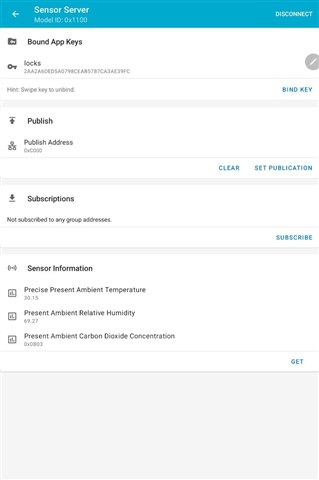
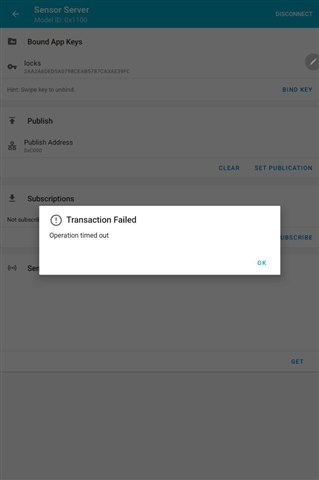
    Can you show me what it looks like in the app, with and without the PM sensor enabled.

    Here are the screenshots you requested, without PM:

    with PM:

    And here's the log with the string printed this time, see line 24:

    <t:    1191622>, proxy.c,  632, Connected
    <t:    1215694>, ble_softdevice_support.c,  104, Successfully updated connection parameters
    <t:    1304410>, mesh_gatt.c,  576, New MTU: 66
    <t:    1305147>, proxy.c,  670, TX ready
    <t:    1305158>, proxy.c,  683, TX complete
    <t:    1305887>, ble_softdevice_support.c,  104, Successfully updated connection parameters
    <t:    1431716>, proxy.c,  675, RX
    <t:    1431722>, proxy.c,  606, RX GATT PDU type 0x0, len 20
    <t:    1431730>, net_packet.c,  228, Unencrypted data: : 00425F12E239F74FED
    <t:    1431734>, network.c,  356, Net RX (unenc): 7405000120002000425F12E239F74FED0C3C0500
    <t:    1431742>, transport.c, 1045, Message decrypted
    <t:    1431753>, x31.c,   95, App Sensor Get
    <t:    1431926>, sht31.c,   46, 31.32, 66.62
    <t:    1431930>, x31.c,  127, Temperature: 3132
    <t:    1431933>, x31.c,   95, App Sensor Get
    <t:    1432107>, sht31.c,   46, 31.38, 66.60
    <t:    1432111>, x31.c,  138, RH: 6660
    <t:    1432114>, x31.c,   95, App Sensor Get
    <t:    1432169>, ds_co2_20.c,   16, Receiving data 0.
    <t:    1432173>, ds_co2_20.c,   17, CO2: 424D DATA: 0394.
    <t:    1432177>, x31.c,   95, App Sensor Get
    <t:    1432185>, pms5003i.c,   29, Receiving data 33281.
    <t:    1432189>, pms5003i.c,   30, PM: 0000 DATA: 00 00 00.
    <t:    1432195>, x31.c,   77, PM1:000,2.5:000,10:000,0
    <t:    1432198>, x31.c,  146, PM Sensor Out Bytes: 24
    <t:    1432211>, network.c,  304, Net TX: 741402A00000420020DF000003B0DBE1F3187328ACDE9857DE00000000
    <t:    1432224>, network.c,  304, Net TX: 741402A00100420020DF00002338BB265171298091646484892FE14EA8
    <t:    1432235>, network.c,  304, Net TX: 741402A00200420020DF00004388DDD423CB452520A44AAA9DE7A60882
    <t:    1432246>, network.c,  304, Net TX: 741402A00300420020DF0000631E61E4EC5A76CEC7D30F107B53F2EE27
    <t:    1432256>, transport.c, 1376, TX:SAR packet: B0DBE1F3187328ACDE9857DE38BB2651712980916464848988DDD423CB452520A44AAA9D1E61E4EC5A76CEC7
    <t:    1432261>, transport.c, 1887, Upper TX Segmented: 0
    <t:    1432266>, proxy.c,  683, TX complete
    <t:    1432272>, proxy.c,  683, TX complete
    <t:    1433030>, proxy.c,  683, TX complete
    <t:    1433684>, proxy.c,  683, TX complete
    <t:    1456051>, proxy.c,  675, RX
    <t:    1456054>, proxy.c,  606, RX GATT PDU type 0x0, len 24
    <t:    1456061>, net_packet.c,  228, Unencrypted data: : 00420000000000000F
    <t:    1456071>, network.c,  356, Net RX (unenc): 7485000121002000420000000000000F0C3C050041650300
    <t:    1456086>, proxy.c,  675, RX
    <t:    1456089>, proxy.c,  606, RX GATT PDU type 0x0, len 24
    <t:    1456096>, net_packet.c,  228, Unencrypted data: : 00420000000000000F
    <t:    1456100>, network.c,  356, Net RX (unenc): 7485000122002000420000000000000F0C3C050041650300
    <t:    1456109>, transport.c, 1657, Could not find active session for ACK packet

    Right now, the sensor isn't working so I'm already sending dummy data, just zeroes. I do not see this data.

    Regards,

    Arif

  • Hi, very interesting case.

    Are you connected to the Node with your phone, or the message goes through some relays?

    Do you have an iPhone to test it on nRF Mesh for iOS? You may export/import the network configurations to iOS.

    Did you try disabling other sensors and sending only PM? Perhaps the packet gets long and segmented and the issue is in SAR?

    From what I can see in the code, both Android and iOS apps should display the value. But I don't have an easy way to test it, so would like to rule out other possibilities first.

    Ref:

    iOS: https://github.com/NordicSemiconductor/IOS-nRF-Mesh-Library/blob/403433c0aff5f64314fda261e90f1052c9e7853a/nRFMeshProvision/Classes/Mesh%20Messages/DeviceProperty.swift#L1072

    Android: https://github.com/NordicSemiconductor/Android-nRF-Mesh-Library/blob/d7b7e61ef5944bb986a9d2fc99145f59ecfaed56/mesh/src/main/java/no/nordicsemi/android/mesh/sensorutils/DeviceProperty.java#L1045

  • Hi,

    Apologies for the late reply, I finally got my hands on an iOS device.

    Are you connected to the Node with your phone, or the message goes through some relays?

    Results are the same for both cases.

    Do you have an iPhone to test it on nRF Mesh for iOS? You may export/import the network configurations to iOS.

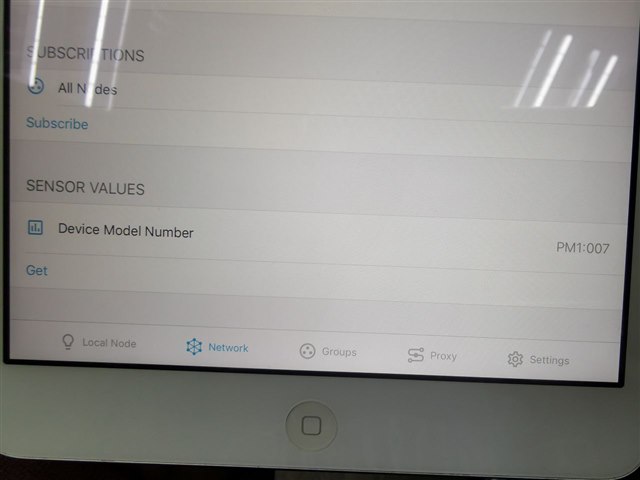
    Yes, this is the result:

    It seems that on iOS, the app does receive the message successfully but only displays the first seven characters for some reason. This is with only the PM sensor.

    Did you try disabling other sensors and sending only PM? Perhaps the packet gets long and segmented and the issue is in SAR?

    I've tested with only the PM. The result is as shown above for iOS and on Android, I get a timeout without any results, same as the original post.

    Seeing it work only partially on iOS is a good sign that the message passes through ok. The message has probably been mishandled on Android's side of things. Perhaps you can let the app team know?

    In the meantime, I'm working on a Sensor Client on a separate device to see if it is indeed sending the full 24 bytes string.

  • Thank you for the update.

    I'll have a look in the new year. Happy holidays!

Reply Children
No Data
Related