case about low power mode rtt not disconnect

Hi,

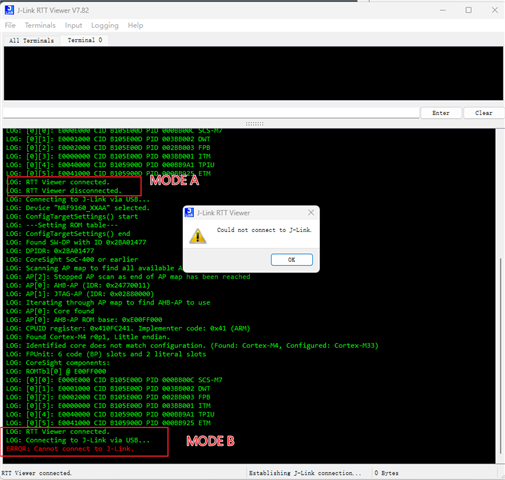
1.Mode B prevents RF9160 from entering low power consumption. How to disconnect RTT from nRF9160 module in mode B

2. In normal mode A, disconnect RTT from the  computer J-Link RTT Viewer V7.82:

3. Abnormal mode B, RTT is not disconnected from the  computer J-Link RTT Viewer V7.82:   RTT disconnects by disconnecting SWDIO and SWCLK
Thank you for all your assistance.
Kind regards,
Peter.Min

Parents Reply Children
  • Hi Charlie,

    1.The code of mode A or mode B is the same

    2. The RTT viewer disconnects in different ways:

    Mode A uses the shortcut key F3 to disconnect,

    Mode B brutally unplug the hardware directly

    3.I know that overlay files can close the rtt log

    I would like to know if there is an api to turn off the rtt log

    4.The above phenomenon occurred when the nRF9160 low power program was tested on the ncs platform, and the same phenomenon can be repeated on the 52 platform low power program.

    Thank you for all your assistance.
    Kind regards,
    Peter.Min

Related