case about low power mode rtt not disconnect

Hi,

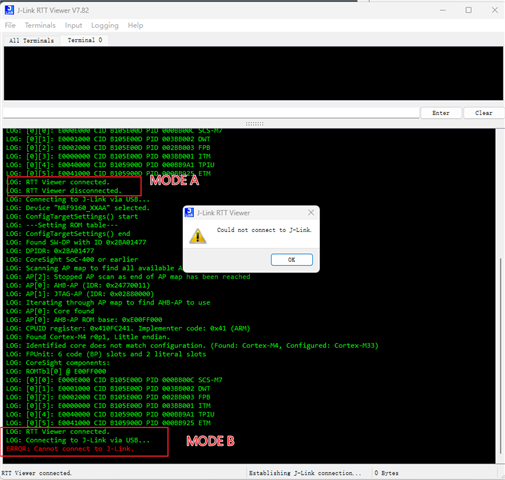
1.Mode B prevents RF9160 from entering low power consumption. How to disconnect RTT from nRF9160 module in mode B

2. In normal mode A, disconnect RTT from the  computer J-Link RTT Viewer V7.82:

3. Abnormal mode B, RTT is not disconnected from the  computer J-Link RTT Viewer V7.82:   RTT disconnects by disconnecting SWDIO and SWCLK
Thank you for all your assistance.
Kind regards,
Peter.Min

Parents
  • Hi Peter,

    1) How do you identify mode B is not "disconnected"? In my opinion, the fact is that it is already physically "disconnected".

    2) Could you explain how you prepare "nRF9160 low power program"? When you enable log and its backend(like RTT), you cannot really achieve low power for your device. It will reserve some resources for logging, and you cannot turn off them at run time, so the low-power firmware is built with overlay-low-power.conf at compiling time.

    Best regards,

    Charlie

Reply
  • Hi Peter,

    1) How do you identify mode B is not "disconnected"? In my opinion, the fact is that it is already physically "disconnected".

    2) Could you explain how you prepare "nRF9160 low power program"? When you enable log and its backend(like RTT), you cannot really achieve low power for your device. It will reserve some resources for logging, and you cannot turn off them at run time, so the low-power firmware is built with overlay-low-power.conf at compiling time.

    Best regards,

    Charlie

Children
No Data
Related