Beware that this post is related to an SDK in maintenance mode
More Info: Consider nRF Connect SDK for new designs

secure bootloader compilation error

Hi All,

I am using nRF5_SDK_17.1.0

while building SDK example project uder the below path with SES

..\nRF5_SDK_17.1.0_ddde560\examples\dfu\secure_bootloader\pca10100_s140_ble\ses the following errors I am getting

Building ‘secure_bootloader_ble_s140_pca10100’ from solution ‘secure_bootloader_ble_s140_pca10100’ in configuration ‘Release’
Compiling ‘nrf_fstorage_nvmc.c’
Compiling ‘micro_ecc_backend_ecc.c’
nrf_crypto_ecc_backend.h
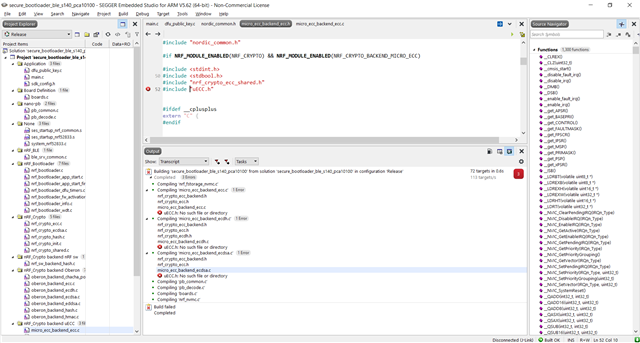
nrf_crypto_ecc.h
micro_ecc_backend_ecc.c
uECC.h: No such file or directory
Compiling ‘micro_ecc_backend_ecdh.c’
nrf_crypto_ecc_backend.h
nrf_crypto_ecc.h
nrf_crypto_ecdh.h
micro_ecc_backend_ecdh.c
uECC.h: No such file or directory
Compiling ‘micro_ecc_backend_ecdsa.c’
nrf_crypto_ecc_backend.h
nrf_crypto_ecc.h
micro_ecc_backend_ecdsa.c
uECC.h: No such file or directory
Compiling ‘pb_common.c’
Compiling ‘pb_decode.c’
Compiling ‘boards.c’
Compiling ‘nrf_nvmc.c’
Build failed

Actually searched for uECC.h file in SDK but it is not included in the SDK,

Is there any way to overcome this.

Regards,

Sudheer

  • Hi,

    As mentioned in the example documentation, you need to Install micro-ecc before you can build the example.

    Best regards,
    Jørgen

  • Hi,

    After following the above link, I run build_all.bat on powershell but got below errors

    PS D:\DMD\NTL-Startopalogy\Central&Peripheral\Porting-DMD\nRF5_SDK_17.1.0_ddde560\external\micro-ecc> .\build_all.bat
    'make' is not recognized as an internal or external command,
    operable program or batch file.
    'make' is not recognized as an internal or external command,
    operable program or batch file.
    'make' is not recognized as an internal or external command,
    operable program or batch file.
    'make' is not recognized as an internal or external command,
    operable program or batch file.
    'make' is not recognized as an internal or external command,
    operable program or batch file.
    'make' is not recognized as an internal or external command,
    operable program or batch file.
    'make' is not recognized as an internal or external command,
    operable program or batch file.
    'make' is not recognized as an internal or external command,
    operable program or batch file.
    'make' is not recognized as an internal or external command,
    operable program or batch file.

    what could be the reason for it

    Regards,

    sudheer

  • It looks like make is not installed or is not found in the path. As the documentation states, you need to install make: "Make sure that make is installed (see, for example, MinGW, GNU Make, or Xcode)". The easiest way to install make today is probably through chocolatey. Note that you will have to install chocolatey before running the command to install make.

    You will also need to have git installed for the script to clone the micro-ecc repository from Github.

  • Hi,

    Now able to build successfully,

    when I Run the following command to generate a DFU Settings Page based on our application hex file 

    C:\Users\sudheerkumar.a\Desktop\Dfu_image>nrfutil settings generate --family NRF52833 --application ble_app_uart_pca10100_s140.hex --application-version 1 --bootloader-version 1 --bl-settings-version 2 bl_settings.hex

    The below error is occurring

     
    Usage: nrfutil settings generate [OPTIONS] HEX_FILE
    Try 'nrfutil settings generate --help' for help.

    Error: Invalid value for '--family': 'NRF52833' is not one of 'NRF51', 'NRF52', 'NRF52QFAB', 'NRF52810', 'NRF52840'.

    Please let me know if anything I need to add for successfully  DFU settings

    Regards,

    Sudheer

  • The problem is stated in the error message: "Invalid value for '--family': 'NRF52833' is not one of 'NRF51', 'NRF52', 'NRF52QFAB', 'NRF52810', 'NRF52840'."

    Try setting --family parameter to "NRF52", as NRF52833 is not a valid option.

Related