Beware that this post is related to an SDK in maintenance mode
More Info: Consider nRF Connect SDK for new designs

GATT Error issue(Error 133) when DFU Firmware updating through nRFConnect application

Hi,

followed below link to do the firmware updating using DFU service with "nRF Connec"t application on Android mobile.

https://novelbits.io/nrf52-ota-dfu-ble-part-4/

While updating the Zip file I am getting Error 133 (0x85):GATT Error, please check the below log and video for more information 

nRF Connect, 2022-12-01
NordicUART (D2:EB:38:F0:47:E8)
V 12:01:54.568 Connecting to D2:EB:38:F0:47:E8...
D 12:01:54.568 gatt = device.connectGatt(autoConnect = false, TRANSPORT_LE, preferred PHY = LE 1M)
D 12:01:54.683 [Callback] Connection state changed with status: 0 and new state: CONNECTED (2)
I 12:01:54.683 Connected to D2:EB:38:F0:47:E8
V 12:01:54.685 Discovering services...
D 12:01:54.685 gatt.discoverServices()
D 12:01:54.695 [Broadcast] Action received: android.bluetooth.device.action.ACL_CONNECTED
I 12:01:55.318 Connection parameters updated (interval: 7.5ms, latency: 0, timeout: 5000ms)
D 12:01:55.671 [Callback] Services discovered with status: 0
I 12:01:55.671 Services discovered
V 12:01:55.675 Generic Access (0x1800)
- Device Name [R W] (0x2A00)
- Appearance [R] (0x2A01)
- Peripheral Preferred Connection Parameters [R] (0x2A04)
- Central Address Resolution [R] (0x2AA6)
Generic Attribute (0x1801)
- Service Changed [I] (0x2A05)
   Client Characteristic Configuration (0x2902)
Unknown Service (6e40bbaa-b5a3-f393-e0a9-e50e24dcca9e)
- Unknown Characteristic [W WNR] (6e400004-b5a3-f393-e0a9-e50e24dcca9e)
- Unknown Characteristic [N] (6e400005-b5a3-f393-e0a9-e50e24dcca9e)
   Client Characteristic Configuration (0x2902)
Secure DFU Service (0xFE59)
- Buttonless DFU [I W] (8ec90003-f315-4f60-9fb8-838830daea50)
   Client Characteristic Configuration (0x2902)
D 12:01:55.675 gatt.setCharacteristicNotification(00002a05-0000-1000-8000-00805f9b34fb, true)
D 12:01:55.678 gatt.setCharacteristicNotification(6e400005-b5a3-f393-e0a9-e50e24dcca9e, true)
I 12:01:55.759 Connection parameters updated (interval: 45.0ms, latency: 0, timeout: 5000ms)
V 12:01:58.332 Enabling indications for 8ec90003-f315-4f60-9fb8-838830daea50
D 12:01:58.332 gatt.setCharacteristicNotification(8ec90003-f315-4f60-9fb8-838830daea50, true)
D 12:01:58.334 gatt.writeDescriptor(00002902-0000-1000-8000-00805f9b34fb, value=0x0200)
I 12:01:58.414 Data written to descr. 00002902-0000-1000-8000-00805f9b34fb, value: (0x) 02-00
A 12:01:58.414 "Indications enabled" sent
V 12:01:58.416 Indications enabled for 8ec90003-f315-4f60-9fb8-838830daea50
V 12:02:04.264 [DFU] DFU service started
V 12:02:04.264 [DFU] Opening file...
I 12:02:04.292 [DFU] Firmware file opened successfully
V 12:02:04.292 [DFU] Connecting to DFU target...
D 12:02:04.292 [DFU] gatt = device.connectGatt(autoConnect = false, TRANSPORT_LE, preferredPhy = LE_1M | LE_2M)
I 12:02:04.301 [DFU] Connected to D2:EB:38:F0:47:E8
V 12:02:04.301 [DFU] Discovering services...
D 12:02:04.301 [DFU] gatt.discoverServices()
I 12:02:04.301 [DFU] Services discovered
D 12:02:04.314 [DFU] wait(1000)
W 12:02:05.306 [DFU] Application with buttonless update found
V 12:02:05.306 [DFU] Jumping to the DFU Bootloader...
V 12:02:05.306 [DFU] Enabling indications for 8ec90003-f315-4f60-9fb8-838830daea50
D 12:02:05.306 [DFU] gatt.setCharacteristicNotification(8ec90003-f315-4f60-9fb8-838830daea50, true)
D 12:02:05.308 [DFU] gatt.writeDescriptor(00002902-0000-1000-8000-00805f9b34fb, value=0x02-00)
I 12:02:05.479 [DFU] Data written to descr.8ec90003-f315-4f60-9fb8-838830daea50, value (0x): 02-00
V 12:02:05.479 [DFU] Notifications enabled for 8ec90003-f315-4f60-9fb8-838830daea50
A 12:02:05.479 [DFU] Indications enabled
D 12:02:05.480 [DFU] wait(1000)
V 12:02:06.495 [DFU] Writing to characteristic 8ec90003-f315-4f60-9fb8-838830daea50
D 12:02:06.496 [DFU] gatt.writeCharacteristic(8ec90003-f315-4f60-9fb8-838830daea50)
I 12:02:06.560 Indication received from 8ec90003-f315-4f60-9fb8-838830daea50, value: (0x) 20-01-01
A 12:02:06.560 "Response for: Enter bootloader
Status: Success" received
A 12:02:06.560 [DFU] Enter bootloader sent (Op Code = 1)
I 12:02:06.560 [DFU] Notification received from 8ec90003-f315-4f60-9fb8-838830daea50, value (0x): 20-01-01
A 12:02:06.560 [DFU] Response received (Op Code = 1, Status = 1)
D 12:02:06.560 [DFU] gatt.refresh() (hidden)
D 12:02:06.565 [DFU] gatt.disconnect()
D 12:02:06.565 [DFU] gatt.close()
V 12:02:06.568 [DFU] Scanning for the DFU Bootloader... (timeout 5000 ms)
I 12:02:06.635 [DFU] DFU Bootloader found with address D2:EB:38:F0:47:E8
V 12:02:06.644 [DFU] DFU service started
I 12:02:06.644 [DFU] Firmware file opened successfully
D 12:02:06.644 [DFU] wait(1000)
I 12:02:07.017 Connection parameters updated (interval: 7.5ms, latency: 0, timeout: 5000ms)
D 12:02:07.647 [DFU] wait(1000)
V 12:02:08.647 [DFU] Connecting to DFU target...
D 12:02:08.647 [DFU] gatt = device.connectGatt(autoConnect = false, TRANSPORT_LE, preferredPhy = LE_1M | LE_2M)
I 12:02:08.664 [DFU] Connected to D2:EB:38:F0:47:E8
V 12:02:08.664 [DFU] Discovering services...
D 12:02:08.664 [DFU] gatt.discoverServices()
D 12:02:12.030 [Callback] Connection state changed with status: 0 and new state: DISCONNECTED (0)
I 12:02:12.030 Disconnected
E 12:02:12.060 [DFU] Disconnected
D 12:02:12.060 [DFU] gatt.refresh() (hidden)
D 12:02:12.060 [DFU] gatt.disconnect()
D 12:02:12.060 [DFU] gatt.close()
D 12:02:12.060 [Broadcast] Action received: android.bluetooth.device.action.ACL_DISCONNECTED
D 12:02:12.066 [DFU] [Broadcast] Action received: android.bluetooth.device.action.ACL_DISCONNECTED
D 12:02:12.066 [DFU] wait(600)
D 12:02:12.666 gatt.close()
D 12:02:12.668 wait(200)
V 12:02:12.868 Connecting to D2:EB:38:F0:47:E8...
D 12:02:12.868 gatt = device.connectGatt(autoConnect = false, TRANSPORT_LE, preferred PHY = LE 1M)
D 12:02:42.884 [Callback] Connection state changed with status: 133 and new state: DISCONNECTED (0)
E 12:02:42.885 Error 133 (0x85): GATT ERROR
I 12:02:42.885 Disconnected

We are using

nrf5 SDK v17.1.0  

S140 softdevice

nRF conncet on Google pixel6 phone with Android 12  

What could  be the cause for it and how to over come 

Regards,

Sudheer

Parents
  • Hello,

    What application is running on your nRF? Does the log from the nRF say anything particular at the disconnect? They are supposed to disconnect, but the nRF should reboot into DFU mode. Does it do that? If you are using an nRF52833 DK, does two of the leds turn on and remain on (indicating that it is in DFU mode)? 

    Did you modify the bootloader in any way? Did you program the bootloader at all?

    If you could share some more details on what's going on on the nRF side, that would be great. The phone application just says that "something is not working".

    Best regards,

    Edvin

  • Hi,

    What application is running on your nRF?

    Customized application (modified ble_app_uart example) 

    If you are using an nRF52833 DK, does two of the leds turn on and remain on (indicating that it is in DFU mode)? 

    No. Custom board with nRF52833, but When I tried  with nRF52833 DK the DFU process is successful.

    Is any changes required for the Custom board to do DFU process?

    Did you modify the bootloader in any way?

    modified only public_key.c 

    Did you program the bootloader at all?

    Yes, Merged all boot loader, soft device and application hex files as single Hex and programed through J-Flash lite application

    Regards,

    Sudheer

  • Hello Sudheer,

    I would suppose it should hit the start of main.c. 

    Can you try to set the LFCLK settings in sdk_config.h: for your bootloader (and application):

    NRF_SDH_CLOCK_LF_SRC 0
    NRF_SDH_CLOCK_LF_RC_CTIV 16
    NRF_SDH_CLOCK_LF_RC_TEMP_CTIV 2
    NRF_SDH_CLOCK_LF_ACCURACY 1

    Can you please upload your bootloader project (zip the project folder), so that I can check if I have more questions. But is optimization disabled in your bootloader project?

    BR,

    Edvin

  • Hi Edvin,

    Yah!, the above clock source changes worked for me. Now DFU process is working successfully with my custom board.

    We sincerely appreciate your efficient, and gracious customer service!!!

    Here I attached the RTT view log of the Successful DFU process, Please let us know is there anything to do better.

    0> <info> app: Setting vector table to bootloader: 0x00078000
     0> <info> app: Setting vector table to main app: 0x00027000
     0> <info> app_timer: RTC: initialized.
     0> <info> app: 1Sec Over!
     0> <info> app: 1Sec Over!
     0> <info> app: 1Sec Over!
     0> <info> app: 1Sec Over!
     0> <info> app: 1Sec Over!
     0> <info> app: 1Sec Over!
     0> <info> app: 1Sec Over!
     0> <info> app: 1Sec Over!
     0> <info> app: 1Sec Over!
     0> <info> app: 1Sec Over!
     0> <info> app: 1Sec Over!
     0> <info> app: 1Sec Over!
     0> <info> app: 1Sec Over!
     0> <info> app: 1Sec Over!
     0> <info> app: 1Sec Over!
     0> <info> app: 1Sec Over!
     0> <info> app: 1Sec Over!
     0> <info> app: 1Sec Over!
     0> <info> app: 1Sec Over!
     0> <info> app: 1Sec Over!
     0> <info> app: Connecting to target F4305B651C7B
     0> <info> app: Connected
     0> <info> app: Connection with link 0x4 established.
     0> <info> app: Data len is set to 0xF4(244)
     0> <info> app: 1Sec Over!
     0> <info> app: 1Sec Over!
     0> <info> app: 1Sec Over!
     0> <info> app: 1Sec Over!
     0> <info> app: 1Sec Over!
     0> <info> app: 1Sec Over!
     0> <info> app: 1Sec Over!
     0> <info> app: 1Sec Over!
     0> <info> app: 1Sec Over!
     0> <info> app: 1Sec Over!
     0> <info> app: 1Sec Over!
     0> <info> app: 1Sec Over!
     0> <info> app: 1Sec Over!
     0> <info> app: Device is preparing to enter bootloader mode
     0> 
     0> <info> app: Device will enter bootloader mode
     0> 
     0> <info> app: Power management wants to reset to DFU mode.
     0> <info> app: Power management allowed to reset to DFU mode.
     0> <info> app: Setting vector table to bootloader: 0x00078000
     0> <info> app: Setting vector table to main app: 0x00027000
     0> <info> app_timer: RTC: initialized.
     0> <info> app: Connecting to target F4305B651C7B
     0> <info> app: Connected
     0> <info> app: Connection with link 0x4 established.
     0> <info> app: Data len is set to 0xF4(244)
     0> <info> app: 1Sec Over!
     0> <info> app: 1Sec Over!
     0> <info> app: 1Sec Over!
     0> <info> app: 1Sec Over!
     0> <info> app: 1Sec Over!
     0> <info> app: 1Sec Over!
     0> <info> app: 1Sec Over!
     0> <info> app: 1Sec Over!
    

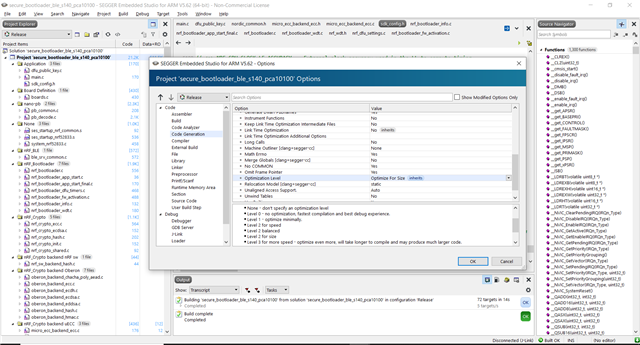
    But is optimization disabled in your bootloader project?

    No, It's "optimize for Size"


    If we keep optimization as "None", can we see more log?

    Regards,

    Sudheer

  • A sudheer Kumar said:
    If we keep optimization as "None", can we see more log?

    No, but when optimization is enabled, it may swap around some of the order of operations that are not affecting the outcome of the application. The application is more optimized, but it may be confusing while debugging. The reason you didn't see the logs was probably that the softdevice wasn't able to boot up, because it was waiting for the LFCLK to start, but since the XTAL was not present, it never started.

    BR,
    Edvin

  • Hi Edvin,

    The reason you didn't see the logs was probably that the softdevice wasn't able to boot up, because it was waiting for the LFCLK to start, but since the XTAL was not present, it never started.

    If softdevice is waiting for the LFCLK, then how it started when we flashed merged(merged boot loader, softdevice and application) hex file with custom board(because it was waiting for the LFCLK to start, but since the XTAL was not present, it never started.)

    Regards,

    Sudheer

  • If you program the application and the settings, the bootloader will see that the application is valid, and it doesn't try to start up the softdevice. It skips that part and goes straight to the application. 

    I still believe that the reason you weren't able to set a breakpoint because of optimization and that things happen in a bit different order when this is enabled.

    I will leave for holidays now. I will be back some time in January. Please expect delayed replies. I am sorry for the inconvenience.

    BR,

    Edvin

Reply
  • If you program the application and the settings, the bootloader will see that the application is valid, and it doesn't try to start up the softdevice. It skips that part and goes straight to the application. 

    I still believe that the reason you weren't able to set a breakpoint because of optimization and that things happen in a bit different order when this is enabled.

    I will leave for holidays now. I will be back some time in January. Please expect delayed replies. I am sorry for the inconvenience.

    BR,

    Edvin

Children
Related