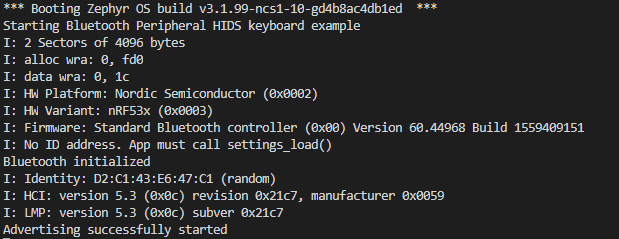
We are using SDK v1.9.1 with VS Code to develop software for a custom BLE board using the nrf5340 SoC. We also have/use a nrf5340-DK development board.
We generally update our custom boards using OTA updates (MCUMANAGER with UI in our own custom iOS App using BLE). We now have a number of custom 5340-based boards with identical hardware and "application core" software (updated with OTA) which are "suddenly" using different power consumption. The power consumption can differ by as much as 1.5mA between different boards (supposedly all using the same hardware and software in a controlled lab setting).
As we are sure that the hardware and our "application software" is identical, we are suspecting that there could be some differences between the BLE SoftDevice versions which have been installed in the boards over time. In addition we are not "trapping" any SoftDevice errors or warnings, so maybe there are some things happening "under the hood" that we are not aware of.
So I would like to add the following to our 5340 application code (main.c):
1. Read the BLE SoftDevice Version number.
I have looked on the DevZone but all the answers seems to be old & out of date. For example, here: https://devzone.nordicsemi.com/f/nordic-q-a/2366/how-to-get-ic-version-number-and-softdevice-version-number they refer to "the API sd_ble_version_get", but I can't seem to find or access that API function. Can you give me an example on how to find & use that with SDK v1.9.1?
2. Trap any SoftDevice Warning/Errors in our application code (main.c). Can you give me an example on how to do this with v1.9.1 SDK? There is probably a callback API function where we can receive such warnings/errors but I can't figure it out!
3. Any other comment/ideas as to why we could be getting these different power consumption numbers on what appears to be IDENTICAL hardware and application software? The power consumption on most boards falls into two categories. Most of them exhibit the higher (+ 1.5mA) power consumption but we recently discovered that about 10% of the boards exhibit this much lower power consumption (in a controlled lab test setting). Any ideas on how we can track down the reasons for these differences as we would obviously like ALL boards to have the lower power consumption (as our application is battery based).
FYI - we have read & implemented all "your" recommendations from this article:
https://devzone.nordicsemi.com/nordic/nordic-blog/b/blog/posts/optimizing-power-on-nrf53-designs
All uarts, USB, logging (etc) has been disabled and all of the above recommendations have been implemented.
See our website for more details on our application: https://wear-sense.com
Thanks!
Gerard