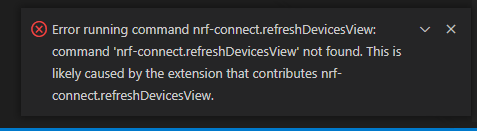
Error in VS connecting to nRF52 DK

I just upacked my new nRF52 DK and installed what I think are all the goodies to do development (on my Windows 11 laptop). I can see the board with the Programmer and I loaded on the S112 soft device without any trouble. My next step was to get the blinky app to compile, download, and run. 

But when I start up Visual Studio, I get the attached error when trying to connect to the board. Can you tell me what might be wrong?

Thanks,

Bret
Parents
  • Hi Bret,

    Can you try to reload the window and see if the error still occurs? Open command palette (ctrl+shift+p) and write reload, then select Developer: Reload Window.

    If this does not work, please generate support information from VS Code by opening command palette and write nRF Connect: Generate support information.

    Please note that the nRF Connect for VS Code extension is not compatible with nRF5 SDK, only with nRF Connect SDK.

    Best regards,

    Marte

Reply
  • Hi Bret,

    Can you try to reload the window and see if the error still occurs? Open command palette (ctrl+shift+p) and write reload, then select Developer: Reload Window.

    If this does not work, please generate support information from VS Code by opening command palette and write nRF Connect: Generate support information.

    Please note that the nRF Connect for VS Code extension is not compatible with nRF5 SDK, only with nRF Connect SDK.

    Best regards,

    Marte

Children
    1. I can't figure out how to use the reply function in this forum to attach files. Where is the little paper-clip icon so I can attach screen shots and debug logs?
    2. I don't understand your note about compatibility. I want to build blinky and download it onto my PCA10040 dev board. Which tool do I use for that?
    3. The README file in the blinky example doesn't refer to the VS Code dev tools at all. Is there a new version of blinky somewhere?
  • It looks like there are now (at least) 3 different dev environments: IAR, Keil, and VS Code. I haven't developed for the nRF for a few years. In the old days, there was a limited version of Keil that was free until you got past a certain code size. And that was the recommended starter environment. There was also a GCC dev environment for ARM if you didn't want to pay the big Keil price. 

    The download page seems to default to the IAR-based SDK: https://www.nordicsemi.com/Products/Development-software/nRF5-SDK/Download#infotabs

    Is IAR now the recommended starter environment?

    The nRF Connect for Desktop installs VS Code. Is that now the recommended starter SDK?

    The document package for the dev board still refers to the limited Keil SDK. Is that still recommended as a starter? I went to the Keil website and couldn't find their limited dev tools any more. The only option is the full price tool.

  • Hi,

    Bret Foreman said:
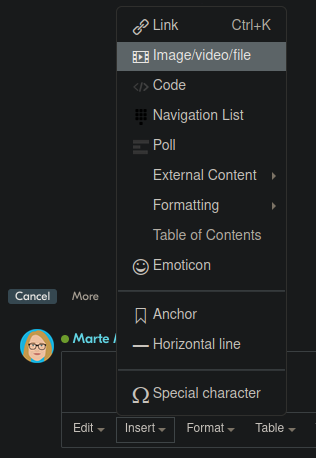
    I can't figure out how to use the reply function in this forum to attach files. Where is the little paper-clip icon so I can attach screen shots and debug logs?

    Use Insert > Image/Video/File:

    Bret Foreman said:
    Is IAR now the recommended starter environment?

    No, for nRF5 SDK the recommended is SEGGER Embedded Studio. See Getting started with nRF5 SDK and SES (nRF51 & nRF52 Series).

    Bret Foreman said:
    The nRF Connect for Desktop installs VS Code. Is that now the recommended starter SDK?

    VS Code is the recommended IDE for nRF Connect SDK. This is a different SDK from the nRF5 SDK. If you are starting new development you should use nRF Connect SDK. However, if you have already started development with nRF5 SDK and migrating will be too time consuming you can continue with this SDK. See nRF Connect SDK and nRF5 SDK statement for more information on the two SDKs.

    Bret Foreman said:
    The README file in the blinky example doesn't refer to the VS Code dev tools at all. Is there a new version of blinky somewhere?

    There is a blinky example in the nRF Connect SDK, see Blinky. This is not a new version of the blinky example in nRF5 SDK, since they are two completely different SDKs. Only nRF Connect SDK is supported in our extension for VS Code (nRF Connect for VS Code extension).

    Best regards,

    Marte

    Best regards,

    Marte

Related