the function sd_power_system_off not go the device to off mode

Hi,

I am using nrf52832 and the device can wake up with 4 GPIO i send the device to off with wake up reason all the GPIO's (its means all the GPIO;s can awake the device)and after the device go to off mode i tried to awke the device with one of the GPIO's and the device not awake this is possible that the device not go to off?

i shared my code
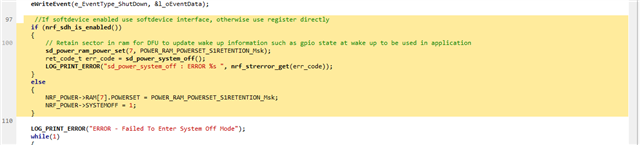
this is possible that one of the function send error and not send the device to sleep?

Parents
  • Hi,

    this is possible that one of the function send error and not send the device to sleep

    As long as you call sd_power_system_off() while not debugging, the device should always enter system off mode. If could be that it is woken up immediately after by one of the configured wake-up sources, though?

    after the device go to off mode i tried to awke the device with one of the GPIO's and the device not awake this is possible that the device not go to off?

    It is not entirely clear for me if the issue is that the device wakes up right away, or if the issue is that the device does not wake up from system off? If it is that it does not wake up form system off, then I would suspect that you have not enabled sense on the GPIO pin, which is needed. That can for instance be done using nrf_gpio_cfg_sense_input().

    If this does not help, then perhaps you can elaborate on the issue?

  • this is possible that the function sd_power_system_off() return error code that  the device not success to enter to off mode?

    my hypothesis that the the function return not success  and the SW ignore this messege

  • Yes, it is possible while debugging. That is why you can see that if using the power management module in the SDK (nrf_pwr_mgmt.c), system off is entered like this when using a SoftDevice:

    #ifdef SOFTDEVICE_PRESENT
            if (nrf_sdh_is_enabled())
            {
                ret_code_t ret_code = sd_power_system_off();
                ASSERT((ret_code == NRF_SUCCESS) || (ret_code == NRF_ERROR_SOFTDEVICE_NOT_ENABLED));
                UNUSED_VARIABLE(ret_code);
    #ifdef DEBUG
                while (true)
                {
                    /* Since the CPU is kept on in an emulated System OFF mode, it is recommended
                     * to add an infinite loop directly after entering System OFF, to prevent
                     * the CPU from executing code that normally should not be executed. */
                    __WFE();
    
                }
    #endif
            }
    #endif // SOFTDEVICE_PRESENT

    Note that for debug builds, an eternal loop is added here to mimic system off mode. This will only happen when debugging, though. In other cases, the call to sd_power_system_off() will not return.

Reply
  • Yes, it is possible while debugging. That is why you can see that if using the power management module in the SDK (nrf_pwr_mgmt.c), system off is entered like this when using a SoftDevice:

    #ifdef SOFTDEVICE_PRESENT
            if (nrf_sdh_is_enabled())
            {
                ret_code_t ret_code = sd_power_system_off();
                ASSERT((ret_code == NRF_SUCCESS) || (ret_code == NRF_ERROR_SOFTDEVICE_NOT_ENABLED));
                UNUSED_VARIABLE(ret_code);
    #ifdef DEBUG
                while (true)
                {
                    /* Since the CPU is kept on in an emulated System OFF mode, it is recommended
                     * to add an infinite loop directly after entering System OFF, to prevent
                     * the CPU from executing code that normally should not be executed. */
                    __WFE();
    
                }
    #endif
            }
    #endif // SOFTDEVICE_PRESENT

    Note that for debug builds, an eternal loop is added here to mimic system off mode. This will only happen when debugging, though. In other cases, the call to sd_power_system_off() will not return.

Children
No Data
Related