Issue initializing UART after enabling mcumgr serial transport

Hello,

We have recently decided to transition from nRF5 SDK to nRF Connect SDK to develop a simple application that is able to respond with its FW version when requested via UART, and to receive upgrades via serial communication. We use a device based on nRF52840 and we based the application on NUS Central UART example as a starting point. We added the functionality to handle custom requests for the FW version over UART.

After we successfully tested this functionality, we decided to use this guide posted by Simon to add serial DFU functionality to the application. In the guide Simon suggests to add this configuration CONFIG_MCUMGR_SMP_UART to prj.conf and enable it by setting its value to 'y' in order to enable the serial mcumgr transport. It seems like enabling this prevents the UART module from being initialized anymore at start up, and the call to uart_callback_set(uart, uart_cb, NULL) returns an error. We tracked the issue further and noticed that inside that routine the callback check done on line 1240 returns NULL. This only occurs when we enable CONFIG_MCUMGR_SMP_UART. Below is the code snippet where the error was discovered.

if (api->callback_set == NULL) {

        return -ENOSYS;
    }
I am including the rest of the settings from prj.conf.
#
# Copyright (c) 2018 Nordic Semiconductor
#
# SPDX-License-Identifier: LicenseRef-Nordic-5-Clause
#

# Enable mcumgr
CONFIG_MCUMGR=y

# Enable most core commands.
CONFIG_MCUMGR_CMD_IMG_MGMT=y
CONFIG_MCUMGR_CMD_OS_MGMT=y

# Enable the UART driver
CONFIG_UART_ASYNC_API=y
CONFIG_NRFX_UARTE0=y

# Enable the BLE stack with GATT Client configuration
CONFIG_BT=y
CONFIG_BT_CENTRAL=y
CONFIG_BT_SMP=y
CONFIG_BT_GATT_CLIENT=y

# Enable the BLE modules from NCS
CONFIG_BT_NUS_CLIENT=y
CONFIG_BT_SCAN=y
CONFIG_BT_SCAN_FILTER_ENABLE=y
CONFIG_BT_SCAN_UUID_CNT=1
CONFIG_BT_GATT_DM=y
CONFIG_HEAP_MEM_POOL_SIZE=2048

# This example requires more workqueue stack
# CONFIG_SYSTEM_WORKQUEUE_STACK_SIZE=2048

# Enable bonding
CONFIG_BT_SETTINGS=y
CONFIG_FLASH=y
CONFIG_FLASH_PAGE_LAYOUT=y
CONFIG_FLASH_MAP=y
CONFIG_NVS=y
CONFIG_SETTINGS=y

# Config logger
CONFIG_LOG=y
CONFIG_LOG_BACKEND_RTT=y
CONFIG_ASSERT=y

# #Enable immutable bootloader
# CONFIG_SECURE_BOOT=y
# #Enable upgradable bootloader
# CONFIG_BOOTLOADER_MCUBOOT=y
# #Use minimum partition
# CONFIG_B0_MIN_PARTITION_SIZE=y
# #Automatically generate pre-signed variants
# CONFIG_BUILD_S1_VARIANT=y
# #Enable signing the firmware image with the private key located at the project relative location
# CONFIG_SB_SIGNING_KEY_FILE="../../../keys/priv.pem"

#Enable the serial mcumgr transport.
CONFIG_MCUMGR_SMP_UART=y
#Disable UART Console and enable the RTT console
CONFIG_UART_CONSOLE=n
CONFIG_RTT_CONSOLE=y
CONFIG_USE_SEGGER_RTT=y

#Some command handlers require a large stack.
CONFIG_SYSTEM_WORKQUEUE_STACK_SIZE=4096
We are wondering what is the reason that we are unable to enable DFU over serial inside of an application that uses the UART? Furthermore, if this approach is not feasible, can you provide some guidance to help us remedy the issue we are seeing?
Thank you!
Parents Reply Children
  • Hello,

    And thank you for the reply! 

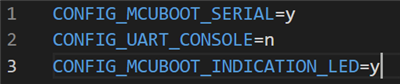
    We have made the changes suggested in proj.conf as follows:

    These changes are causing us to not be able to simply call mcumgr like suggested in Simon's guide. For example, the call to echo "hello" responds with an "Access is denied" error. I suspect that simply including the three configuration parameters in the file is not sufficient in our case.

    FYI, we are using an nRF52840 DK for testing.

    Could you please help us understand the differences on a more technical level between SMT transport and passthrough or possibly why we are seeing this response?

    Thanks

  • Hi,

    It seems that the uart console pass through is only for shell, and will not work with the uart used in the central_uart sample.
    Have you looked into using the mcuboot serial recovery mode instead for DFU?

  • Hello,

    I do not have experience with mcuboot serial recovery mode for DFU. Can you provide some resources to get us started?

    Thanks!

  • Sigurd has everything you need here: https://github.com/hellesvik-nordic/samples_for_nrf_connect_sdk/tree/main/bootloader_samples

    The readme files should guide you through it, but let me know if you get stuck.

  • Hello Øivind, 

    Thank you for sharing the link!

    We made the following changes as mentioned in Sigurd's example:

    • created mcuboot.conf file and placed under child_image directory
    • did not include CONFIG_SINGLE_APPLICATION_SLOT=y as we would like to be able to use the default dual image slot. Can you think of an issue with this?

    We put nRF52840 DK in serial recovery mode by pressing Button1 and reset the board. We confirmed that LED1 was ON upon reboot and sent it the following command to perform an update over serial:

    mcumgr --conntype serial --connstring "COM12,baud=115200" image upload app_update.bin

    The response we received was successful   

    After we performed a reset, we were able to see the new application was executing.

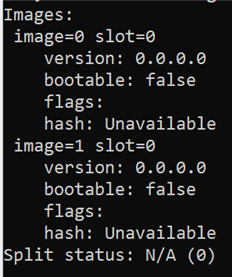
    We did encounter some unexpected behavior while in serial recovery mode when we commanded it to list the available images in the device. It seems that the various fields were not being updated using this approach. The reason we say that this was unexpected is because we had developed DFU scripts based on the sequence of commands suggested in Simon's guide. There, after we perform an update, we need to command the device to do an image test and image confirm commands to promote mcuboot to swap the images on reset. Image test requires the hash of the update image as an argument. Is it not needed to perform these additional commands when we use the serial recovery mode? Or a better question is, what is the complete sequence of commands to complete the DFU?

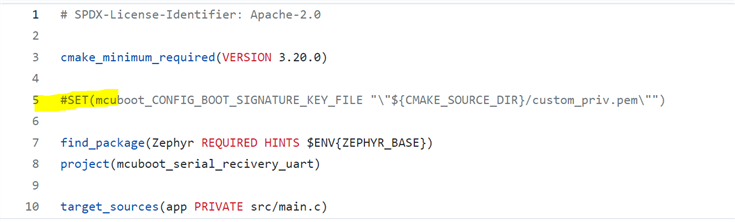
    Additionally, we noticed this line added to CMakeLists.txt in the example and we were wondering, is the intention to use that once ready to go to production and a custom key is needed?

    Thank you again for your help!

Related