Unable to enable the standard library in nRF Connect SDK 2.2.0

Hello, based on the Zephyr document C++ language support: the doc mentioned that Zephyr does not support templates, so pretty much 99% of the STL are NOT available. But in the paragraph, it says:

"Any application that makes use of the Standard Template Library (STL) components, such as std::string and std::vector, must enable the C++ standard library support."

The help document does not mention how to enable the standard library support, and I can not find any other useful instructions to enable the support from anywhere. I guess that is another help doc that does not help at all.

I tried to enable the STL based on the reference https://docs.zephyrproject.org/latest/kconfig.html#CONFIG_LIB_CPLUSPLUS. I have the following prj.conf

CONFIG_CPLUSPLUS=y
CONFIG_REQUIRES_FULL_LIBC=y
CONFIG_LIB_CPLUSPLUS=y

When I rebuild the project, I have the following warning
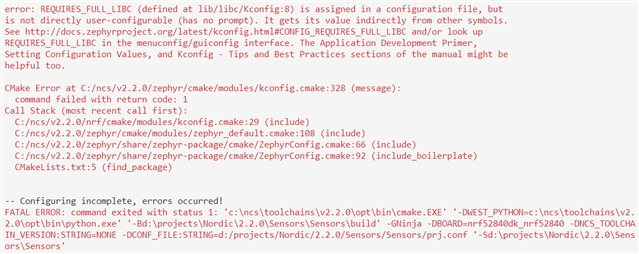
Any suggestion for enabling the STL? 

  • Hi,

    You get the error because it is not allowed to set CONFIG_REQUIRES_FULL_LIBC=y (it is used internally). A typical set of configurations sensible for using STL is:

    CONFIG_CPLUSPLUS=y
    CONFIG_LIB_CPLUSPLUS=y
    CONFIG_NEWLIB_LIBC=y

    I tested this on my end, taking the C++ Synchronization sample and adding #include <vector>, and this function that I call in the main loop (demonstrating some basic STL usage with vector):

    void stl_stuff(void)
    {
    	std::vector<int> array;
    
    	array.reserve(20);
    	for(int i=0; i<5; ++i)
    	{
    		array.push_back(i);
    	}
    
    	printk("Array capacity: %u\n", array.capacity());
    	printk("Array size: %u\n", array.size());
    
    	for(const auto &element : array)
    	{
        		printk("Element value: %i\n", element);
    	}
    }

    That worked as expected on my end.

Related