nRF Connect SDK Linux Installation & Compiling Failure

Hi,

I installed nRF Connect SDK manually by following the instruction in this page. I had 2 problems but I did a trick and it seems it solved for now. However I need to know for the future.

OS: Ubuntu 22.04

ncs: In home directory and the structure is lie below.

ncs
 |___ .west
 |___ bootloader
 |___ modules
 |___ nrf
 |___ nrfxlib
 |___ zephyr
 |___ ...

SDK: In home directory with the name like zephyr-sdk-0.14.1 and also isntalled 0.15.1 at the same time. However VSCode has given an error that v2.2.0 requires zephyr-sdk-0.15.1. It couldn't detect automatically. I have checked the $PATH env. var. There is no toolchain variable in it, but I don't understand how VScode can find 0.14.1. Anyway I renamed folders 0.14.1 to 0.15.1 and 0.15.1 to 0.14.1. Now VSCode doesn't give any error and it accepts. It seems that this problem has been solved temporarily.

The setting VSCode extention:

nRF Connect SDK: 2.2.0 (/home/soz/ncs)        => as detected

nRF Connect Toolchain: PATH (Zephyr SDK: /home/soz/zephyr-sdk-0.14.1)     => as detected. 0.15.1 couldn't detected so as mentioned above renamed folder.

Output of PATH env.

soz@salihonur-lnx:~/ncs/zephyr$ echo $PATH
/home/soz/ncs/zephyr/scripts:/home/soz/.local/bin:/home/soz/gn:/usr/local/sbin:/usr/local/bin:/usr/sbin:/usr/bin:/sbin:/bin:/usr/games:/usr/local/games:/snap/bin:/snap/bin:/home/soz/nRF52/gcc-arm/bin
soz@salihonur-lnx:~/ncs/zephyr$

Output of ZEPHYR_BASE variable:

soz@salihonur-lnx:~$ echo $ZEPHYR_BASE

soz@salihonur-lnx:~$ cd ncs/zephyr/
soz@salihonur-lnx:~/ncs/zephyr$ source zephyr-env.sh 
soz@salihonur-lnx:~/ncs/zephyr$ echo $ZEPHYR_BASE
/home/soz/ncs/zephyr
soz@salihonur-lnx:~/ncs/zephyr$ echo $BOARD

soz@salihonur-lnx:~/ncs/zephyr$ echo $CONF_FILE

soz@salihonur-lnx:~/ncs/zephyr$ echo $DTS_OVERLAY_FILE

Error of compling "blinky" example in VSCode:

Building blinky
west build --build-dir /home/soz/ELEKTRONIK/Test/blinky/build_1 /home/soz/ELEKTRONIK/Test/blinky --pristine --board nrf52840dongle_nrf52840 -- -DNCS_TOOLCHAIN_VERSION:STRING="NONE" -DCONF_FILE:STRING="/home/soz/ELEKTRONIK/Test/blinky/prj.conf"

-- west build: generating a build system
STATUS,XXXXX: 
Loading Zephyr default modules (Zephyr base).
-- Application: /home/soz/ELEKTRONIK/Test/blinky
-- Found Python3: /usr/bin/python3.10 (found suitable exact version "3.10.6") found components: Interpreter 
-- Cache files will be written to: /home/soz/.cache/zephyr
-- Zephyr version: 3.2.99 (/home/soz/ncs/zephyr)
-- Found west (found suitable version "0.14.0", minimum required is "0.7.1")
-- Board: nrf52840dongle_nrf52840
-- Found host-tools: zephyr 0.15.1 (/home/soz/zephyr-sdk-0.14.1)
-- Found toolchain: zephyr 0.15.1 (/home/soz/zephyr-sdk-0.14.1)
-- Found Dtc: /home/soz/zephyr-sdk-0.14.1/sysroots/x86_64-pokysdk-linux/usr/bin/dtc (Required is at least version "1.4.6") 
-- Found BOARD.dts: /home/soz/ncs/zephyr/boards/arm/nrf52840dongle_nrf52840/nrf52840dongle_nrf52840.dts
-- Generated zephyr.dts: /home/soz/ELEKTRONIK/Test/blinky/build_1/zephyr/zephyr.dts
-- Generated devicetree_generated.h: /home/soz/ELEKTRONIK/Test/blinky/build_1/zephyr/include/generated/devicetree_generated.h
-- Including generated dts.cmake file: /home/soz/ELEKTRONIK/Test/blinky/build_1/zephyr/dts.cmake
CMake Error at /home/soz/ncs/zephyr/cmake/modules/dts.cmake:308 (message):
  command failed with return code: No such file or directory
Call Stack (most recent call first):
  /home/soz/ncs/zephyr/cmake/modules/zephyr_default.cmake:108 (include)
  /home/soz/ncs/zephyr/share/zephyr-package/cmake/ZephyrConfig.cmake:67 (include)
  /home/soz/ncs/zephyr/share/zephyr-package/cmake/ZephyrConfig.cmake:93 (include_boilerplate)
  CMakeLists.txt:4 (find_package)


-- Configuring incomplete, errors occurred!
FATAL ERROR: command exited with status 1: /home/soz/.local/bin/cmake -DWEST_PYTHON=/usr/bin/python3 -B/home/soz/ELEKTRONIK/Test/blinky/build_1 -GNinja -DBOARD=nrf52840dongle_nrf52840 -DNCS_TOOLCHAIN_VERSION:STRING=NONE -DCONF_FILE:STRING=/home/soz/ELEKTRONIK/Test/blinky/prj.conf -S/home/soz/ELEKTRONIK/Test/blinky

Questions:

  1. I guess the compiler can't find PATH variables. Only ZEPHYR_BASE variable comes if "source zephyr-env.sh" is executed. What are the default location of these variables below? I can define them manually.
    BOARD
    CONF_FILE
    SHIELD
    ZEPHYR_BASE
    ZEPHYR_EXTRA_MODULES
    ZEPHYR_MODULES
    ZEPHYR_BOARD_ALIASES

    ZEPHYR_SDK_INSTALL_DIR
    ZEPHYR_TOOLCHAIN_VARIANT
    {TOOLCHAIN}_TOOLCHAIN_PATH
  2. Where can I change the toolchain path?
Parents
  • Hi,

    The environment variables you need to define are:

    ZEPHYR_TOOLCHAIN_VARIANT=zephyr

    ZEPHYR_SDK_INSTALL_DIR=<path to zephyr-sdk-0.15.1>

    After you have set this, you should make sure to create a new workspace in VS Code so you do not use previous workspace settings, and delete the build folder before building again.

    Best regards,

    Marte

  • Hi Marte,

    I set those environment variables but still having problem. I closed Workplace in VScode, re-installed nRF Connect extention and created new blinky project.

    Here are the line which are appended into .bashrc file.

    export PATH=${HOME}/zephyr-sdk:"$PATH"
    export ZEPHYR_TOOLCHAIN_VARIANT=zephyr
    export ZEPHYR_SDK_INSTALL_DIR=${HOME}/zephyr-sdk
    
    export GNUARMEMB_TOOLCHAIN_PATH=${HOME}/nRF52/gcc-arm/bin
    

    If ı remove ZEPHYR_TOOLCHAIN_VARIANT and EPHYR_SDK_INSTALL_DIR variables in .bashrc file then VSCode can find the path automatically however this time I get gnu-arm variant error even if it is already set with GNUARMEMB_TOOLCHAIN_PATH variable in the .bashrc file.

    The output when a new project is created:

    [variant] Loaded new set of variants
    [kit] Successfully loaded 2 kits from /home/soz/.local/share/CMakeTools/cmake-tools-kits.json
    [proc] Executing command: /usr/bin/arm-none-eabi-gcc -v
    [main] Configuring folder: blinky 
    [proc] Executing command: /home/soz/.local/bin/cmake --no-warn-unused-cli -DCMAKE_EXPORT_COMPILE_COMMANDS:BOOL=TRUE -DCMAKE_BUILD_TYPE:STRING=Debug -DCMAKE_C_COMPILER:FILEPATH=/usr/bin/arm-none-eabi-gcc -DCMAKE_CXX_COMPILER:FILEPATH=/usr/bin/arm-none-eabi-g++ -S/home/soz/ELEKTRONIK/Test/blinky -B/home/soz/ELEKTRONIK/Test/blinky/build -G Ninja
    [cmake] STATUS,XXXXX: 
    [cmake] Not searching for unused variables given on the command line.
    [cmake] -- Application: /home/soz/ELEKTRONIK/Test/blinky
    [cmake] Loading Zephyr default modules (Freestanding).
    [cmake] -- Found Python3: /usr/bin/python3.10 (found suitable exact version "3.10.6") found components: Interpreter 
    [cmake] -- Cache files will be written to: /home/soz/.cache/zephyr
    [cmake] -- Zephyr version: 3.2.99 (/home/soz/ncs/zephyr)
    [cmake] -- Found west (found suitable version "0.14.0", minimum required is "0.7.1")
    [cmake] CMake Error at /home/soz/ncs/zephyr/cmake/modules/extensions.cmake:2520 (message):
    [cmake]   BOARD is not being defined on the CMake command-line, in the environment or
    [cmake]   by the app.
    [cmake] Call Stack (most recent call first):
    [cmake]   /home/soz/ncs/zephyr/cmake/modules/boards.cmake:52 (zephyr_check_cache)
    [cmake]   /home/soz/ncs/zephyr/cmake/modules/zephyr_default.cmake:108 (include)
    [cmake]   /home/soz/ncs/zephyr/share/zephyr-package/cmake/ZephyrConfig.cmake:67 (include)
    [cmake]   /home/soz/ncs/zephyr/share/zephyr-package/cmake/ZephyrConfig.cmake:160 (include_boilerplate)
    [cmake]   CMakeLists.txt:4 (find_package)
    [cmake] 
    [cmake] 
    [cmake] -- Configuring incomplete, errors occurred!
    [proc] The command: /home/soz/.local/bin/cmake --no-warn-unused-cli -DCMAKE_EXPORT_COMPILE_COMMANDS:BOOL=TRUE -DCMAKE_BUILD_TYPE:STRING=Debug -DCMAKE_C_COMPILER:FILEPATH=/usr/bin/arm-none-eabi-gcc -DCMAKE_CXX_COMPILER:FILEPATH=/usr/bin/arm-none-eabi-g++ -S/home/soz/ELEKTRONIK/Test/blinky -B/home/soz/ELEKTRONIK/Test/blinky/build -G Ninja exited with code: 1 and signal: null


    The output of creating a new "build configuration"

     *  Executing task: nRF Connect: Generate config nrf52840dk_nrf52840 for /home/soz/ELEKTRONIK/Test/blinky 
    
    Building blinky
    west build --build-dir /home/soz/ELEKTRONIK/Test/blinky/build_1 /home/soz/ELEKTRONIK/Test/blinky --pristine --board nrf52840dk_nrf52840 -- -DNCS_TOOLCHAIN_VERSION:STRING="NONE"
    
    -- west build: generating a build system
    STATUS,XXXXX: 
    Loading Zephyr default modules (Zephyr base).
    -- Application: /home/soz/ELEKTRONIK/Test/blinky
    -- Found Python3: /usr/bin/python3.10 (found suitable exact version "3.10.6") found components: Interpreter 
    -- Cache files will be written to: /home/soz/.cache/zephyr
    -- Zephyr version: 3.2.99 (/home/soz/ncs/zephyr)
    -- Found west (found suitable version "0.14.0", minimum required is "0.7.1")
    -- Board: nrf52840dk_nrf52840
    -- Found host-tools: zephyr 0.15.1 (/home/soz/zephyr-sdk)
    -- Found toolchain: zephyr 0.15.1 (/home/soz/zephyr-sdk)
    -- Found Dtc: /home/soz/zephyr-sdk/sysroots/x86_64-pokysdk-linux/usr/bin/dtc (Required is at least version "1.4.6") 
    -- Found BOARD.dts: /home/soz/ncs/zephyr/boards/arm/nrf52840dk_nrf52840/nrf52840dk_nrf52840.dts
    -- Generated zephyr.dts: /home/soz/ELEKTRONIK/Test/blinky/build_1/zephyr/zephyr.dts
    -- Generated devicetree_generated.h: /home/soz/ELEKTRONIK/Test/blinky/build_1/zephyr/include/generated/devicetree_generated.h
    -- Including generated dts.cmake file: /home/soz/ELEKTRONIK/Test/blinky/build_1/zephyr/dts.cmake
    CMake Error at /home/soz/ncs/zephyr/cmake/modules/dts.cmake:308 (message):
      command failed with return code: No such file or directory
    Call Stack (most recent call first):
      /home/soz/ncs/zephyr/cmake/modules/zephyr_default.cmake:108 (include)
      /home/soz/ncs/zephyr/share/zephyr-package/cmake/ZephyrConfig.cmake:67 (include)
      /home/soz/ncs/zephyr/share/zephyr-package/cmake/ZephyrConfig.cmake:93 (include_boilerplate)
      CMakeLists.txt:4 (find_package)
    
    
    -- Configuring incomplete, errors occurred!
    FATAL ERROR: command exited with status 1: /home/soz/.local/bin/cmake -DWEST_PYTHON=/usr/bin/python3 -B/home/soz/ELEKTRONIK/Test/blinky/build_1 -GNinja -DBOARD=nrf52840dk_nrf52840 -DNCS_TOOLCHAIN_VERSION:STRING=NONE -S/home/soz/ELEKTRONIK/Test/blinky
    
     *  The terminal process terminated with exit code: 1. 
     *  Terminal will be reused by tasks, press any key to close it. 

    The output of the compile

    Building blinky
    west build --build-dir /home/soz/ELEKTRONIK/Test/blinky/build_1 /home/soz/ELEKTRONIK/Test/blinky --pristine --board nrf52840dk_nrf52840 -- -DNCS_TOOLCHAIN_VERSION:STRING="NONE" -DCONF_FILE:STRING="/home/soz/ELEKTRONIK/Test/blinky/prj.conf"
    
    -- west build: generating a build system
    STATUS,XXXXX: 
    Loading Zephyr default modules (Zephyr base).
    -- Application: /home/soz/ELEKTRONIK/Test/blinky
    -- Found Python3: /usr/bin/python3.10 (found suitable exact version "3.10.6") found components: Interpreter 
    -- Cache files will be written to: /home/soz/.cache/zephyr
    -- Zephyr version: 3.2.99 (/home/soz/ncs/zephyr)
    -- Found west (found suitable version "0.14.0", minimum required is "0.7.1")
    -- Board: nrf52840dk_nrf52840
    -- Found host-tools: zephyr 0.15.1 (/home/soz/zephyr-sdk)
    -- Found toolchain: zephyr 0.15.1 (/home/soz/zephyr-sdk)
    -- Found Dtc: /home/soz/zephyr-sdk/sysroots/x86_64-pokysdk-linux/usr/bin/dtc (Required is at least version "1.4.6") 
    -- Found BOARD.dts: /home/soz/ncs/zephyr/boards/arm/nrf52840dk_nrf52840/nrf52840dk_nrf52840.dts
    -- Generated zephyr.dts: /home/soz/ELEKTRONIK/Test/blinky/build_1/zephyr/zephyr.dts
    -- Generated devicetree_generated.h: /home/soz/ELEKTRONIK/Test/blinky/build_1/zephyr/include/generated/devicetree_generated.h
    -- Including generated dts.cmake file: /home/soz/ELEKTRONIK/Test/blinky/build_1/zephyr/dts.cmake
    CMake Error at /home/soz/ncs/zephyr/cmake/modules/dts.cmake:308 (message):
      command failed with return code: No such file or directory
    Call Stack (most recent call first):
      /home/soz/ncs/zephyr/cmake/modules/zephyr_default.cmake:108 (include)
      /home/soz/ncs/zephyr/share/zephyr-package/cmake/ZephyrConfig.cmake:67 (include)
      /home/soz/ncs/zephyr/share/zephyr-package/cmake/ZephyrConfig.cmake:93 (include_boilerplate)
      CMakeLists.txt:4 (find_package)
    
    
    -- Configuring incomplete, errors occurred!
    FATAL ERROR: command exited with status 1: /home/soz/.local/bin/cmake -DWEST_PYTHON=/usr/bin/python3 -B/home/soz/ELEKTRONIK/Test/blinky/build_1 -GNinja -DBOARD=nrf52840dk_nrf52840 -DNCS_TOOLCHAIN_VERSION:STRING=NONE -DCONF_FILE:STRING=/home/soz/ELEKTRONIK/Test/blinky/prj.conf -S/home/soz/ELEKTRONIK/Test/blinky
    
     *  The terminal process terminated with exit code: 1. 
     *  Terminal will be reused by tasks, press any key to close it. 
    

  • Hi,

    I will continue helping in this case.

    Can you run the following command and upload the log file?

    cd ncs/zephyr
    tree > tree_log.txt

    Regards,
    Sigurd Hellesvik

  • From the log, I can find the file I thought were missing, so that should be fine.

    Can you try  to build the zephyr/samples/hello_world sample, and see if you still get the same error?

    I had 2 problems but I did a trick and it seems it solved for now.

    By the way, what was this trick?

    Regards,
    Sigurd Hellesvik

  • Unfortunately same. Here is the output.

    soz@salihonur-lnx:~$ cd ncs/zephyr/samples/hello_world/
    soz@salihonur-lnx:~/ncs/zephyr/samples/hello_world$ west build -b nrf52840dongle_nrf52840
    -- west build: generating a build system
    STATUS,XXXXX: /home/soz/ncs/zephyr
    Loading Zephyr default modules (Zephyr base (cached)).
    -- Application: /home/soz/ncs/zephyr/samples/hello_world
    -- Cache files will be written to: /home/soz/.cache/zephyr
    -- Zephyr version: 3.2.99 (/home/soz/ncs/zephyr)
    -- Found west (found suitable version "0.14.0", minimum required is "0.7.1")
    -- Board: nrf52840dongle_nrf52840
    -- Found host-tools: zephyr 0.15.1 (/home/soz/zephyr-sdk)
    -- Found toolchain: zephyr 0.15.1 (/home/soz/zephyr-sdk)
    -- Found BOARD.dts: /home/soz/ncs/zephyr/boards/arm/nrf52840dongle_nrf52840/nrf52840dongle_nrf52840.dts
    -- Generated zephyr.dts: /home/soz/ncs/zephyr/samples/hello_world/build/zephyr/zephyr.dts
    -- Generated devicetree_generated.h: /home/soz/ncs/zephyr/samples/hello_world/build/zephyr/include/generated/devicetree_generated.h
    -- Including generated dts.cmake file: /home/soz/ncs/zephyr/samples/hello_world/build/zephyr/dts.cmake
    CMake Error at /home/soz/ncs/zephyr/cmake/modules/dts.cmake:308 (message):
      command failed with return code: No such file or directory
    Call Stack (most recent call first):
      /home/soz/ncs/zephyr/cmake/modules/zephyr_default.cmake:108 (include)
      /home/soz/ncs/zephyr/share/zephyr-package/cmake/ZephyrConfig.cmake:67 (include)
      /home/soz/ncs/zephyr/share/zephyr-package/cmake/ZephyrConfig.cmake:98 (include_boilerplate)
      CMakeLists.txt:5 (find_package)
    
    
    -- Configuring incomplete, errors occurred!
    FATAL ERROR: command exited with status 1: /home/soz/.local/bin/cmake -DWEST_PYTHON=/usr/bin/python3 -B/home/soz/ncs/zephyr/samples/hello_world/build -GNinja -S/home/soz/ncs/zephyr/samples/hello_world
    

    I found something interesting. If I set ZEPHYR_TOOLCHAIN_VARIANT=zephyr then VSCode can't find the toolchain path even if ZEPHYR_SDK_INSTALL_DIR=${HOME}/zephyr-sdk is already set.

    About the tick:

    At the begging there were 2 version zephyr-sdk-0.14.1 and zephyr-sdk-0.15.1 in the home directory. VScode. By the way only ZEPHYR_SDK_INSTALL_DIR variable was set to 0.15.1. However VSCode couldn't find 0.15.1, it was finding 0.14.1. Then I did a trick and changed the folder name. It solved.

    A few days later I removed 0.14.1 named folder then VSCode could find 0.15.1. Then I figured out that VSCode looks up folder names in ascending. Finally I removed all sdk folder and created a new folder as zephyr-sdk with the 0.15.1 version.

    I think VSCode automatically finds the folder with the name zephyr-sdk. It doesn't accept underscores or a name in different format.

    I will try another installation on a virtual machine and I will record it. I can upload it to Youtube and share the link as well.

    Hope to find a solution next week, happy new year in advance. Santa

  • Salih Onur ZORLU said:
    I will try another installation on a virtual machine and I will record it. I can upload it to Youtube and share the link as well.

    This would be very useful indeed!

    If you intend to use a virtual machine to do this, maybe do one for using our Automatic install instead of the manual install also?
    The Toolchain Manager should be quite fast, and it would be interesting to see if it works.

    Happy new year!

    Regards,
    Sigurd Hellesvik

Reply Children
  • Hi Sigurd,

    I already installed it with automatic tool. Unfortunately it didn't work and then I tried to fix it manually.

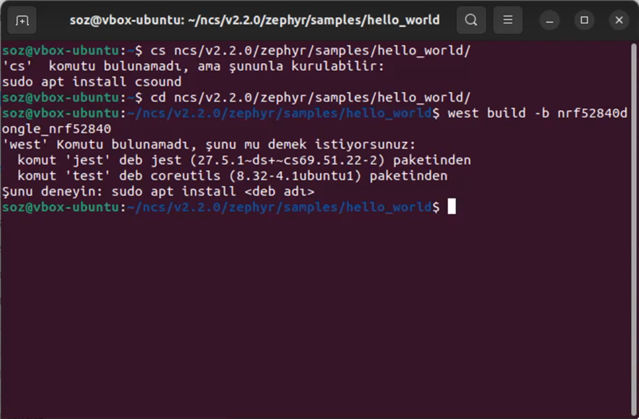
    I recorded 2 videos and saw that teh problem is caused by the automatic installation. I don't know if I did something wrong. Please check it.

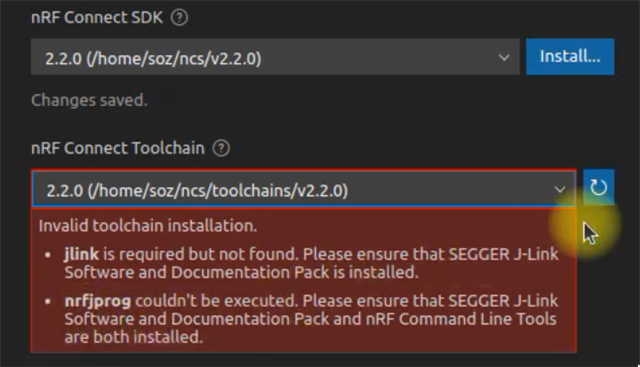
    In fact, there is a missing point in the manual installation guide that VSCode gives an error about missing nrfjprog even if nRF Command Line Tools is already installed (with deb file in Ubuntu 22.04). Segger JLink support has to be installed seperately.

    I re-installed Ubuntu OS on my computer and did nRF manual installation. It works properly now.

    PS: The videos can only be accessed via the link. It is unlisted on Youtube.

    Automatic installation:

    Manual installation:

  • Hi,

    I will have a look at these videos at Wednesday.

    Regards,
    Sigurd Hellesvik

  • Hi,

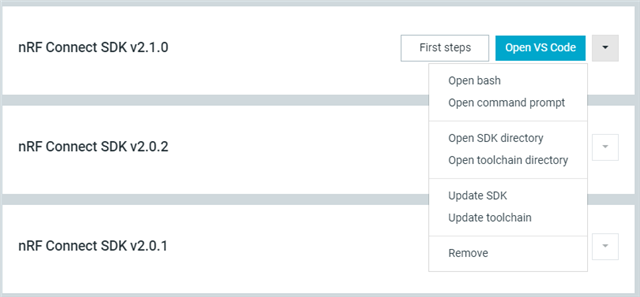
    To use the command line from the Toolchain Manager, it is easier to open a terminal from the Toolchain Manager, to get all the environment variables set correctly:

    For Linux this should say "Open Terminal" instead I think.

    Here. I think you should start by installing JLink from the J-Link Software and Documentation Pack.
    I agree that this should be better documented. But if you got time, give it a try and see if it works.
    If you are still missing nrfjprog after, you can install it from https://www.nordicsemi.com/Products/Development-tools/nrf-command-line-tools

    From the Manual Installation, it seems like things are working fine, except for the jlink and nrfjprog error. Right?
    For information: JLink and nrfjprog are used to flash and debug the device.
    You will be able to build project withouth these, just not flash them to the device.

    Regards,
    Sigurd Hellesvik

  • Hi Sigurd,

    I would like to split cases for the clear information. By the way, I re-installed Ubuntu OS and SDK manually for the frash installation including Jlink and Command Line Tools. Now I have no problem anymore.

    Case #1: Manual installation at first time 

    All works fine (of course Jlink and Command Line Tools should be install for the programming)

    Projects can be compiled if it is in any level sub-folders in the SDK root folder (here it is ${HOME}/ncs

    If you want to work in different workspace for example ${HOME}/My Projects, then you need to add these environment variables into ~/.bashrc file like below. Otherwise you get west build command not found error.

    export ZEPHYR_TOOLCHAIN_VARIANT=zephyr
    export ZEPHYR_BASE=${HOME}/ncs/zephyr

    I tried all thing in direct access console, not from Toolchain Manager (Open Command Prompt or similar). Enviroment variables might be set automatically, sorry I have no experience about that.

    Case #2: Automatic installation 

    Nothing works. An error occurs like the video. Somtimes VSCode can't find the SDK root.

    Case #3: Manual installation to fix after automatic installation 

    Nothing works. Only good thing is that VSCode can find the SDK root itself however still the project can not be compiled even if I follow step exactly described in manual installation.

    Note: The problem about automatic installation might be caused about the OS language or date/time format or number format. I have seen such kind of inconsistency in different platforms. For example I get an error with an MS Excel add-in because of number format (in Windows). The add-in supports the decimal and thousands point like "1,000.00" but in Turkish it is used like "1.000,00". Please consider it.

  • Salih Onur ZORLU said:

    Case #1: Manual installation at first time 

    All works fine

    Good to hear!

    For Case #2 and #3, I will report this to our developers, so that they can keep it in mind when working with our Linux installer.
    Thanks a lot for the reports, and good luck with your continued developement!

    EDIT: By the way, I should mention that we do not support space (" ") in paths, such as:

    Salih Onur ZORLU said:
    for example ${HOME}/My Projects,

    Regards,
    Sigurd Hellesvik

Related