Documentation steps for building dongle coprocessor fail

Under:

    https://developer.nordicsemi.com/nRF_Connect_SDK/doc/2.2.0/nrf/ug_thread_tools.html#configuring-a-radio-co-processor

steps listed for 1 and "nRF52840 Dongle (USB transport)" fail on Intel MacOS 13.1 with the details shown below.

/////

(nrf) 

user@machine ~/dev/2022/v2.2.0/coprocessor 1 

$ west build -p always -b nrf52840dongle_nrf52840 nrf/samples/openthread/coprocessor/ -- -DOVERLAY_CONFIG="overlay-usb.conf" -DDTC_OVERLAY_FILE="usb.overlay"

usage: west [-h] [-z ZEPHYR_BASE] [-v] [-V] <command> ...

west: error: argument <command>: invalid choice: 'build' (choose from 'init', 'update', 'list', 'manifest', 'diff', 'status', 'forall', 'help', 'config', 'topdir', 'selfupdate')

(nrf) 

user@machine ~/dev/2022/v2.2.0/coprocessor 2 

$ west --version

West version: v0.14.0

(nrf) 

user@machine ~/dev/2022/v2.2.0/coprocessor 0 

$ which west

/opt/nordic/ncs/toolchains/v2.2.0/bin/west

\\\\\

  • Hi,

    It seems like something have gone wrong in your installation.

    How did you install the nRF Connect SDK?

    Regards,
    Sigurd Hellesvik

  • More info...

    I've been having great success with doing everything from vscode in conjunction with the nRF Connect plugin.  In trying to build the coprocessor for nrf52840_dongle and failing... I searched for hits on "nrf 2840 dongle OTBR" and found the link referred to in my previous post.

    I subsequently found:

        https://devzone.nordicsemi.com/f/nordic-q-a/89008/west-build-is-invalid-choice/372661

    Which means I'm stuck and confused between being largely ignorant of west thanks to vscode / nrf Connect (honest thank you there) but stuck when looking at generic zephyr command line examples in the posts of others.

    I did some more searching and saw there is:

        nrf/samples/openthrea/coprocessor AND

        zephyr/samples/net/openthread/compressor

    Unfortunately I started by trying the zephyr example in vscode / nrf Connect (which I could say I haven't done that before).

    After trying the nrf one and from the vscode terminal session I see what is listed below.

    /////

    Building coprocessor
    west build --build-dir /Users/user/dev/2022/v2.2.0/coprocessor/build /Users/user/dev/2022/v2.2.0/coprocessor --pristine --board nrf52840dongle_nrf52840 -- -DNCS_TOOLCHAIN_VERSION:STRING="NONE" -DBOARD_ROOT:STRING="/Users/user/dev/2022/v2.2.0/coprocessor" -DCONF_FILE:STRING="/Users/user/dev/2022/v2.2.0/coprocessor/prj.conf"

    -- west build: generating a build system
    Loading Zephyr default modules (Zephyr base).
    -- Application: /Users/user/dev/2022/v2.2.0/coprocessor
    -- Found Python3: /opt/nordic/ncs/toolchains/v2.2.0/bin/python3.9 (found suitable exact version "3.9.6") found components: Interpreter
    -- Cache files will be written to: /Users/user/Library/Caches/zephyr
    -- Zephyr version: 3.2.99 (/opt/nordic/ncs/v2.2.0/zephyr)
    -- Found west (found suitable version "0.14.0", minimum required is "0.7.1")
    -- Board: nrf52840dongle_nrf52840
    -- Found host-tools: zephyr 0.15.1 (/opt/nordic/ncs/toolchains/v2.2.0/opt/zephyr-sdk)
    -- Found toolchain: zephyr 0.15.1 (/opt/nordic/ncs/toolchains/v2.2.0/opt/zephyr-sdk)
    -- Found Dtc: /opt/nordic/ncs/toolchains/v2.2.0/bin/dtc (found suitable version "1.6.1", minimum required is "1.4.6")
    -- Found BOARD.dts: /opt/nordic/ncs/v2.2.0/zephyr/boards/arm/nrf52840dongle_nrf52840/nrf52840dongle_nrf52840.dts
    -- Generated zephyr.dts: /Users/user/dev/2022/v2.2.0/coprocessor/build/zephyr/zephyr.dts
    -- Generated devicetree_generated.h: /Users/user/dev/2022/v2.2.0/coprocessor/build/zephyr/include/generated/devicetree_generated.h
    -- Including generated dts.cmake file: /Users/user/dev/2022/v2.2.0/coprocessor/build/zephyr/dts.cmake

    warning: UART_INTERRUPT_DRIVEN (defined at boards/shields/sparkfun_sara_r4/Kconfig.defconfig:24, boards/shields/wnc_m14a2a/Kconfig.defconfig:17, soc/arm/quicklogic_eos_s3/Kconfig.defconfig:17, drivers/serial/Kconfig:72) has direct dependencies (NETWORKING && SHIELD_SPARKFUN_SARA_R4) || (NETWORKING && SHIELD_WNC_M14A2A) || (SERIAL && SOC_EOS_S3) || (SERIAL_SUPPORT_INTERRUPT && SERIAL) with value n, but is currently being y-selected by the following symbols:
    - OPENTHREAD_COPROCESSOR (defined at subsys/net/l2/openthread/Kconfig:217), with value y, direct dependencies NET_L2_OPENTHREAD && NETWORKING (value: y), and select condition NET_L2_OPENTHREAD && NETWORKING (value: y)

    error: Aborting due to Kconfig warnings

    Parsing /Users/user/dev/2022/v2.2.0/coprocessor/Kconfig
    Loaded configuration '/opt/nordic/ncs/v2.2.0/zephyr/boards/arm/nrf52840dongle_nrf52840/nrf52840dongle_nrf52840_defconfig'
    Merged configuration '/Users/user/dev/2022/v2.2.0/coprocessor/prj.conf'
    CMake Error at /opt/nordic/ncs/v2.2.0/zephyr/cmake/modules/kconfig.cmake:328 (message):
    command failed with return code: 1
    Call Stack (most recent call first):
    /opt/nordic/ncs/v2.2.0/nrf/cmake/modules/kconfig.cmake:29 (include)
    /opt/nordic/ncs/v2.2.0/zephyr/cmake/modules/zephyr_default.cmake:108 (include)
    /opt/nordic/ncs/v2.2.0/zephyr/share/zephyr-package/cmake/ZephyrConfig.cmake:66 (include)
    /opt/nordic/ncs/v2.2.0/zephyr/share/zephyr-package/cmake/ZephyrConfig.cmake:92 (include_boilerplate)
    CMakeLists.txt:11 (find_package)


    -- Configuring incomplete, errors occurred!
    FATAL ERROR: command exited with status 1: /opt/nordic/ncs/toolchains/v2.2.0/bin/cmake -DWEST_PYTHON=/opt/nordic/ncs/toolchains/v2.2.0/bin/python3 -B/Users/user/dev/2022/v2.2.0/coprocessor/build -GNinja -DBOARD=nrf52840dongle_nrf52840 -DNCS_TOOLCHAIN_VERSION:STRING=NONE -DBOARD_ROOT:STRING=/Users/user/dev/2022/v2.2.0/coprocessor -DCONF_FILE:STRING=/Users/user/dev/2022/v2.2.0/coprocessor/prj.conf -S/Users/user/dev/2022/v2.2.0/coprocessor

    \\\\\

    Hmm?

  • Oh aha, I think that your first issue is that if you just open a normal terminal and run west, it will not be configured.

    Since you are using the Toolchain Manager to install, use the Toolchain Manager to open a terminal if you want to run west commands from the terminal.

    Or the nRF Connect Terminal as you mention:

    jahess said:
    After trying the nrf one and from the vscode terminal session I see what is listed below.

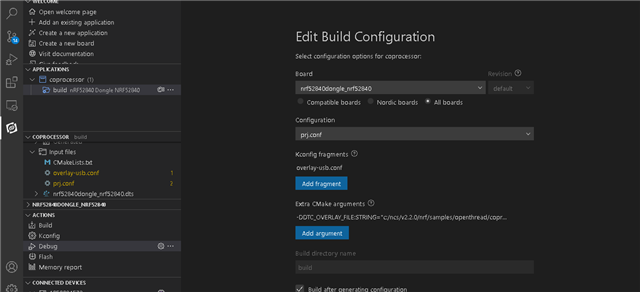
    Instead of running it in the terminal though, try to add the extra configurations using VS Code.

    You do this in "Extra CMake Arguments", as such:

    Does that work for you?

    Regards,
    Sigurd Hellesvik

  • I installed the nRF Connect SDK and toolchain via nRF Connect for Desktop.  The latter never finds vscode to open it.  I set up a conda environment with code and:

         /opt/nordic/ncs/toolchains/v2.2.0/bin

    In the PATH and things started working for me -- multimage builds for nrf5340 started working then.

    Also works for other things I've been flashing and running.

  • Sweet.  It builds.  Your screen shot also showed me that the conf and overlay files go in different settings...

    Thank you, Sigurd!

Related