DFU OTA with a new SDK -> Error SDK Version

We are working on a application with with SDK s140_nrf52_7.2.0. Now I updated to 7.3.0 with

SoftDevice_ID = '0x0123'

os.system('nrfutil pkg generate --hw-version 52 --application-version ' + firmware_version_hex + ' --application ' + input_app_file_name + ' --sd-req ' + SoftDevice_ID + ' --key-file private.key --app-boot-validation VALIDATE_ECDSA_P256_SHA256 --sd-boot-validation VALIDATE_ECDSA_P256_SHA256 ' + output_dfu_file_name)

And now I receive the error SDK wrong version on a OTA BLE Upadte. Do I have to change some settings in the sdk_config.h or what is the issue that the bootloader blocks the new SDK version?

is this

This is the Error I get with the Nordic App:
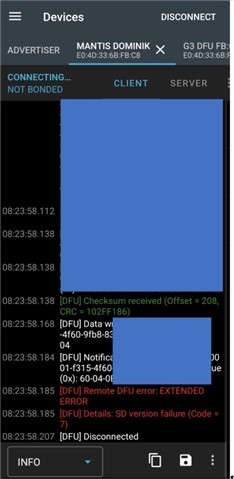
with nrfutil I use

--sd-req 0x0123

Update 07.01.2023 08:42:

on the new zip file, with the old 0x0100 on the zip file building its possible to update.

Question: now I have the new SD on the target, so I guess I can use the 0x0123 in the future. But how can I handle devices with old 7.2.0 and new 7.3.0 witn the same zip file? Is this possible to handle on the zip file building / nrf52840 or only possible to read out the actual version with a custom made app and use the zip file with sd-req 0x0100 or 0x0123 according to the actual SDK on the target?

Thanks for clarification

Parents
  • Hi Dominik,

    You should be able to update the S140 SoftDevice from v7.2.0 to v7.3.0, as they are binary compatible. 

    If I understand correctly, your script command will call nrfutil pkg generate with the --sd-req option being just "0x123."

    Let's review the documentation of --sd-req from nrfutil pkg generate --help:

    The SoftDevice requirements. A comma-
    separated list of SoftDevice firmware IDs (1
    or more) of which one must be present on the
    target device. Each item on the list must be
    a two- or four-digit hex number prefixed
    with "0x" (e.g. "0x12", "0x1234"). A non-
    exhaustive list of well-known values to use

    Thus, if the device being updated is running S140 v7.2.0, then you also need to put the S140 v7.2.0's firmware ID as a part of the --sd-req option.

    Here is a reference command:

    nrfutil pkg generate --hw-version 52 --sd-req 0x100,0x123 --softdevice .\s140_nrf52_7.3.0_softdevice.hex --key-file ..\private.key sd_dfu_pkg.zip

    See also:
    - nRF Util for nRF5 SDK | Generate DFU Package
    - nRF5 SDK Device Firmware Update (DFU) Process | Validation

    Hieu

Reply
  • Hi Dominik,

    You should be able to update the S140 SoftDevice from v7.2.0 to v7.3.0, as they are binary compatible. 

    If I understand correctly, your script command will call nrfutil pkg generate with the --sd-req option being just "0x123."

    Let's review the documentation of --sd-req from nrfutil pkg generate --help:

    The SoftDevice requirements. A comma-
    separated list of SoftDevice firmware IDs (1
    or more) of which one must be present on the
    target device. Each item on the list must be
    a two- or four-digit hex number prefixed
    with "0x" (e.g. "0x12", "0x1234"). A non-
    exhaustive list of well-known values to use

    Thus, if the device being updated is running S140 v7.2.0, then you also need to put the S140 v7.2.0's firmware ID as a part of the --sd-req option.

    Here is a reference command:

    nrfutil pkg generate --hw-version 52 --sd-req 0x100,0x123 --softdevice .\s140_nrf52_7.3.0_softdevice.hex --key-file ..\private.key sd_dfu_pkg.zip

    See also:
    - nRF Util for nRF5 SDK | Generate DFU Package
    - nRF5 SDK Device Firmware Update (DFU) Process | Validation

    Hieu

Children
Related