bootloader not loading application (nRF25832, SES, SDK v.17.1.0, SoftDevice s112 v7.2.0)

Hello,

I have followed this guide https://devzone.nordicsemi.com/guides/short-range-guides/b/software-development-kit/posts/getting-started-with-nordics-secure-dfu-bootloader to create an image with bootloader, custom application and softdevice.

My problem is that bootloader is never loading the application, I can see with nRFConnect that the bootloader is advertising as DfuTarg.

I suspect that bootloader is not recognising the application as valid, so my questions are:

- how do I debug what is happening in bootloader? If I load bootloader_debug with SES I lose my application in the flash

-what could be a possible solution?

Regards,

Rocco

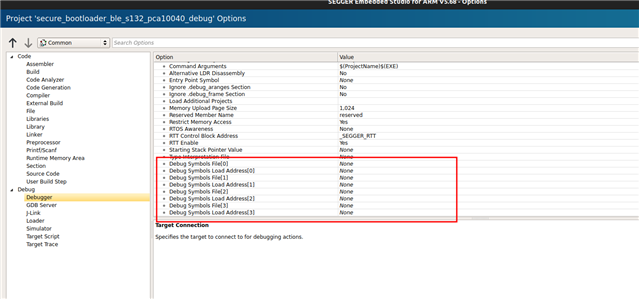
  • You can instruct the debugger to load symbols from the bootloader elf, but to flash the device from the merged hex file. No idea how to do that exactly with SES but it should not be difficult to find in the debug setup/options.

    Otherwise just attach the debugger w/o flashing. That should be possible, too.

  • I have instructed SES to load softdevice and my custom application from Options->Common->Debugger->Loader->AdditionalFile but I can't load the settings.hex file, it doesn't allow me to write at address 0x7f000

  • What is the error you get when you try to load the setting.hex? If the settings.hex is not programmed, then that would likely explain why the why the application is not booting.

    - how do I debug what is happening in bootloader? If I load bootloader_debug with SES I lose my application in the flash

    Does the application get erased in flash? That should not happen if you have the default settings here:

    Turbo J said:
    No idea how to do that exactly with SES but it should not be difficult to find in the debug setup/option

  • when I try to load settings.hex it's just reporting "write failed.

    I have tested using only example code from Nordic I have the same issue.

    Files:

    ble_app_uart_pca10040_s112.hex

    secure_bootloader_ble_s112_pca10040e.hex

    s112_nrf52_7.2.0_softdevice.hex

    the only thing that I have changed is the flash placement of the bootloader according to this info from the InfoCenter for SofDevice s112:


    Bootloader settings                           0x0002 F000 - 0x0003 0000 (4 kB)
    MBR parameter storage                   0x0002 E000 - 0x0002 F000 (4 kB)
    Bootloader                                        0x0002 8000 - 0x0002 E000 (24 kB)
    Application area (incl. free space)    0x0001 9000 - 0x0002 8000 (60 kB)
    SoftDevice                                        0x0000 1000 - 0x0001 9000 (96 kB)
    Master Boot Record (MBR)              0x0000 0000 - 0x0000 1000 (4 kB)

    what I have noticed is that when I create the settings.hex with command:

    nrfutil settings generate --family NRF52 --application ble_app_uart_pca10040_s112.hex --application-version 0 --bootloader-version 0 --bl-settings-version 2 settings.hex

    the start address is set to 0x7F000, while from the schema above it should be 0x2F000:

    Bootloader DFU Settings:
    * File:                     settings.hex
    * Family:                   nRF52
    * Start Address:            0x0007F000
    * CRC:                      0x8C6D5445
    * Settings Version:         0x00000002 (2)
    * App Version:              0x00000000 (0)
    * Bootloader Version:       0x00000000 (0)
    * Bank Layout:              0x00000000
    * Current Bank:             0x00000000
    * Application Size:         0x00005110 (20752 bytes)
    * Application CRC:          0x030E67D1
    * Bank0 Bank Code:          0x00000001
    * Softdevice Size:          0x00000000 (0 bytes)
    * Boot Validation CRC:      0x696C3C3C
    * SD Boot Validation Type:  0x00000000 (0)
    * App Boot Validation Type: 0x00000001 (1)

    is there a way to change the address of settings.hex?

  • I thought you were building for the 52832. When using the 52810, you must select '--family NRF52810' when generating the settings page.

Related