Libuarte + nus

  • Libuarte seems can't handle too many data or fast enough that comes from nus. 

  • Peripheral and central devices transmit data through Libuarte and nus.

  • Below is the part I have done,libuarte is unable to output complete data when transferring the file
  • What should I do to make B output complete data when transferring files

  • nrf52832   SDK_17.1.0
Parents
  • Hi,

    Which data rates are we talking about here? How fast do you want to communicate over UART and what do you achieve? What can you achieve if you skip the BLE part and only do dummy data over UARTE? Also, please elaborate more on the configuration (baud rate, flow control, etc), and what you have found from testing/debugging.

    PS: You can insert code using Insert -> Code instead of screenshots to make it more readable and searchable.

    • baud rate 460800  No flow control

    • The peripheral device receives the data of the central device completely, but it cannot output to the PC through libuarte in time, and the data overflow
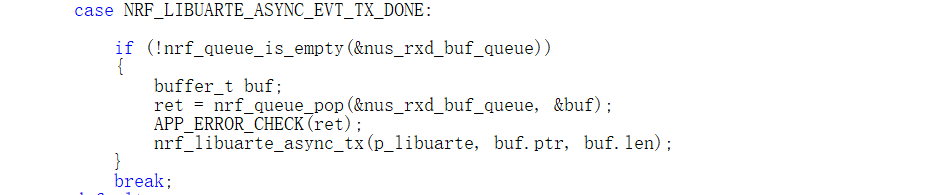
    •         case NRF_LIBUARTE_ASYNC_EVT_TX_DONE:
      
      			if (!nrf_queue_is_empty(&nus_rxd_buf_queue))
      			{
      				buffer_t buf;
      				ret = nrf_queue_pop(&nus_rxd_buf_queue, &buf);            
      				APP_ERROR_CHECK(ret);
      				nrf_libuarte_async_tx(p_libuarte, buf.ptr, buf.len);				
      			}
                  break;

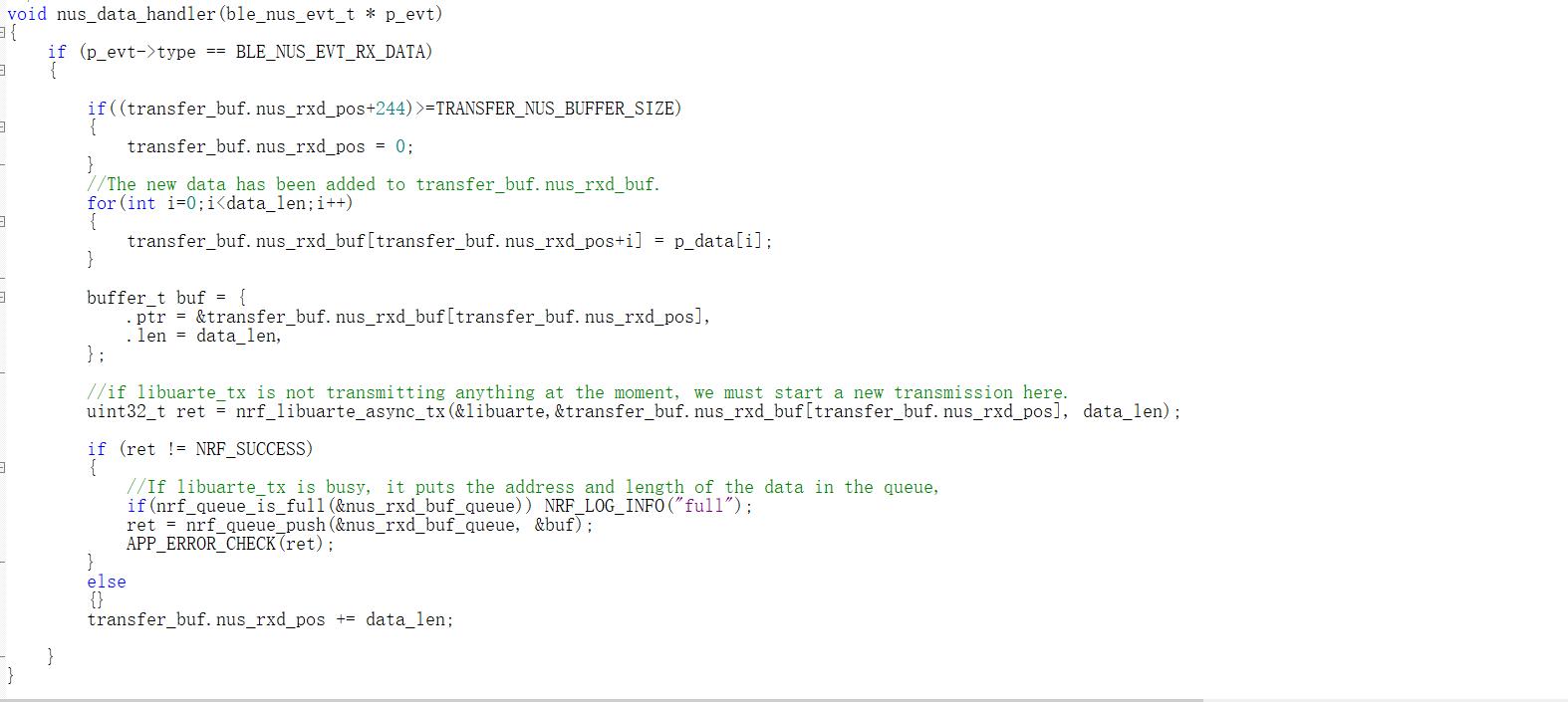
  • /**@brief Function for handling the data from the Nordic UART Service.
     *
     * @details This function will process the data received from the Nordic UART BLE Service and send
     *          it to the LIBUARTE module.
     *
     * @param[in] p_evt       Nordic UART Service event.
     */
    void nus_data_handler(ble_nus_evt_t * p_evt)
    {
    
    	if((transfer_buf.nus_rxd_pos+244)>=TRANSFER_NUS_BUFFER_SIZE)
    	{
    		transfer_buf.nus_rxd_pos = 0;
    	}	
    	//The new data has been added to transfer_buf.nus_rxd_buf.
    	for(int i=0;i<data_len;i++)
    	{
    		transfer_buf.nus_rxd_buf[transfer_buf.nus_rxd_pos+i] = p_data[i];
    	}
    	
    	buffer_t buf = {
    		.ptr = &transfer_buf.nus_rxd_buf[transfer_buf.nus_rxd_pos],
    		.len = data_len,
    	};
    
    	//if libuarte_tx is not transmitting anything at the moment, we must start a new transmission here.
        uint32_t ret = nrf_libuarte_async_tx(&libuarte,&transfer_buf.nus_rxd_buf[transfer_buf.nus_rxd_pos], data_len);
    	
        if (ret != NRF_SUCCESS)
        {
    		//If libuarte_tx is busy, it puts the address and length of the data in the queue,
    		if(nrf_queue_is_full(&nus_rxd_buf_queue)) NRF_LOG_INFO("full");
    		ret = nrf_queue_push(&nus_rxd_buf_queue, &buf);            
    		APP_ERROR_CHECK(ret);
        }
        else
        {}
    	transfer_buf.nus_rxd_pos += data_len;
    
    }
    

  • I have a buffer of 8k size to store the data received by nus. libuarte could not output the data in time, resulting in buffer overflow。I'm sorry that I can't speak English, so the description is not clear.

Reply Children
  • Hi,

    I don't fully understand the code in your nus_data_handler. Where does p_data point to and where does data_len come from? I would have expected that you would get the data you received form NUS via p_evt which is a ble_nus_evt_t instance that has rx_data which is of type ble_nus_evt_rx_data_t, and that points to the data and has the length.

    So, I suggest that you first split this in two:

    1. Make sure you get the NUS data as expected, and that it works. Test with a low data rate.

    2. Make sure you get UART working as epxected, test with a low data rate.

    3. Now combine the two, making sure that it still works with a low data rate.

    4. Increase to the data rate that you need gradually. Does it work now? If not, when does it fail? If still problematic, can you share your code (at least enough that I get the full picutre about the relevant parts), and explain in detail how you tested? At what data rate did things work, and when did things stop failing? What did you find by debugging?

  • /**@brief Function for handling the data from the Nordic UART Service.
     *
     * @details This function will process the data received from the Nordic UART BLE Service and send
     *          it to the LIBUARTE module.
     *
     * @param[in] p_evt       Nordic UART Service event.
     */
    void nus_data_handler(ble_nus_evt_t * p_evt)
    {
        if (p_evt->type == BLE_NUS_EVT_RX_DATA)
        {
    		ble_nus_chars_received_uart_print((uint8_t*)p_evt->params.rx_data.p_data, p_evt->params.rx_data.length);        
        }
    }
    
    /**@brief Function for handling characters received by the Nordic UART Service (NUS).
     *
     * @details This function takes a list of characters of length data_len and prints the characters out on UART.
     *          If @ref ECHOBACK_BLE_UART_DATA is set, the data is sent back to sender.
     */
    static void ble_nus_chars_received_uart_print(uint8_t * p_data, uint16_t data_len)
    {
    	len+=data_len;
    	NRF_LOG_INFO("re %d",len);//Get the total NUS data length
    	if((transfer_buf.nus_rxd_pos+244)>=TRANSFER_NUS_BUFFER_SIZE)
    	{
    		transfer_buf.nus_rxd_pos = 0;
    	}	
    	//The new data has been added to transfer_buf.nus_rxd_buf.
    	for(int i=0;i<data_len;i++)
    	{
    		transfer_buf.nus_rxd_buf[transfer_buf.nus_rxd_pos+i] = p_data[i];
    	}
    	
    	buffer_t buf = {
    		.ptr = &transfer_buf.nus_rxd_buf[transfer_buf.nus_rxd_pos],
    		.len = data_len,
    	};
    
    	//if libuarte_tx is not transmitting anything at the moment, we must start a new transmission here.
        uint32_t ret = nrf_libuarte_async_tx(&libuarte,&transfer_buf.nus_rxd_buf[transfer_buf.nus_rxd_pos], data_len);
    	
        if (ret != NRF_SUCCESS)
        {
    		//If libuarte_tx is busy, it puts the address and length of the data in the queue,
    		if(nrf_queue_is_full(&nus_rxd_buf_queue)) NRF_LOG_INFO("full");
    		ret = nrf_queue_push(&nus_rxd_buf_queue, &buf);            
    		APP_ERROR_CHECK(ret);
        }
        else
        {}
    	transfer_buf.nus_rxd_pos += data_len;		
    }


    • My logic is to imitate app_uart_put.

    • I can confirm that nus received the data in its entirety and saved it in an 8k buffer.
    • libuarte is perfectly fine.

    • Transfer rates up to roughly 35kb/s are fine, but higher rates will cause byte loss. Buffers storing data received by nus also print overflow flags.
    • Under the same conditions, the mobile phone as the central device can receive data completely and print data completely.
  • I found a new phenomenon when the transfer rate is 23kb/s, and after 5 minutes of continuous transfer, the phenomenon of byte loss occurs. The same is true for the other rates but the time at which the loss starts is different. I think there is something wrong with my code. I will check it again. Thank you very much.

  • Did you make any progress (find anything when checking your code)?

  • I'm not getting anywhere.

    I want peripheral and central high-speed transmission.The problem is that libuarte cannot timely output the data received by nus.

    Set the baud rate for the peripheral to 115200,Set the baud rate for the central to 460800.The periphery sends data to the center,liburte in the center can print the data completely,But when the baud rate is the same,The periphery again sends data to the center,At this time, liburte in the center cannot complete the output data.The phone acts as the center and receives the data completely.But I don't have a solution yet.

    My test scenario. pc<-->periphery <-->Central<-->pc .


Related