How to configure the publication parameters for the sensor server model [NRF connect sdk 2.2.0]

Hi,

I would like to set the publication period sensor model and directly in the code by default (compilation time).

and how can I set by default a publication group address to this model?    

I am using the example Bluetooth: Mesh sensor — nRF Connect SDK 2.2.0 documentation (nordicsemi.com) 

Best regards.

  • Hello just further information.

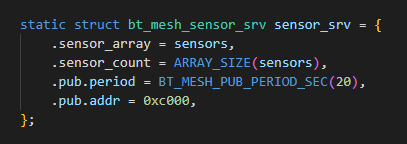
    Not sure but it looks like I can configure the publication period by changing the code below.

    But when I set the publication settings through the android application the config server override the publish period.

    How can we avoid this behavior and make sure that when we configure the model through the application(for exemple set the publication adress) it doesn't override the publish period ?

    Best regards.

    Cedric

  • Hi an other update.

      I can configure the periodic publication and the a public group address by changing the code below is it correct ?


    Issue 1: After the provisioning, when I set the publication settings through the Nrf Mesh android (set a unicast publication address). The application overrides the publication period that I previously set up in the code.

    • Is it possible for the application to upload/refresh the current configuration already defined on the node ?

    Issue 2:in the case of if I just Provision the node but not configure the publication settings through nrf Mesh app nothing Happen the  bt_mesh_model_pub::update callback is not called,

  • Hello

    You cannot prevent the smartphone from changing the publication period. Configuring publication period is part of the Bluetooth mesh specification; the model should be configurable in this way.
    You could solve this through selecting the desired values in the nRF Mesh app when doing the configuration, or use a different app (which either has the desired value as default, always uses the desired value, or does not change the value.)
    You could also solve this through self-configuration of the node. However, if you use self-configuration to reset the publication settings, it will appear as if configuration of the model does not work. I.e. if you connect and deliberately change the settings, they will immediately be reset so that your changes does not apply.
    cedriczz said:
    Is it possible for the application to upload/refresh the current configuration already defined on the node ?

    Yes. After provisioning and key configuration, in Set Publication, you may have to refresh (pull down on the screen) for the configured values to appear under Publication. There is no need to set the publication for the model in-app when it is already configured.

    Best regards,

    Einar

Related