SDK version: nRF5_SDK_17.1.0_ddde560
SES version: v6.30
HW: pca10040 1.2.4
The steps:
1. Build the micro ECC library
2. Generate my own dfu_public_key.c
3. Build the bootloader: nRF5_SDK_17.1.0_ddde560\examples\dfu\secure_bootloader\pca10040_uart and nRF5_SDK_17.1.0_ddde560\examples\dfu\secure_bootloader\pca10040_uart_debug.
4. Build the test app: nRF5_SDK_17.1.0_ddde560\examples\peripheral\blinky\pca10040\mbr
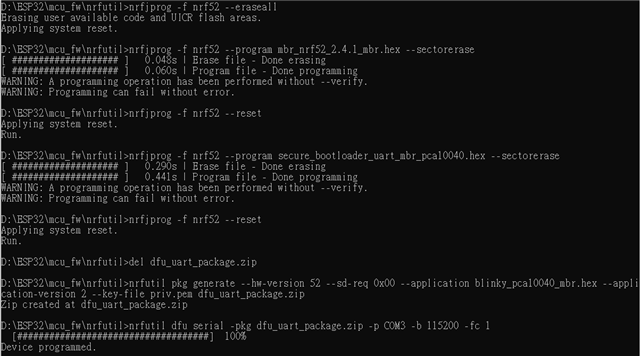
And then with the following test script, the mbr, bootloader are flashed into the nrf52832 and then trigger the UART transmission to transfer the blinky_pca10040_mbr.hex.
nrfjprog -f nrf52 --eraseall
nrfjprog -f nrf52 --program mbr_nrf52_2.4.1_mbr.hex --sectorerase
nrfjprog -f nrf52 --reset
nrfjprog -f nrf52 --program secure_bootloader_uart_mbr_pca10040_debug.hex --sectorerase
nrfjprog -f nrf52 --reset
del dfu_uart_package.zip
nrfutil pkg generate --hw-version 52 --sd-req 0x00 --application blinky_pca10040_mbr.hex --application-version 2 --key-file priv.pem dfu_uart_package.zip
nrfutil dfu serial -pkg dfu_uart_package.zip -p COM3 -b 115200 -fc 1
nrfjprog -f nrf52 --reset
If I uses the debug version of bootloader secure_bootloader_uart_mbr_pca10040_debug.hex, then the app could runs successfully, and I could see LEDs blinking.
But if in line 4, I change to use the non-debug version of bootloader, secure_bootloader_uart_mbr_pca10040.hex, the the app failed to run.
In this situation, the LEDs are all off, so the app is not running(LED blinking) nor in bootloader(LED1 and LED3 constant on).
Is there any difference between the debug and non-debug version bootloader? Did I miss any step?
BTW, the UART downloading process are all successful in both cases.