

Hi,
we are using nrf9160 custom board. Modem connected to LTE network but it is not connected to AWS cloud service. It's giving the -111 error, means connection refused. But with same esim card connected to AWS modem version of 1.2.3.
Hi,
we are using nrf9160 custom board. Modem connected to LTE network but it is not connected to AWS cloud service. It's giving the -111 error, means connection refused. But with same esim card connected to AWS modem version of 1.2.3.
Hi Jagadish,
I assume you are playing NCS2.2.0 nRF9160: AWS IoT with your custom board. If yes, please check if you are using nRF9160 Rev2 and confirm you have updated the modem firmware to MFW v1.3.4.
Please share the full log printout and modem trace recording, so we would be able to help you analyse more details on the communication traffic.
Best regards,
Charlie

Hi charlie,
My custom board modem firmware version is 1.3.2. Yes, it is NCS2.2.0 nRF9160: AWSIoT.
And my nrf9160 development kit MFW is 1.3.2 Our aws_iot code is working in my development kit and i have another nrf9169 custom board with MFW is 1.3.2 in this also aws_iot code is working
But is not working our new nrf9160 custom board which is MFW is 1.3.2
I will try to upgrade the modem firmware also and i will update you the response.
please let me know is their any other reason why our new nrf9160 custom is not working when i use aws_iot.
thank you

Hi Jagadish,
Can you provide the information I requested in the former reply?
1) Did you require HW require for your new custom board? what is the link to this case?
2) Can you share the modem trace recording?
The two error codes show the connection may be bad and not stable. Have you checked the signal quality through %CESQ notification?
#define ECONNREFUSED 111 /* Connection refused */
#define ETIMEDOUT 116 /* Connection timed out */
Best regards,
Charlie
Hi charlie,
Can you share the modem trace recording?
Can you help me to get modem trace recording i have no idea how to get it.
Did you require HW require for your new custom board? what is the link to this case?
we have already designed a new nrf9160 custom board but in this new custom board only we are getting this AWS connection error.
Thanks
Hi Jagadish,
Jagadish M said:Can you help me to get modem trace recording i have no idea how to get it.
Yes, just search "nrf9160 modem trace" and you would find documents and lots of discussion on Devzone.
Jagadish M said:we have already designed a new nrf9160 custom board but in this new custom board only we are getting this AWS connection error.
Nordic provides free HW reviews for your design to make sure you get good RF performance on your design. In this case, you may have a bad antenna design which causes bad signal quality for your device. This is why I also suggest you check the %CESQ notification with at client sample to confirm.
Best regards,
Charlie
Hi charlie,
please find the below zip file for modem trace log
pc-nrfconnect-tracecollector.zip
This is why I also suggest you check the %CESQ notification with at client sample to confirm.
As you suggested we send AT+CESQ=? and below is the response for that
+CESQ: (99),(99),(255),(255),(0-34,255),(0-97,255)
OK
Nordic provides free HW reviews for your design to make sure you get good RF performance on your design. In this case, you may have a bad antenna design which causes bad signal quality for your device.
please make this ticket as private so i can able to send my design for review
Thanks.
Hi Jagadish,
1) The modem trace is empty, their size is zero. You should see the File size increase when you successfully collect the modem trace.
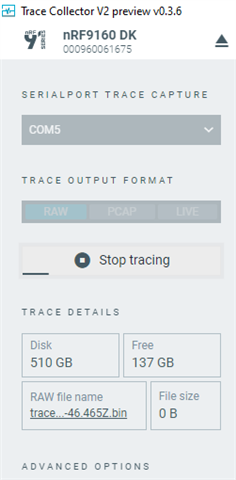
2) CESQ information is not valuable.
To get signal strength information, program your device with nRF9160: AT Client — nRF Connect SDK 2.2.0 documentation (nordicsemi.com). Open LTE Link Monitor, select SETTING->Autmatcie requests. Send AT+CFUN=1 and AT+CFUN?, and you will get a log like the following:
2023-02-08T11:44:30.265Z DEBUG Application data folder: C:\Users\chs1\AppData\Roaming\nrfconnect\pc-nrfconnect-linkmonitor
2023-02-08T11:44:30.366Z INFO Using nrf-device-lib-js version: 0.4.13
2023-02-08T11:44:30.366Z INFO Using nrf-device-lib version: 0.12.8
2023-02-08T11:44:30.367Z INFO Using nrfjprog DLL version: 10.16.0
2023-02-08T11:44:30.367Z INFO Using JLink version: JLink_V7.80c
2023-02-08T11:44:30.390Z DEBUG App pc-nrfconnect-linkmonitor v2.0.2 official
2023-02-08T11:44:30.390Z DEBUG App path: C:\Users\chs1\.nrfconnect-apps\node_modules\pc-nrfconnect-linkmonitor
2023-02-08T11:44:30.390Z DEBUG nRFConnect 3.12.0, required by the app is (^3.12.0)
2023-02-08T11:44:30.390Z DEBUG nRFConnect path: C:\Users\chs1\AppData\Local\Programs\nrfconnect\resources\app.asar
2023-02-08T11:44:30.390Z DEBUG HomeDir: C:\Users\chs1
2023-02-08T11:44:30.390Z DEBUG TmpDir: C:\Users\chs1\AppData\Local\Temp
2023-02-08T11:44:30.391Z INFO Installed JLink version does not match the provided version (V7.66a)
2023-02-08T11:44:35.298Z ERROR Opening COM6: Access denied
2023-02-08T11:44:47.518Z INFO Modem port is opened
2023-02-08T11:46:53.728Z DEBUG modem >> AT+CFUN?
2023-02-08T11:46:53.740Z DEBUG modem << +CFUN: 0
2023-02-08T11:46:53.776Z DEBUG modem << OK
2023-02-08T11:46:55.499Z DEBUG modem >> AT+CFUN=1
2023-02-08T11:46:55.539Z DEBUG modem << OK
2023-02-08T11:46:59.279Z DEBUG modem >> AT+CFUN?
2023-02-08T11:46:59.283Z DEBUG modem << +CFUN: 1
2023-02-08T11:46:59.291Z DEBUG modem << OK
2023-02-08T11:46:59.292Z DEBUG modem >> AT+CGSN=1
2023-02-08T11:46:59.300Z DEBUG modem << +CGSN: "351358815320657"
2023-02-08T11:46:59.301Z DEBUG modem << OK
2023-02-08T11:46:59.305Z DEBUG modem >> AT+CGMI
2023-02-08T11:46:59.310Z DEBUG modem << Nordic Semiconductor ASA
2023-02-08T11:46:59.312Z DEBUG modem << OK
2023-02-08T11:46:59.318Z DEBUG modem >> AT+CGMM
2023-02-08T11:46:59.324Z DEBUG modem << nRF9160-SICA
2023-02-08T11:46:59.326Z DEBUG modem << OK
2023-02-08T11:46:59.328Z DEBUG modem >> AT+CGMR
2023-02-08T11:46:59.333Z DEBUG modem << mfw_nrf9160_1.3.4
2023-02-08T11:46:59.335Z DEBUG modem << OK
2023-02-08T11:46:59.336Z INFO Nordic Semiconductor ASA nRF9160-SICA [mfw_nrf9160_1.3.4] SerNr: 351358815320657
2023-02-08T11:46:59.337Z DEBUG modem >> AT+CEMODE?
2023-02-08T11:46:59.341Z DEBUG modem << +CEMODE: 2
2023-02-08T11:46:59.343Z DEBUG modem << OK
2023-02-08T11:46:59.353Z DEBUG modem >> AT%XCBAND=?
2023-02-08T11:46:59.361Z DEBUG modem << %XCBAND: (1,2,3,4,5,8,12,13,18,19,20,25,26,28,66)
2023-02-08T11:46:59.366Z DEBUG modem << OK
2023-02-08T11:46:59.372Z DEBUG modem >> AT+CMEE?
2023-02-08T11:46:59.376Z DEBUG modem << +CMEE: 0
2023-02-08T11:46:59.378Z DEBUG modem << OK
2023-02-08T11:46:59.382Z DEBUG modem >> AT+CMEE=1
2023-02-08T11:46:59.387Z DEBUG modem << OK
2023-02-08T11:46:59.390Z DEBUG modem >> AT+CNEC?
2023-02-08T11:46:59.395Z DEBUG modem << +CNEC: 0
2023-02-08T11:46:59.396Z DEBUG modem << OK
2023-02-08T11:46:59.401Z DEBUG modem >> AT+CNEC=24
2023-02-08T11:46:59.405Z DEBUG modem << OK
2023-02-08T11:46:59.407Z DEBUG modem >> AT+CGEREP?
2023-02-08T11:46:59.411Z DEBUG modem << +CGEREP: 0,0
2023-02-08T11:46:59.413Z DEBUG modem << OK
2023-02-08T11:46:59.417Z DEBUG modem >> AT+CGDCONT?
2023-02-08T11:46:59.433Z DEBUG modem << +CGDCONT: 0,"IPV4V6","telenor.smart","10.168.150.56 2A02:2121:0282:032B:0000:0000:558E:710B",0,0
2023-02-08T11:46:59.435Z DEBUG modem << OK
2023-02-08T11:46:59.441Z DEBUG modem >> AT+CGACT?
2023-02-08T11:46:59.446Z DEBUG modem << +CGACT: 0,1
2023-02-08T11:46:59.451Z DEBUG modem <<
2023-02-08T11:46:59.452Z DEBUG modem << OK
2023-02-08T11:46:59.457Z DEBUG modem >> AT+CGEREP=1
2023-02-08T11:46:59.466Z DEBUG modem << OK
2023-02-08T11:46:59.473Z DEBUG modem >> AT+CIND=1,1,1
2023-02-08T11:46:59.484Z DEBUG modem << OK
2023-02-08T11:46:59.487Z DEBUG modem >> AT+CEREG=5
2023-02-08T11:46:59.496Z DEBUG modem << OK
2023-02-08T11:46:59.500Z DEBUG modem >> AT+CEREG?
2023-02-08T11:46:59.510Z DEBUG modem << +CEREG: 5,1,"7789","031B4300",7,,,"00100001","11000001"
2023-02-08T11:46:59.512Z DEBUG modem << OK
2023-02-08T11:46:59.520Z DEBUG modem >> AT+COPS=3,2
2023-02-08T11:46:59.526Z DEBUG modem << OK
2023-02-08T11:46:59.529Z DEBUG modem >> AT+COPS?
2023-02-08T11:46:59.537Z DEBUG modem << +COPS: 0,2,"24201",7
2023-02-08T11:46:59.540Z DEBUG modem << OK
2023-02-08T11:46:59.546Z DEBUG modem >> AT%XCBAND
2023-02-08T11:46:59.556Z DEBUG modem << %XCBAND: 20
2023-02-08T11:46:59.557Z DEBUG modem << OK
2023-02-08T11:46:59.562Z DEBUG modem >> AT+CGDCONT?
2023-02-08T11:46:59.574Z DEBUG modem << +CGDCONT: 0,"IPV4V6","telenor.smart","10.168.150.56 2A02:2121:0282:032B:0000:0000:558E:710B",0,0
2023-02-08T11:46:59.576Z DEBUG modem << OK
2023-02-08T11:46:59.583Z DEBUG modem >> AT+CGACT?
2023-02-08T11:46:59.594Z DEBUG modem << +CGACT: 0,1
2023-02-08T11:46:59.598Z DEBUG modem << OK
2023-02-08T11:46:59.611Z DEBUG modem >> AT%CESQ=1
2023-02-08T11:46:59.622Z DEBUG modem << OK
2023-02-08T11:46:59.626Z DEBUG modem >> AT+CESQ
2023-02-08T11:46:59.634Z DEBUG modem << +CESQ: 99,99,255,255,17,65
2023-02-08T11:46:59.637Z DEBUG modem << OK
2023-02-08T11:46:59.641Z DEBUG modem >> AT%XSIM=1
2023-02-08T11:46:59.654Z DEBUG modem << OK
2023-02-08T11:46:59.660Z DEBUG modem >> AT%XSIM?
2023-02-08T11:46:59.671Z DEBUG modem << %XSIM: 1
2023-02-08T11:46:59.673Z DEBUG modem << OK
2023-02-08T11:46:59.678Z DEBUG modem >> AT+CPIN?
2023-02-08T11:46:59.683Z DEBUG modem << +CPIN: READY
2023-02-08T11:46:59.685Z DEBUG modem << OK
2023-02-08T11:46:59.691Z DEBUG modem >> AT+CPINR="SIM PIN"
2023-02-08T11:46:59.704Z DEBUG modem << +CPINR: "SIM PIN",3
2023-02-08T11:46:59.706Z DEBUG modem << OK
2023-02-08T11:46:59.710Z DEBUG modem >> AT+CIMI
2023-02-08T11:46:59.717Z DEBUG modem << 242016001371427
2023-02-08T11:46:59.718Z DEBUG modem << OK
2023-02-08T11:46:59.719Z INFO IMSIdentity: 242016001371427
2023-02-08T11:46:59.728Z DEBUG modem << %CESQ: 65,3,18,2
2023-02-08T11:47:08.111Z DEBUG modem << %CESQ: 62,3,10,1
2023-02-08T11:48:07.726Z DEBUG modem << %CESQ: 255,0,255,0
You can find how the single strength is evaluated here (+) case about rsrq rsrp - Nordic Q&A - Nordic DevZone - Nordic DevZone (nordicsemi.com).
3)
Jagadish M said:please make this ticket as private so i can able to send my design for review
Please create a separate private case and share the link here. My colleague with help you review it.
Best regards,
Charlie
Hi Jagadish,
1) The modem trace is empty, their size is zero. You should see the File size increase when you successfully collect the modem trace.
2) CESQ information is not valuable.
To get signal strength information, program your device with nRF9160: AT Client — nRF Connect SDK 2.2.0 documentation (nordicsemi.com). Open LTE Link Monitor, select SETTING->Autmatcie requests. Send AT+CFUN=1 and AT+CFUN?, and you will get a log like the following:
2023-02-08T11:44:30.265Z DEBUG Application data folder: C:\Users\chs1\AppData\Roaming\nrfconnect\pc-nrfconnect-linkmonitor
2023-02-08T11:44:30.366Z INFO Using nrf-device-lib-js version: 0.4.13
2023-02-08T11:44:30.366Z INFO Using nrf-device-lib version: 0.12.8
2023-02-08T11:44:30.367Z INFO Using nrfjprog DLL version: 10.16.0
2023-02-08T11:44:30.367Z INFO Using JLink version: JLink_V7.80c
2023-02-08T11:44:30.390Z DEBUG App pc-nrfconnect-linkmonitor v2.0.2 official
2023-02-08T11:44:30.390Z DEBUG App path: C:\Users\chs1\.nrfconnect-apps\node_modules\pc-nrfconnect-linkmonitor
2023-02-08T11:44:30.390Z DEBUG nRFConnect 3.12.0, required by the app is (^3.12.0)
2023-02-08T11:44:30.390Z DEBUG nRFConnect path: C:\Users\chs1\AppData\Local\Programs\nrfconnect\resources\app.asar
2023-02-08T11:44:30.390Z DEBUG HomeDir: C:\Users\chs1
2023-02-08T11:44:30.390Z DEBUG TmpDir: C:\Users\chs1\AppData\Local\Temp
2023-02-08T11:44:30.391Z INFO Installed JLink version does not match the provided version (V7.66a)
2023-02-08T11:44:35.298Z ERROR Opening COM6: Access denied
2023-02-08T11:44:47.518Z INFO Modem port is opened
2023-02-08T11:46:53.728Z DEBUG modem >> AT+CFUN?
2023-02-08T11:46:53.740Z DEBUG modem << +CFUN: 0
2023-02-08T11:46:53.776Z DEBUG modem << OK
2023-02-08T11:46:55.499Z DEBUG modem >> AT+CFUN=1
2023-02-08T11:46:55.539Z DEBUG modem << OK
2023-02-08T11:46:59.279Z DEBUG modem >> AT+CFUN?
2023-02-08T11:46:59.283Z DEBUG modem << +CFUN: 1
2023-02-08T11:46:59.291Z DEBUG modem << OK
2023-02-08T11:46:59.292Z DEBUG modem >> AT+CGSN=1
2023-02-08T11:46:59.300Z DEBUG modem << +CGSN: "351358815320657"
2023-02-08T11:46:59.301Z DEBUG modem << OK
2023-02-08T11:46:59.305Z DEBUG modem >> AT+CGMI
2023-02-08T11:46:59.310Z DEBUG modem << Nordic Semiconductor ASA
2023-02-08T11:46:59.312Z DEBUG modem << OK
2023-02-08T11:46:59.318Z DEBUG modem >> AT+CGMM
2023-02-08T11:46:59.324Z DEBUG modem << nRF9160-SICA
2023-02-08T11:46:59.326Z DEBUG modem << OK
2023-02-08T11:46:59.328Z DEBUG modem >> AT+CGMR
2023-02-08T11:46:59.333Z DEBUG modem << mfw_nrf9160_1.3.4
2023-02-08T11:46:59.335Z DEBUG modem << OK
2023-02-08T11:46:59.336Z INFO Nordic Semiconductor ASA nRF9160-SICA [mfw_nrf9160_1.3.4] SerNr: 351358815320657
2023-02-08T11:46:59.337Z DEBUG modem >> AT+CEMODE?
2023-02-08T11:46:59.341Z DEBUG modem << +CEMODE: 2
2023-02-08T11:46:59.343Z DEBUG modem << OK
2023-02-08T11:46:59.353Z DEBUG modem >> AT%XCBAND=?
2023-02-08T11:46:59.361Z DEBUG modem << %XCBAND: (1,2,3,4,5,8,12,13,18,19,20,25,26,28,66)
2023-02-08T11:46:59.366Z DEBUG modem << OK
2023-02-08T11:46:59.372Z DEBUG modem >> AT+CMEE?
2023-02-08T11:46:59.376Z DEBUG modem << +CMEE: 0
2023-02-08T11:46:59.378Z DEBUG modem << OK
2023-02-08T11:46:59.382Z DEBUG modem >> AT+CMEE=1
2023-02-08T11:46:59.387Z DEBUG modem << OK
2023-02-08T11:46:59.390Z DEBUG modem >> AT+CNEC?
2023-02-08T11:46:59.395Z DEBUG modem << +CNEC: 0
2023-02-08T11:46:59.396Z DEBUG modem << OK
2023-02-08T11:46:59.401Z DEBUG modem >> AT+CNEC=24
2023-02-08T11:46:59.405Z DEBUG modem << OK
2023-02-08T11:46:59.407Z DEBUG modem >> AT+CGEREP?
2023-02-08T11:46:59.411Z DEBUG modem << +CGEREP: 0,0
2023-02-08T11:46:59.413Z DEBUG modem << OK
2023-02-08T11:46:59.417Z DEBUG modem >> AT+CGDCONT?
2023-02-08T11:46:59.433Z DEBUG modem << +CGDCONT: 0,"IPV4V6","telenor.smart","10.168.150.56 2A02:2121:0282:032B:0000:0000:558E:710B",0,0
2023-02-08T11:46:59.435Z DEBUG modem << OK
2023-02-08T11:46:59.441Z DEBUG modem >> AT+CGACT?
2023-02-08T11:46:59.446Z DEBUG modem << +CGACT: 0,1
2023-02-08T11:46:59.451Z DEBUG modem <<
2023-02-08T11:46:59.452Z DEBUG modem << OK
2023-02-08T11:46:59.457Z DEBUG modem >> AT+CGEREP=1
2023-02-08T11:46:59.466Z DEBUG modem << OK
2023-02-08T11:46:59.473Z DEBUG modem >> AT+CIND=1,1,1
2023-02-08T11:46:59.484Z DEBUG modem << OK
2023-02-08T11:46:59.487Z DEBUG modem >> AT+CEREG=5
2023-02-08T11:46:59.496Z DEBUG modem << OK
2023-02-08T11:46:59.500Z DEBUG modem >> AT+CEREG?
2023-02-08T11:46:59.510Z DEBUG modem << +CEREG: 5,1,"7789","031B4300",7,,,"00100001","11000001"
2023-02-08T11:46:59.512Z DEBUG modem << OK
2023-02-08T11:46:59.520Z DEBUG modem >> AT+COPS=3,2
2023-02-08T11:46:59.526Z DEBUG modem << OK
2023-02-08T11:46:59.529Z DEBUG modem >> AT+COPS?
2023-02-08T11:46:59.537Z DEBUG modem << +COPS: 0,2,"24201",7
2023-02-08T11:46:59.540Z DEBUG modem << OK
2023-02-08T11:46:59.546Z DEBUG modem >> AT%XCBAND
2023-02-08T11:46:59.556Z DEBUG modem << %XCBAND: 20
2023-02-08T11:46:59.557Z DEBUG modem << OK
2023-02-08T11:46:59.562Z DEBUG modem >> AT+CGDCONT?
2023-02-08T11:46:59.574Z DEBUG modem << +CGDCONT: 0,"IPV4V6","telenor.smart","10.168.150.56 2A02:2121:0282:032B:0000:0000:558E:710B",0,0
2023-02-08T11:46:59.576Z DEBUG modem << OK
2023-02-08T11:46:59.583Z DEBUG modem >> AT+CGACT?
2023-02-08T11:46:59.594Z DEBUG modem << +CGACT: 0,1
2023-02-08T11:46:59.598Z DEBUG modem << OK
2023-02-08T11:46:59.611Z DEBUG modem >> AT%CESQ=1
2023-02-08T11:46:59.622Z DEBUG modem << OK
2023-02-08T11:46:59.626Z DEBUG modem >> AT+CESQ
2023-02-08T11:46:59.634Z DEBUG modem << +CESQ: 99,99,255,255,17,65
2023-02-08T11:46:59.637Z DEBUG modem << OK
2023-02-08T11:46:59.641Z DEBUG modem >> AT%XSIM=1
2023-02-08T11:46:59.654Z DEBUG modem << OK
2023-02-08T11:46:59.660Z DEBUG modem >> AT%XSIM?
2023-02-08T11:46:59.671Z DEBUG modem << %XSIM: 1
2023-02-08T11:46:59.673Z DEBUG modem << OK
2023-02-08T11:46:59.678Z DEBUG modem >> AT+CPIN?
2023-02-08T11:46:59.683Z DEBUG modem << +CPIN: READY
2023-02-08T11:46:59.685Z DEBUG modem << OK
2023-02-08T11:46:59.691Z DEBUG modem >> AT+CPINR="SIM PIN"
2023-02-08T11:46:59.704Z DEBUG modem << +CPINR: "SIM PIN",3
2023-02-08T11:46:59.706Z DEBUG modem << OK
2023-02-08T11:46:59.710Z DEBUG modem >> AT+CIMI
2023-02-08T11:46:59.717Z DEBUG modem << 242016001371427
2023-02-08T11:46:59.718Z DEBUG modem << OK
2023-02-08T11:46:59.719Z INFO IMSIdentity: 242016001371427
2023-02-08T11:46:59.728Z DEBUG modem << %CESQ: 65,3,18,2
2023-02-08T11:47:08.111Z DEBUG modem << %CESQ: 62,3,10,1
2023-02-08T11:48:07.726Z DEBUG modem << %CESQ: 255,0,255,0
You can find how the single strength is evaluated here (+) case about rsrq rsrp - Nordic Q&A - Nordic DevZone - Nordic DevZone (nordicsemi.com).
3)
Jagadish M said:please make this ticket as private so i can able to send my design for review
Please create a separate private case and share the link here. My colleague with help you review it.
Best regards,
Charlie
Hi charlie,
Please create a separate private case and share the link here. My colleague with help you review it.
Best regards,
below is the separate private case link for our custom board design.
devzone.nordicsemi.com/.../302602
CESQ information is not valuable.
To get signal strength information, program your device with nRF9160: AT Client — nRF Connect SDK 2.2.0 documentation (nordicsemi.com). Open LTE Link Monitor, select SETTING->Autmatcie requests. Send AT+CFUN=1 and AT+CFUN?, and you will get a log like the following:
shortly i will share the AT+CFUN=1 and AT+CFUN?
thanks
Hi charlie,
shortly i will share the AT+CFUN=1 and AT+CFUN?
Please find the below modem tracing logs.
14:14:45.312 -> AT
14:14:45.319 -> OK
14:14:56.814 -> AT+CFUN=1
14:14:56.816 -> OK
14:15:06.251 -> AT+CFUN?
14:15:06.251 -> +CFUN: 1
14:15:06.251 -> OK
14:15:29.527 -> AT+CGSN=1
14:15:29.527 -> +CGSN: "351358817528042"
14:15:29.527 -> OK
14:15:42.448 -> AT+CGMI
14:15:42.448 -> Nordic Semiconductor ASA
14:15:42.448 -> OK
14:16:03.809 -> AT+CGMM
14:16:03.809 -> nRF9160-SICA
14:16:03.809 -> OK
14:16:14.980 -> AT+CGMR
14:16:14.980 -> mfw_nrf9160_1.3.4
14:16:14.980 -> OK
14:16:50.243 -> AT+CEMODE?
14:16:50.243 -> +CEMODE: 2
14:16:50.243 -> OK
14:17:07.493 -> AT%XCBAND?
14:17:18.017 -> %XCBAND: (1,2,3,4,5,8,12,13,18,19,20,25,26,28,66)
14:17:18.063 -> OK
14:17:35.199 -> AT+CMEE?
14:17:35.199 -> +CMEE: 0
14:17:35.199 -> OK
14:17:49.869 -> AT+CMEE=1
14:17:49.869 -> OK
14:18:10.135 -> AT+CNEC?
14:18:10.135 -> +CNEC: 0
14:18:10.135 -> OK
14:18:50.404 -> AT+CNEC=24
14:18:50.404 -> OK
14:19:16.663 -> AT+CGEREP?
14:19:16.663 -> +CGEREP: 0,0
14:19:16.663 -> OK
14:19:35.950 -> AT+CGDCONT?
14:19:35.950 -> +CGDCONT: 0,"IP","wlapn.com","10.111.106.73",0,0
14:19:35.950 -> OK
14:20:42.228 -> AT+CGACT?
14:20:42.228 -> +CGACT: 0,1
14:20:42.228 -> OK
14:21:08.162 -> AT+CGEREP=1
14:21:08.162 -> OK
14:21:40.514 -> AT+CIND=1,1,1
14:21:40.514 -> OK
14:21:59.226 -> AT+CEREG=5
14:21:59.226 -> OK
14:22:10.387 -> AT+CEREG?
14:22:10.387 -> +CEREG: 5,5,"5604","0052C017",7,,,"11100000","11100000"
14:22:10.387 -> OK
14:22:35.451 -> AT+COPS=3,2
14:22:35.451 -> OK
14:22:52.700 -> AT+COPS?
14:22:52.700 -> +COPS: 0,2,"26203",7
14:22:52.700 -> OK
14:23:18.363 -> AT%XCBAND
14:23:18.363 -> %XCBAND: 20
14:23:18.363 -> OK
14:23:35.874 -> AT+CGDCONT?
14:23:35.874 -> +CGDCONT: 0,"IP","wlapn.com","10.111.106.73",0,0
14:23:35.874 -> OK
14:24:07.293 -> AT+CGACT?
14:24:07.293 -> +CGACT: 0,1
14:24:07.293 -> OK
14:24:21.152 -> AT%CESQ=1
14:24:21.152 -> OK
14:24:22.878 -> AT+CESQ
14:24:22.878 -> %CESQ: 39,1,10,1
14:24:27.828 -> OK
14:25:06.006 -> AT%XSIM=1
14:25:06.006 -> OK
14:25:11.981 -> AT%XSIM?
14:25:11.981 -> %XSIM: 1
14:25:11.981 -> OK
14:25:27.537 -> ATCPIN?
14:25:27.537 -> +CPIN: READY
14:25:27.537 -> OK
14:26:43.121 -> AT+CPINR="SIM PIN"
14:26:43.121 -> +CPINR: "SIM PIN",3
14:26:43.121 -> OK
14:27:07.374 -> AT+CIMI
14:27:07.374 -> 206018130251423
14:27:07.374 -> OK
thanks