

Hi,
we are using nrf9160 custom board. Modem connected to LTE network but it is not connected to AWS cloud service. It's giving the -111 error, means connection refused. But with same esim card connected to AWS modem version of 1.2.3.
Hi,
we are using nrf9160 custom board. Modem connected to LTE network but it is not connected to AWS cloud service. It's giving the -111 error, means connection refused. But with same esim card connected to AWS modem version of 1.2.3.
Hi Jagadish,
1) 14:24:22.878 -> %CESQ: 39,1,10,1 shows RSRP is -101, which is not very good. It may be because you are far away from a cell station. You can do a comparation with nRF9160DK.
2) Ok, my colleague has started to review your case now.
3) Again, a mode trace would be very helpful to understand what happens in the communication traffic. I am looking forward to it. Just let me know if you need help. nRF9160DK may be a good start to try, so you can identify if it is hardware difference block modem track collection.
Best regard,
Charlie

Hi Charlie,
As per previous reply I have taken nrf9160dk modem trace logs with E-sim
please find the below nrf9160dk modem logs with E-sim to compare with our custom board modem trace logs
please check it and if any issue is their let know
09:58:54.923 -> AT
09:58:54.923 -> OK
09:59:21.111 -> AT+CFUN=1
09:59:21.111 -> OK
09:59:32.779 -> AT+CFUN?
09:59:32.779 -> +CFUN: (0,1,2,4,20,21,30,31,40,41,44)
09:59:32.779 -> OK
10:00:05.575 -> AT++CGSN=1
10:00:05.575 -> +CGSN: "351358812705074"
10:00:05.575 -> OK
10:00:20.109 -> AT+CGMI
10:00:20.109 -> Nordic Semiconductor ASA
10:00:20.109 -> OK
10:00:52.251 -> AT+CGMM
10:00:52.251 -> nRF9160-SICA
10:00:52.251 -> OK
10:01:11.770 -> AT+CEMODE?
10:01:11.770 -> +CEMODE: 2
10:01:11.770 -> OK
10:01:33.708 -> AT%XCBAND?
10:02:01.678 -> ERROR
10:02:25.714 -> mfw_nrf9160_1.3.2
10:02:25.761 -> OK
10:03:41.818 -> +CEMODE: 2
10:03:41.818 -> OK
10:03:55.892 -> AT+CMEE?
10:04:15.413 -> +CMEE: 0
10:04:15.413 -> OK
10:04:25.434 -> AT+CMEE=1
10:04:25.434 -> OK
10:04:41.865 -> AT+CNEC?
10:04:41.865 -> +CNEC: 0
10:04:41.865 -> OK
10:10:46.818 -> AT+CNEC=24
10:10:46.818 -> OK
10:11:08.234 -> AT+CGEREP?
10:11:08.234 -> +CGEREP: 0,0
10:11:08.234 -> OK
10:11:21.871 -> AT+CGDCONT?
10:11:21.871 -> +CGDCONT: 0,"IP","wlapn.com","10.111.106.72",0,0
10:11:21.871 -> OK
10:11:44.279 -> AT+CGACT?
10:11:44.279 -> +CGACT: 0,1
10:11:44.279 -> OK
10:11:57.901 -> AT+CGEREP=1
10:11:57.901 -> OK
10:12:25.300 -> AT+CIND=1,1,1
10:12:25.300 -> +CME ERROR: 0
10:12:38.490 -> OK
10:12:54.081 -> AT+CEREG=5
10:12:54.081 -> OK
10:13:16.348 -> AT+CEREG?
10:13:16.348 -> +CEREG: 5,5,"5604","0052C017",7,,,"11100000","11100000"
10:13:16.395 -> OK
10:13:28.996 -> AT+COPS=3,2
10:13:28.996 -> OK
10:13:48.618 -> AT%XCBAND
10:13:48.618 -> %XCBAND: 20
10:13:48.618 -> OK
10:14:04.636 -> AT+CGDCONT?
10:14:04.636 -> +CGDCONT: 0,"IP","wlapn.com","10.111.106.72",0,0
10:14:04.636 -> OK
10:14:19.354 -> AT+CGACT?
10:14:19.354 -> +CGACT: 0,1
10:14:19.354 -> OK
10:14:34.603 -> AT%CESQ=1
10:14:34.603 -> OK
10:14:34.931 -> AT+CESQ
10:14:34.931 -> %CESQ: 33,1,8,1
10:15:05.839 -> +CESQ: 99,99,255,255,7,34
10:15:05.886 -> OK
10:15:28.663 -> %CESQ: 30,1,2,0
10:16:00.410 -> AT%XSIM=1
10:16:00.410 -> OK
10:16:11.254 -> AT%XSIM?
10:16:11.254 -> %XSIM: 1
10:16:11.300 -> OK
10:16:24.973 -> %CESQ: 35,1,9,1
10:16:26.935 -> AT+CPIN?
10:16:26.935 -> +CPIN: READY
10:16:26.935 -> OK
10:16:58.025 -> AT+CPINR="SIM PIN"
10:16:58.025 -> +CPINR: "SIM PIN",3
10:16:58.025 -> OK
10:17:32.697 -> AT+CIMI
10:17:32.697 -> 206018130251422
10:17:32.697 -> OK
Thanks

Modem trace is different from log output. Please record a valid modem trace recording from your issue device and share it with me.
Try to use nRF9160DK to record modem trace first they try with your device.
Best regards,
Charlie
Hi Jagadish,
If you convert the file with Trace Collector V2 preview to PCAP and open it with Wireshark. You would be able to find It is still empty. Did you try nRF9160DK first and follow the steps mentioned in the documents? Let me know if you can or not successfully record the modem trace with nRF9160DK first.
Searching "custom nrf9160 modem trace" in Devzone you would find many discussions on this topic.
I really want to help you but I cannot without seeing the modem trace to analyse what happens with the communication traffic of your device.
Best regards,
Charlie
Hi charlie,
Please find the attached file nrf9160 development kit modem tracing.
I can't able to find the custom board tracings, in the trace collector itself port not showing, but port showing in programmer.
Hi Jagadish,
The recording nRF9160DK.bin is still not valid. Let's do a simple test with your nRF9160DK.
1) You can build nRF9160: AWS IoT — nRF Connect SDK 2.2.0 documentation (nordicsemi.com) by just adding "CONFIG_NRF_MODEM_LIB_TRACE=y" and getting firmware.
2) Open Trace Collector V2 preview and start tracing, you will see File size increasing.
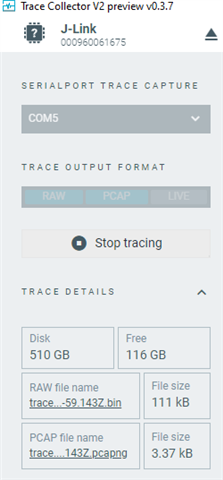
3) The pcapng file can be opened by Wireshark and you would find communication traffic in different levels of the OSI model.
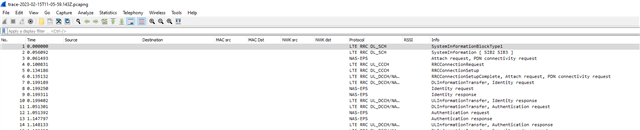
Can you confirm everything works with this flow?
Best regards,
Charlie
Hi Jagadish,
The recording nRF9160DK.bin is still not valid. Let's do a simple test with your nRF9160DK.
1) You can build nRF9160: AWS IoT — nRF Connect SDK 2.2.0 documentation (nordicsemi.com) by just adding "CONFIG_NRF_MODEM_LIB_TRACE=y" and getting firmware.
2) Open Trace Collector V2 preview and start tracing, you will see File size increasing.
3) The pcapng file can be opened by Wireshark and you would find communication traffic in different levels of the OSI model.
Can you confirm everything works with this flow?
Best regards,
Charlie
Hi charlie,
trace-2023-02-16T10-02-50.404Z.pcapng
Please find the attached tracing file from nrf9160DK develpement kit. but cannot able to find from custom board. Custom board connected to nrf9160DK board over JTAG.
Hi Jagadish,
Very good! Now we can move forward a bit now.
Modem trace using UART1 as output backend. Can you enable modem trace in your firmware and collect modem trace from your UART1 port?
Maybe you need to use a USB to UART Adapter to collect with your PC. Let me know if you need more help.
Best regards,
Charlie
Hi charlie,
Modem trace using UART1 as output backend. Can you enable modem trace in your firmware and collect modem trace from your UART1 port?
i have to use nrf9160DK (or) our custom board? and tell me which pins i have to use for uart1?
if need to take modem trace from our custom board then we are using P13 and P14 pins are using for uart1.
is it possible to take modem trace in our custom board?
reply me ASAP so we can test modem trace based on your reply.
Thanks
Hi Jagadish,
Sorry for confusing you. The previous exercises on nRF9160DK help you to understand how to set up modem trace recording. nRF9160DK USB power provides a virtual COM port to access UART1.
Now you need to work on collecting modem traces for your custom board. Since it uses P13 and P14, try to connect them with USB to UART Adapter, and collect modem traces in a similar way as you did with nRF9160DK.
Please share the modem trace recording when you repeat the issue.
Best regards,
Charlie