NRF5340: FW OTA

Hi:

I am working on the NRF5340 FW OTA.

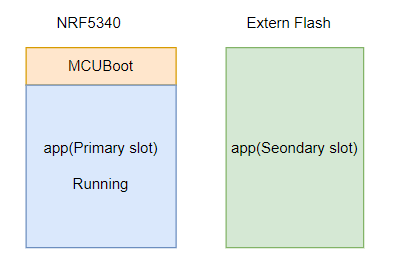
By reading this document Secure bootloader chain, I think our FW architecture should use MCUboot as the upgradable second-stage bootloader as below.
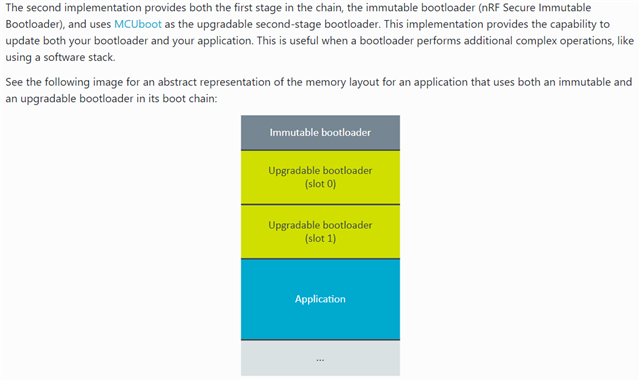
As I know, the default MCU Boot is not able to receive the FW, just swap the FW. I have questions as below:

1. how to custom the MCUBoot to be able to receive the FW by BLE like the application?  because if the application is corrupted(e,g, overwrites parts of the application firmware image) somehow by the bug, the device should stay in the MCU boot and be able to recover the application by BLE.  Is there any sample code or document for this?

2. if question 1 is not a recommended method, what is the recommended method?

Thanks!

Parents
  • Hi,

    I recommend you have a look at this repository written by a colleague of mine in addition to the SDK documentation you're already looking at: https://github.com/hellesvik-nordic/samples_for_nrf_connect_sdk/tree/main/bootloader_samples

    1. how to custom the MCUBoot to be able to receive the FW by BLE like the application?  because if the application is corrupted(e,g, overwrites parts of the application firmware image) somehow by the bug, the device should stay in the MCU boot and be able to recover the application by BLE.  Is there any sample code or document for this?

    The most basic smp_ble sample showcases how to use BLE to perform DFU https://github.com/hellesvik-nordic/samples_for_nrf_connect_sdk/tree/main/bootloader_samples/smp/mcuboot_smp_ble 

    I do see that you've tagged the nRF5340 in the case tags. Is this the board you're going to use in development?

    If it is the nRF5340, I would recommend you to have a look at the 5340 folder in the repository and choose if you want to do simultaneous (easier, but requires external flash), or non-simultaneous (more complex, but does not require external flash): github.com/.../nrf5340

    2. if question 1 is not a recommended method, what is the recommended method?

    This is a good solution for this purpose, so I would recommend you to investigate the samples in the github-repository. 

    However, do note that it will be slightly different if you're going also include that MCUboot should be upgradable. In that case, you will have to add the Immutable Bootloader as a first stage bootloader illustrated in the image.

    Let me know if this answers your questions, or if you have any additional questions related to the topic

    Kind regards,
    Andreas

Reply
  • Hi,

    I recommend you have a look at this repository written by a colleague of mine in addition to the SDK documentation you're already looking at: https://github.com/hellesvik-nordic/samples_for_nrf_connect_sdk/tree/main/bootloader_samples

    1. how to custom the MCUBoot to be able to receive the FW by BLE like the application?  because if the application is corrupted(e,g, overwrites parts of the application firmware image) somehow by the bug, the device should stay in the MCU boot and be able to recover the application by BLE.  Is there any sample code or document for this?

    The most basic smp_ble sample showcases how to use BLE to perform DFU https://github.com/hellesvik-nordic/samples_for_nrf_connect_sdk/tree/main/bootloader_samples/smp/mcuboot_smp_ble 

    I do see that you've tagged the nRF5340 in the case tags. Is this the board you're going to use in development?

    If it is the nRF5340, I would recommend you to have a look at the 5340 folder in the repository and choose if you want to do simultaneous (easier, but requires external flash), or non-simultaneous (more complex, but does not require external flash): github.com/.../nrf5340

    2. if question 1 is not a recommended method, what is the recommended method?

    This is a good solution for this purpose, so I would recommend you to investigate the samples in the github-repository. 

    However, do note that it will be slightly different if you're going also include that MCUboot should be upgradable. In that case, you will have to add the Immutable Bootloader as a first stage bootloader illustrated in the image.

    Let me know if this answers your questions, or if you have any additional questions related to the topic

    Kind regards,
    Andreas

Children
  • Hi AHaug,

    I do see that you've tagged the nRF5340 in the case tags. Is this the board you're going to use in development?

    yes, our product uses the NRF5340 with an external flash.

    I check the links you shared, but it seems to implement the SMP server on the application level, I know how to use the SMP server on the application side, my question is if the application is corrupted/crash somehow, how does MCUboot recover the application via BLE?

    For example, if a bug overwrites parts of the application firmware image, then the system will reboot due to a fault, and the MCUBoot will detect the firmware was corrupted and will not run the application, then how does the MCUBoot recover the application(except the serial recovery)?

  • Hi,

    Jason said:
    yes, our product uses the NRF5340 with an external flash.

    Thank you for verifying

    Jason said:
    I check the links you shared, but it seems to implement the SMP server on the application level, I know how to use the SMP server on the application side, my question is if the application is corrupted/crash somehow, how does MCUboot recover the application via BLE?

    This is mentioned in smp folder, but I will expand on it here. Do note that I am also assuming that you're using the default DFU algorithm in nRF Connect SDK which is the move-algorithm (swap without using scratch).

    When performing DFU with MCUboot and using a SMP server, you will have your memory area divided into the bootloader area, the primary application area (which is where the app is running from), and the secondary application area (which is empty and at least the same size as the original application) as well as a swap area.

    When you enter bootloader mode to perform DFU, you start by uploading the upgrade image. This image will be stored on the secondary slot, and the bootloader is instructed to swap the images in the primary and secondary slots. This is done roughly one swap area-size of the time, so it moves the application around as seen in this image

    When it has been swapped, the bootloader will run a test and verify if the new image is functional or broken. If it is functional, the device will reboot and launch from the new image and remove the old image from the secondary slot. If it is broken due to a bug , the bootloader will revert back the images and you will be running with the original image once more after the move has been done.

    This will also be the same procedure if you have defined your secondary slot to be on an external flash such as you illustrate in your reply.

    And to clarify, the recovery of the application is not done via BLE. After you've transported the image with BLE, it is the bootloader/firmware on the device that sorts out all the required moving, verification and testing, removing/reverting and rebooting. If anything breaks or crashes throughout the image procedure, the bootloader should pick up where it left, or revert back to the original image on its own.

    Let me know if this clarifies things for you and please feel free to ask more questions related to this topic if you have any

    Kind regards,
    Andreas

  • Hi AHaug,

    Thanks for your clear explanation.

    So the MUCBoot can make sure the upgrade is secure, even if there is hardware reset during swapping(I just tested on the nrf5340 DK by pressing the reset button during swapping, and it seems to work after reset.)  So I don't need to worry about the security of the upgrade process, right?

    However, the main point that I am concerned about is that the new FW has been upgraded successfully, but there is a bug that occurred during runtime and caused infinite restarts. (e.g The application accesses the error setting information stored in the internal flash and does not handle it well, resulting in a bus fault), or other bug leads to the impossible to upgrade the FW again. we have another product using nrf52840 with NRF SDK instead of the NCS, for this case, we can force the device to enter the bootloader when reset via the button combination, and you know, the bootloader of NRF SDK has the OTA feature so that can recover the application via the BLE. For NRF5340, how to handle this case(except the serial recovery, which is impossible for this product)?

  • Hi,

    Apologies for the slight delay in response time

    Jason said:
    So the MUCBoot can make sure the upgrade is secure, even if there is hardware reset during swapping(I just tested on the nrf5340 DK by pressing the reset button during swapping, and it seems to work after reset.)  So I don't need to worry about the security of the upgrade process, right?

    Yes, this is correct. Given that you sign the new firmware with the key the bootloader expects you to use as well as build a upgrade image that is compatible with your memory address map (for instance with regards to where the applications start address is and size of the primary slot), this should work out of the box and you should not need to worry about the security for faulting during the upgrade process. 

    Jason said:
    However, the main point that I am concerned about is that the new FW has been upgraded successfully, but there is a bug that occurred during runtime and caused infinite restarts. (e.g The application accesses the error setting information stored in the internal flash and does not handle it well, resulting in a bus fault), or other bug leads to the impossible to upgrade the FW again.

    If you have a bug during run time in the application, you should implement some sort of way to get the device in bootloader mode so you can be certain you have redundancy w.r.t. managing to patch your device. Typically we recommend serial recovery.

    And I also know that this is an obvious statement that you probably already know, and that you're asking for "what if this happens even though we've tested properly", but a proper test-setup is always recommended before pushing apps that may induce device breaking bugs during run time.

    Jason said:
    we have another product using nrf52840 with NRF SDK instead of the NCS, for this case, we can force the device to enter the bootloader when reset via the button combination, and you know, the bootloader of NRF SDK has the OTA feature so that can recover the application via the BLE. For NRF5340, how to handle this case(except the serial recovery, which is impossible for this product)?

    Could you elaborate on why serial recovery is impossible? In the case where the application breaks during runtime there are no possible way for the application to enter a mode where you can patch it over BLE as the smp server with BLE is only supported in the application and the bootloader. If you have serial recovery in the bootloader, then you can patch the broken image when you enter serial recovery mode. Other than that, the only other option is to patch the broken image with a device with a programmer

    You may implement some way of checking if a pin is low or high (one of the options) at the start and if the condition you set is met, then you can initiate the bootloader. Do note that this is just a suggestion and is up to you to solve.

    Kind regards,
    Andreas

  • Hi,

    Could you elaborate on why serial recovery is impossible?

    I thought the serial recovery only supported UART, so it is impossible for the user to recover the device because they don't have USB-to-UART hardware. now I find the serial recovery also supports USB CDC, this may be an option. But the best way is the recovery mode to support BLE. so that is very easy for the user to recover the crashed device. (we have a smartphone  APP for our product).

Related