[NRF52833] [Nrf connect SDK] HID forward module via bluetooth

Hi Nordic team,
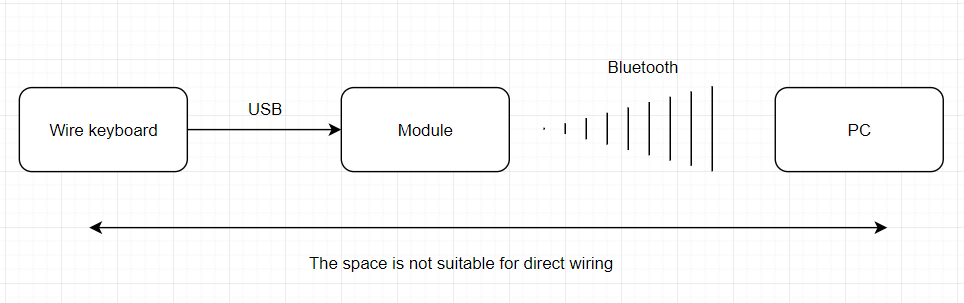
I'm trying to implement a module that forward messages from the keyboard to the computer via bluetooth.
Input:
Wired keyboard plugs into the USB port on the module, the keyboard will be powered by the module to operate.
The module will read the keyboard's HID message continuously.
Outcomes:
The read message will be converted to bluetooth and sent to the computer via the HID bluetooth keyboard.
If it is possible, please help me!
Thanks in advance!

Parents
  • Hello,

    Before you start on this project, you should be aware that you will not be able to connect the USB on from the wired keyboard to the USB on the nrf52833, because neither the keyboard nor the nRF are USB hosts. 

    Besides, I don't think wired keyboards are typically very low power (because they are not designed for it), so you would either need a quite big battery, or you need a wired power supply, which sort of defeats the purpose. You will just move the wire from the computer to the wall. 

    If you, however, are able to get key strokes from the keyboard to the nRF (you would need an external USB host), then we have a sample for HID keyboard, that you can probably use. If you use NCS (nRF Connect SDK) look in ncs\samples\bluetooth\peripheral_hids_keyboard. If you are using the nRF5 SDK, please check out SDK\examples\ble_peripheral\ble_app_hids_keyboard.

    Best regards,

    Edvin

Reply
  • Hello,

    Before you start on this project, you should be aware that you will not be able to connect the USB on from the wired keyboard to the USB on the nrf52833, because neither the keyboard nor the nRF are USB hosts. 

    Besides, I don't think wired keyboards are typically very low power (because they are not designed for it), so you would either need a quite big battery, or you need a wired power supply, which sort of defeats the purpose. You will just move the wire from the computer to the wall. 

    If you, however, are able to get key strokes from the keyboard to the nRF (you would need an external USB host), then we have a sample for HID keyboard, that you can probably use. If you use NCS (nRF Connect SDK) look in ncs\samples\bluetooth\peripheral_hids_keyboard. If you are using the nRF5 SDK, please check out SDK\examples\ble_peripheral\ble_app_hids_keyboard.

    Best regards,

    Edvin

Children
Related