HOW TO ADD DRIVER FILES IN SEGGER EMBEDDED STUDIO

Hi, Can anyone please tell me how to add driver files in segger embedded studio. 

I want to add nrfx_gpiote.c file into my fatfs example project. I tried adding existing file into the driver folder of fatfs example and also, I copied the config file of gpiote into the config file of fatfs example but still it didn't work.

Thanks.

  • Hi 

    Generally you need to do the following when adding any additional code to a Segger Embedded Studio project:

    • Add the C file(s) to the project. Typically by right-clicking a "folder" and selecting "Add Edisting File...".
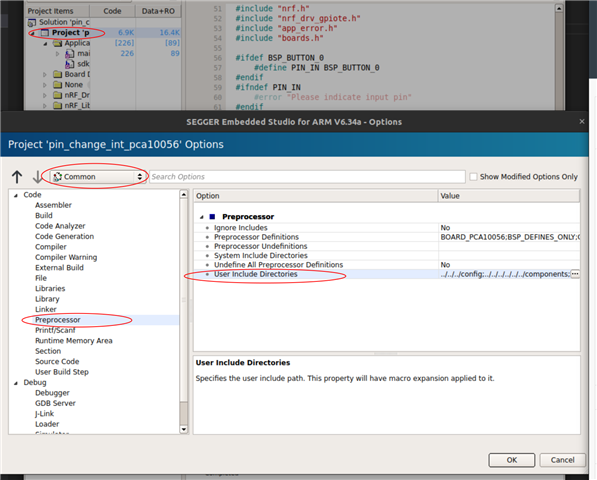
    • Add the folder(s) with the header files to the include path if not already there. Go to project options, select "Common" so that you do the change for all build configurations, and under Preprocessor find the User Include Directories, and add the directories(s) there: 
    • Lastly, for SDK modules you often ened to enable a config in sdk_config.h, as they typically use macros to only include content that is enabled in sdk_config.h.

    This is generally the same regardless of which IDE or toolchain you use, but the exact procedure differs a bit. A key is still that the compiler will not find C files that are not added, and not find header files that are not in the include path.

Related