PPK2 stops working and get strange values on nRF Connect

Hi,

suddenly our PPK2 stops working and we started to have strange values on nRF Connect  interface (current values in YA...).

This screenshot has been taken with a connected nRF52 board (that should consume a few uAmps).

I'm using nRF Connect v4.0 on Ubuntu Linux 22.04. 

I've already performed a firmware update by holding TP34+GND to enter in bootloader mode, but nothing has changed.

Is there anything that I could do to revive this PPK2?

Parents
  • Hi Samuele,

    Do you have any other hardware connected to the DK, for eg any peripherals, etc?

    Have you tried changing the cables?

    When you power on the PPK2, does it light up?

    Best Regards,

    Priyanka

  • No, we don't have any other hardware connected other than our nrf52832 board.

    We have another PPK2 board and the other one with the same setup is measuring the correct current values.

    I'm afraid something has messed up on the hardware...

  • After setting the PPK2 in bootloader mode, did you reprogram it when prompted?

    -Priyanka

  • Yes, after setting in bootloader mode, I have reprogrammed the PPK2 when nRFConnect asked me to reproram the board.

    The reprogramming logs didn't show any errors and after that I was able to reconnect to the PPK2 in the Power Profiler app (but I get the wrong measures).

  • That looks strange. But in the screenshot that you attached, the device is still "Unknown". Is this screenshot after you re-programmed it?

    Could you attach the ppk log?

    -Priyanka

  • I try to attach some info from the system:

    $ dmesg
    [375617.679764] usb 1-4: new full-speed USB device number 59 using xhci_hcd
    [375617.830317] usb 1-4: New USB device found, idVendor=1915, idProduct=c00a, bcdDevice= 1.00
    [375617.830328] usb 1-4: New USB device strings: Mfr=1, Product=2, SerialNumber=3
    [375617.830333] usb 1-4: Product: PPK2
    [375617.830336] usb 1-4: Manufacturer: Nordic Semiconductor
    [375617.830340] usb 1-4: SerialNumber: C2F61ED61B5A
    [375617.833417] cdc_acm 1-4:1.1: ttyACM0: USB ACM device
    

    nRFConnect / Power Profiler

    Logs of Power Profiler:

    17:24:57.913	Using nrf-device-lib-js version: 0.5.0
    17:24:57.913	Using nrf-device-lib version: 0.13.11
    17:24:57.913	Using nrfjprog DLL version: 10.18.2
    17:24:57.913	Using JLink version: JLink_V7.80c
    17:24:58.015	Installed JLink version does not match the provided version (V7.66a)
    17:25:22.937	Validating firmware for device with s/n C2F61ED61B5A
    17:25:22.945	Opening device with s/n C2F61ED61B5A
    17:25:23.233	Trigger length updated to 10 ms
    17:25:23.380	PPK started
    17:25:23.408	PPK opened
    17:26:27.791	DUT ON
    17:26:28.925	Sampling started
    17:26:43.469	Sampling stopped
    17:26:45.389	DUT OFF
    

    Thanks for your support.

    BR,

    Samuele.

  • Hi Samuele,

    I understand that you have tried all this once, but just to make sure, Could you try the following?

    "Disconnect all other nordic devices from the computer, turn off the kit and remove it from the plastic by removing the four screws. Insert USB to J2 (USB DATA/POWER). Short a connection between GND (e.g on the four pin power output header) to TP34 on the PPK2. While holding the jumper cable, turn the kit on and remove the jumper. Now the PPK2 should be in bootloader again.

    Open the PPK app, and select the device which is now just a serial number.

    When selecting it, the user will be prompted to program the application and it should now be working again."


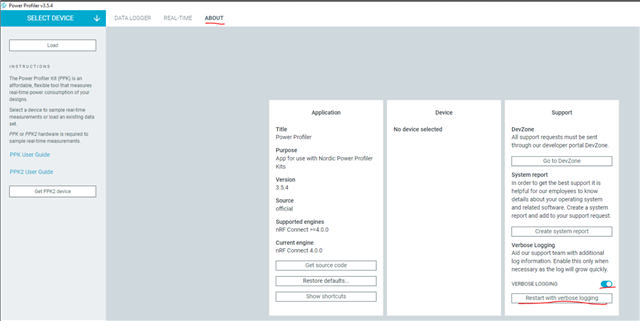
    But before you do this, please turn on Verbose Logging in the Power Profiler app, then upload the log file here, if it doesn't work.

    -Priyanka

Reply
  • Hi Samuele,

    I understand that you have tried all this once, but just to make sure, Could you try the following?

    "Disconnect all other nordic devices from the computer, turn off the kit and remove it from the plastic by removing the four screws. Insert USB to J2 (USB DATA/POWER). Short a connection between GND (e.g on the four pin power output header) to TP34 on the PPK2. While holding the jumper cable, turn the kit on and remove the jumper. Now the PPK2 should be in bootloader again.

    Open the PPK app, and select the device which is now just a serial number.

    When selecting it, the user will be prompted to program the application and it should now be working again."


    But before you do this, please turn on Verbose Logging in the Power Profiler app, then upload the log file here, if it doesn't work.

    -Priyanka

Children
  • Hi Priyanka,

    below you can find the logs of the firmware upload (with verbose logs enabled):

    14:23:06.946	Using nrf-device-lib-js version: 0.5.0
    14:23:06.947	Using nrf-device-lib version: 0.13.11
    14:23:06.947	Using nrfjprog DLL version: 10.18.2
    14:23:06.947	Using JLink version: JLink_V7.80c
    14:23:07.025	Installed JLink version does not match the provided version (V7.66a)
    14:23:17.972	Validating firmware for device with s/n C2F61ED61B5A
    14:23:21.036	[nrfdl][info](14:23:21.035) Loaded plugin /tmp/.mount_nrfconc84L3R/resources/app.asar.unpacked/node_modules/@nordicsemiconductor/nrf-device-lib-js/Release/nrfdl-sdfu-plugin.nrfdl, starting to resolve symbols
    14:23:21.038	Opening serial port for SDFU programming: 0%
    14:23:21.439	[nrfdl][info](14:23:21.439) [sdfu] Successfully opened /dev/ttyACM0. Baud rate: 115200. Flow control: none. Parity: none
    14:23:21.441	Opening serial port for SDFU programming: 100%
    14:23:21.442	Uploading image through SDFU: 0%
    14:23:21.718	Uploading image through SDFU: 1%
    14:23:21.718	Uploading image through SDFU: 2%
    14:23:21.718	Uploading image through SDFU: 3%
    14:23:21.718	Uploading image through SDFU: 5%
    14:23:21.881	Uploading image through SDFU: 6%
    14:23:21.881	Uploading image through SDFU: 7%
    14:23:21.881	Uploading image through SDFU: 8%
    14:23:21.881	Uploading image through SDFU: 10%
    14:23:22.047	Uploading image through SDFU: 11%
    14:23:22.047	Uploading image through SDFU: 12%
    14:23:22.047	Uploading image through SDFU: 13%
    14:23:22.047	Uploading image through SDFU: 15%
    14:23:22.213	Uploading image through SDFU: 16%
    14:23:22.213	Uploading image through SDFU: 17%
    14:23:22.213	Uploading image through SDFU: 19%
    14:23:22.214	Uploading image through SDFU: 20%
    14:23:22.376	Uploading image through SDFU: 21%
    14:23:22.377	Uploading image through SDFU: 22%
    14:23:22.377	Uploading image through SDFU: 24%
    14:23:22.377	Uploading image through SDFU: 25%
    14:23:22.540	Uploading image through SDFU: 26%
    14:23:22.540	Uploading image through SDFU: 27%
    14:23:22.540	Uploading image through SDFU: 29%
    14:23:22.540	Uploading image through SDFU: 30%
    14:23:22.703	Uploading image through SDFU: 31%
    14:23:22.703	Uploading image through SDFU: 32%
    14:23:22.703	Uploading image through SDFU: 34%
    14:23:22.704	Uploading image through SDFU: 35%
    14:23:22.866	Uploading image through SDFU: 36%
    14:23:22.866	Uploading image through SDFU: 37%
    14:23:22.866	Uploading image through SDFU: 39%
    14:23:22.866	Uploading image through SDFU: 40%
    14:23:23.030	Uploading image through SDFU: 41%
    14:23:23.030	Uploading image through SDFU: 43%
    14:23:23.030	Uploading image through SDFU: 44%
    14:23:23.030	Uploading image through SDFU: 45%
    14:23:23.193	Uploading image through SDFU: 46%
    14:23:23.193	Uploading image through SDFU: 48%
    14:23:23.193	Uploading image through SDFU: 49%
    14:23:23.193	Uploading image through SDFU: 50%
    14:23:23.356	Uploading image through SDFU: 51%
    14:23:23.357	Uploading image through SDFU: 53%
    14:23:23.357	Uploading image through SDFU: 54%
    14:23:23.357	Uploading image through SDFU: 55%
    14:23:23.520	Uploading image through SDFU: 56%
    14:23:23.520	Uploading image through SDFU: 58%
    14:23:23.520	Uploading image through SDFU: 59%
    14:23:23.520	Uploading image through SDFU: 60%
    14:23:23.683	Uploading image through SDFU: 62%
    14:23:23.683	Uploading image through SDFU: 63%
    14:23:23.683	Uploading image through SDFU: 64%
    14:23:23.683	Uploading image through SDFU: 65%
    14:23:23.846	Uploading image through SDFU: 67%
    14:23:23.846	Uploading image through SDFU: 68%
    14:23:23.846	Uploading image through SDFU: 69%
    14:23:23.846	Uploading image through SDFU: 70%
    14:23:24.009	Uploading image through SDFU: 72%
    14:23:24.009	Uploading image through SDFU: 73%
    14:23:24.010	Uploading image through SDFU: 74%
    14:23:24.010	Uploading image through SDFU: 75%
    14:23:24.172	Uploading image through SDFU: 77%
    14:23:24.172	Uploading image through SDFU: 78%
    14:23:24.172	Uploading image through SDFU: 79%
    14:23:24.173	Uploading image through SDFU: 80%
    14:23:24.336	Uploading image through SDFU: 82%
    14:23:24.336	Uploading image through SDFU: 83%
    14:23:24.336	Uploading image through SDFU: 84%
    14:23:24.336	Uploading image through SDFU: 86%
    14:23:24.499	Uploading image through SDFU: 87%
    14:23:24.499	Uploading image through SDFU: 88%
    14:23:24.499	Uploading image through SDFU: 89%
    14:23:24.499	Uploading image through SDFU: 91%
    14:23:24.662	Uploading image through SDFU: 92%
    14:23:24.662	Uploading image through SDFU: 93%
    14:23:24.662	Uploading image through SDFU: 94%
    14:23:24.662	Uploading image through SDFU: 96%
    14:23:24.826	Uploading image through SDFU: 97%
    14:23:24.826	Uploading image through SDFU: 98%
    14:23:24.826	Uploading image through SDFU: 99%
    14:23:24.826	Uploading image through SDFU: 100%
    14:23:25.626	[nrfdl][info](14:23:25.626) [sdfu] serial port /dev/ttyACM0 closed.
    14:23:25.627	[nrfdl][info](14:23:25.626) close plugin dll at path: /tmp/.mount_nrfconc84L3R/resources/app.asar.unpacked/node_modules/@nordicsemiconductor/nrf-device-lib-js/Release/nrfdl-sdfu-plugin.nrfdl
    14:23:25.627	All dfu images have been written to the target device
    14:23:27.108	Opening device with s/n C2F61ED61B5A
    14:23:27.802	Trigger length updated to 10 ms
    14:23:27.802	PPK started
    14:23:27.802	PPK opened

    but when I started measuring I still get the YA values as shown in the screenshot below:

    --

    Samuele

  • Hi Samuele,

    The log looks fine. It looks like your PPK2 is faulty now. Could you try to contact your distributor and try to get a replacement board? It looks like your calibration data somehow got erased.

    -Priyanka

Related