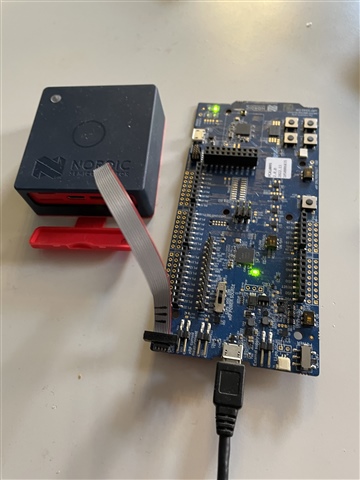
Programming Thingy:53 with Bluetooth Mesh sensor_server example

I have successfully built the Bluetooth Mesh sensor_server example, using the thingy53_nrf5340_cpuspp_ns build configuration.

But when I come to try and program the Thingy:53, it does not appear in the Connected Devices list, when connected to an nRF5340-DK board with a standard 10-pin cable (I used one from a STLink-V3). The RGB LED on the Thingy:53 illuminates on power up and cycles through the three colours a couple of times before going out, as it does when not connected via the 10-pin cable. When the Thingy:53 is connected via the 10-pin cable to the nRF5340-DK, the LEDs on the latter are not illuminated and neither appear in the Connected Devices list.

When I unplug and replug the USB cable to the nRF5340-DK board without the Thingy:53 connected, then the nRF5340-DK is detected and does appear in the Connected Devices list.

What else do I need to do for the Thingy:53 to be detected please?

I am using nRF Connect SDK v2.3.0 on Windows 11.

Parents
  • Hello,

    But when I come to try and program the Thingy:53, it does not appear in the Connected Devices list, when connected to an nRF5340-DK board with a standard 10-pin cable

    So when using the DK as an external programmer, the Thingy does not show up, but does the 5340DK still show up? I believe that is the way it is supposed to be, the DK is simply claiming it is the programmer/debugger on the DK, not what SoC it is necessarily programming. 

    When the Thingy:53 is connected via the 10-pin cable to the nRF5340-DK, the LEDs on the latter are not illuminated and neither appear in the Connected Devices list.

    By this, do you mean that the DK doesn't show up as a device?

    Regards,

    Elfving

  • Hi Elfving,

    Neither the nRF5340-DK nor the Thingy:53 appear in the VS Code Connected Devices list when connected via the USB cable to the PC with the Thingy:53 connected to the nRF5340-DK with the 10-pin cable.

    The nRF5340-DK only appears in the Connected Devices list when it is connected via the USB cable to the PC without the 10-pin cable connected.

    I am referring to these articles:

    https://infocenter.nordicsemi.com/topic/ug_nrf5340_dk/UG/dk/hw_debug_out.html

    https://developer.nordicsemi.com/nRF_Connect_SDK/doc/latest/nrf/working_with_nrf/nrf53/thingy53.html

    https://developer.nordicsemi.com/nRF_Connect_SDK/doc/latest/nrf/samples/bluetooth/mesh/sensor_server/README.html#bluetooth-mesh-sensor-server

    Kind regards,

    Al

  • Just to eliminate the cable as being the problem, could you provide an example of the 10-pin cable to use please?

  • Hi Elfving,

    Any progress please on identifying the issue?

    Kind regards,

    Al

  • Hello Al, and sorry about the wait. Things have been a bit busy lately.

    alwalker said:

    The nRF5340-DK only appears in the Connected Devices list when it is connected via the USB cable to the PC without the 10-pin cable connected.

    This is strange, as the DK should still be listed as connected even though the Thingy is connected to it. You don't see anything pop-up when you press the refresh button on the top right of the Connected Devices list? I would ask you if your Thingy is turned on (The switch should be turned towards the "I"), but in either case I believe you should be able to see the DK as a connected device.

    Are you connecting it to the debug out connector P19? Are you connecting the other side of it to the right side of the Thingy?

    Have you shorted anything on either of the devices? Is SW9 on VDD? Have you changed anything on the switches with plastic film?

    alwalker said:
    Just to eliminate the cable as being the problem, could you provide an example of the 10-pin cable to use please?

    An example of a use-case for the 10-pin cable you mean? Do you have another DK? If so, you can use one to program the other.

    Regards,

    Elfving

  • Hi Elfving,

    With the switch in the centre VDD position, I confirm that the nRF5340-DK does appear on the Connected Devices list with the Thingy:53 connected to it via the 10-pin cable. Regardless of whether I connect via USB with the Thingy:53 already connected via the 10-pin cable, or connect it to the nRF5340-DK when it is already connected to USB, the Thingy:53 does not appear in the list of Connected Devices. Cycling the power switch on the Thingy:53 also has no effect.


    The list of Connected Devices shows the following:

    1050006835 (nRF5340-DK serial number)

         NRF5340_xxAA_ENGD

         VCOM1 COM26

         VCOM0 COM27

         RTT

    If I attempt to flash the sensor_server project that is built for Thingy:53 I get an error saying it can’t connect to a debugger.

    What else do I need to do please? Do I need to erase any application running on the nRF5340-DK first?

    Kind regards,

    Al

  • Hi Elfving,

    With the switch in the centre VDD position, I confirm that the nRF5340-DK does appear on the Connected Devices list with the Thingy:53 connected to it via the 10-pin cable. Regardless of whether I connect via USB with the Thingy:53 already connected via the 10-pin cable, or connect it to the nRF5340-DK when it is already connected to USB, the Thingy:53 does not appear in the list of Connected Devices. Cycling the power switch on the Thingy:53 also has no effect.


    The list of Connected Devices shows the following:

    1050006835 (nRF5340-DK serial number)

         NRF5340_xxAA_ENGD

         VCOM1 COM26

         VCOM0 COM27

         RTT

    If I attempt to flash the sensor_server project that is built for Thingy:53 I get an error saying it can’t connect to a debugger.

    What else do I need to do please? Do I need to erase any application running on the nRF5340-DK first?

    I tried erasing the DK by clicking on the ellipsis (…)  to the right of the serial number, but I get a messge saying:

    ‘Error erasing device, See the Output tab for details.’

    But nothing is displayed on the Output tab.

    Kind regards,

    Al

Reply
  • Hi Elfving,

    With the switch in the centre VDD position, I confirm that the nRF5340-DK does appear on the Connected Devices list with the Thingy:53 connected to it via the 10-pin cable. Regardless of whether I connect via USB with the Thingy:53 already connected via the 10-pin cable, or connect it to the nRF5340-DK when it is already connected to USB, the Thingy:53 does not appear in the list of Connected Devices. Cycling the power switch on the Thingy:53 also has no effect.


    The list of Connected Devices shows the following:

    1050006835 (nRF5340-DK serial number)

         NRF5340_xxAA_ENGD

         VCOM1 COM26

         VCOM0 COM27

         RTT

    If I attempt to flash the sensor_server project that is built for Thingy:53 I get an error saying it can’t connect to a debugger.

    What else do I need to do please? Do I need to erase any application running on the nRF5340-DK first?

    I tried erasing the DK by clicking on the ellipsis (…)  to the right of the serial number, but I get a messge saying:

    ‘Error erasing device, See the Output tab for details.’

    But nothing is displayed on the Output tab.

    Kind regards,

    Al

Children
No Data
Related